

Immersive Navigation on Android Auto: What It Is and Why It Matters
Immersive Navigation on Android Auto is a redesigned Google Maps Android Auto experience that renders urban terrain in detailed 3D, adds more prominent landmarks, and refines on-screen guidance so drivers get a modern-looking, visually clear car dashboard navigation view instead of the flat, dated interface they have used for years. The key takeaway: this Android Auto update is not cosmetic fluff. It is Google finally treating the dashboard as seriously as the phone screen, closing the gap between what you see through the windshield and what you see on your display. Back in March, Google announced a major overhaul of the Google Maps navigation interface with a new Immersive Navigation UI. Until now, that upgrade mostly appeared on phones and other platforms, leaving Android Auto stuck in the past. With Immersive Navigation coming to Android Auto, the car is no longer the second-class citizen in Google’s mapping world—and drivers stand to benefit every time they pull onto a complex interchange.
A More Visually Engaging, Information-Rich UI
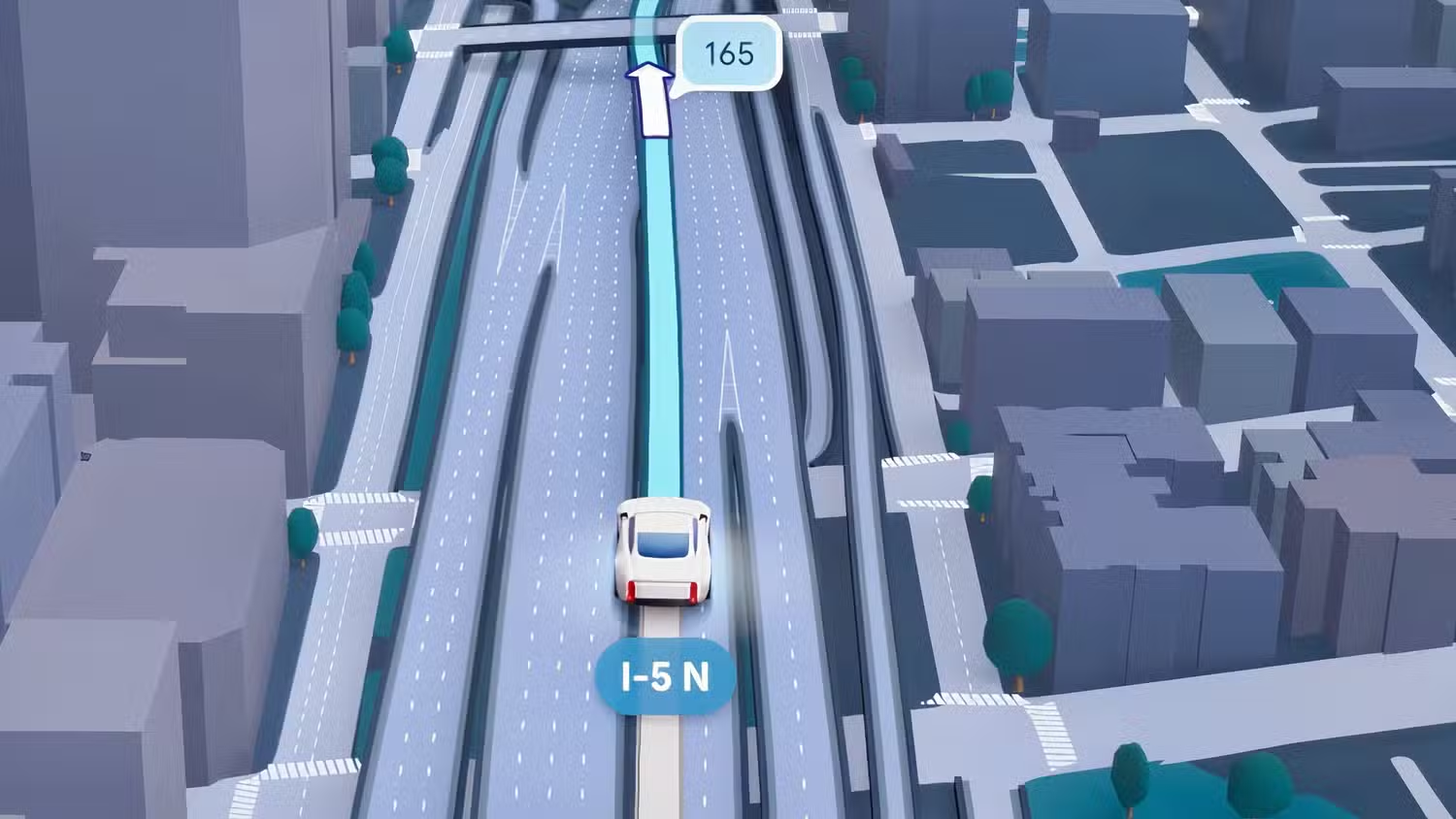
The most obvious change is the Immersive Navigation UI itself: a 3D map that finally looks like the city you are driving through. Screenshots of Google Maps Android Auto now show easy-to-spot flyovers, 3D buildings, and even individual trees, replacing the bland, flat layout many drivers tolerated for years. This is not about eye candy; it is about instant comprehension. Overpasses, off-ramps, and building entrances are rendered in more elaborate 3D, so the route line stands out and the surroundings make visual sense at a glance. The new design also improves information hierarchy. Key turn prompts and lane guidance sit where your eyes naturally go, while secondary data recedes. The landscape “reflects what you’re actually seeing in front of you” thanks to smarter camera angles and transparency effects that keep the route clear even in dense downtowns. In practice, that means fewer second guesses and less squinting at your car dashboard navigation when the road layout gets messy.
Practical Driving Benefits: Clarity, Landmarks, and Voice Guidance
Where Immersive Navigation earns its place on Android Auto is in everyday driving. Better 3D context directly addresses the classic highway confusion of “above or below?”—those moments when you are unsure if the route wants the ramp or the underpass. When flyovers and off-ramps are rendered with clear separation on-screen, the correct path feels obvious instead of requiring a split-second guess. The richer urban terrain also makes it easier to orient yourself: crosswalks, overpasses, and building entrances show up in ways that mirror the road ahead. Google is pairing this visual overhaul with smarter voice instructions. Instead of vague distance calls like “In 1 mile, exit right,” you can hear directions tied to landmarks—“Go past this exit and take the next one for Duval Road”—which align naturally with how most people think while driving. Combined, clearer visuals and landmark-based audio make Google Maps Android Auto feel less like a technical tool and more like a competent co-driver.
How the Rollout Works and Who Can Use It
If you expect Immersive Navigation to appear the moment you install the latest Android Auto update, you may be disappointed. A Reddit user reported seeing the new UI after updating to Android Auto v17.3, and you do need both Android Auto 17.3 and the latest Google Maps app to be eligible. However, another user running the latest beta versions of both Android Auto and Google Maps still did not see the new interface. That inconsistency highlights the real gatekeeper: Google’s servers. The rollout appears to be a server-side update, not something tied solely to a specific app version. Even if your phone and apps are up to date, Google still has to open access for your account and region via its servers. Immersive navigation in Google Maps is available in the US on iOS, CarPlay, Android, Android Auto, and cars with Google built-in, but coverage focuses on major urban terrain first. In short, you can prepare your device, but you cannot force the switch—Google controls the timing.
Limitations to Expect—and Why It Is Still Worth Waiting For
Immersive Navigation is not a free upgrade in the performance sense. Rendering elaborate 3D maps and switching camera angles on the fly is demanding. There may be performance limitations, and you should not expect this to work smoothly if your phone struggles with 3D or does not have 5G connectivity. Early reports already show that some users with up-to-date apps do not have access yet, underscoring that eligibility and availability are separate hurdles. There is also the frustration of a slow, opaque rollout. Immersive navigation is available on multiple platforms in the US, but Google has offered no timeline for expansion elsewhere, nor a clear way for drivers to know when their region is next. According to one report, “Immersive Navigation comes to Android Auto” as part of a broader expansion that began in March 2026. Even with these caveats, the direction is right: the car dashboard is finally getting the same design attention as the smartphone. If you care about safer, more intuitive guidance, this is an update worth watching—and, when it reaches you, worth keeping turned on.