


Siri AI and Apple Intelligence: A Practical Redesign, Not a Revolution
Siri AI in iOS 27 is Apple’s attempt to turn its long-lagging voice assistant into a context-aware productivity tool that ties Apple Intelligence directly into everyday tasks across the iPhone, from search and dictation to camera and app control, focusing on accuracy and reliability rather than flashy tricks. The key takeaway after a month on the public beta: Siri AI finally feels useful, but it’s more of a sober upgrade than a grand reinvention. The first public beta of iOS 27, released on Monday and available for anyone to install, brings this new assistant to supported devices alongside familiar interface tweaks that leave the system looking “mostly iOS 26.” That restraint is good news for people who care more about getting things done than chasing novelty, but it also exposes gaps between Apple’s marketing message and what Siri AI can handle today.
Seven Siri AI Improvements That Matter Day to Day
After extended hands-on use, seven Siri AI improvements stand out as meaningful upgrades rather than cosmetic noise. The new visual bubble at the top of the screen is more than a design flourish; it makes it obvious when you are in Siri mode, especially in the car, where the assistant’s greater accuracy with directions and contact-based addresses is a genuine safety and convenience win. Siri AI now works best when it draws on context across your phone, pulling recent entertainment, files, and app content into responses. There is a dedicated Siri app that keeps a persistent history of requests, while skipping trivial items like timers. Expressive Voice lets you adjust pace and tone, though for now it is limited to US English and only one male and one female option. Combined with system-wide dictation gains that handle punctuation and formatting more reliably, these changes make Siri less of a toy and more of a daily tool.
Search, Photos, Mail and Camera: Where Siri AI Earns Its Keep
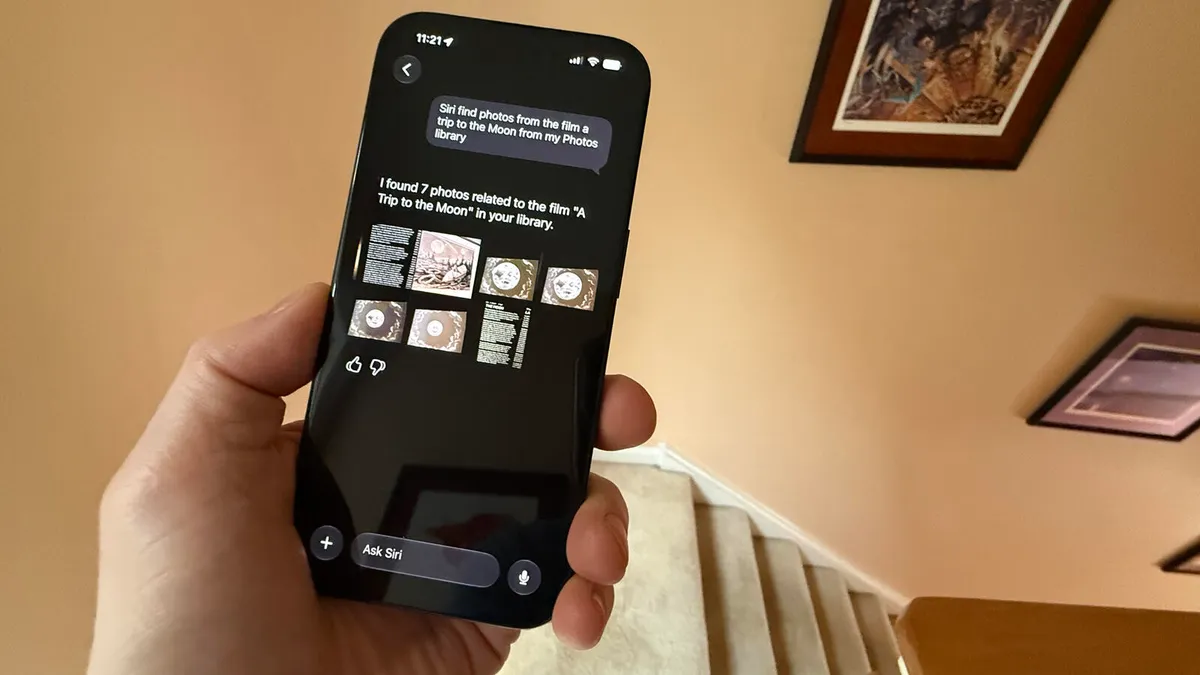
The most convincing Siri AI improvements show up in search and media workflows, where Apple Intelligence finally plays to its strength of living inside the device. Siri AI can find specific files on your iPhone, including documents, photos, videos, and music, and in testing it correctly surfaced niche requests like photos of the film “A Trip to the Moon” from the local library. According to one early reviewer, “this upgraded phone search does what the likes of Claude and ChatGPT can’t because Siri AI is built into your iPhone.” The assistant is effective at digging up particular images such as passport headshots or family pictures and ties multimodal analysis into a new Siri tab in the Camera app, which can interpret a shot after you tap the shutter. In Mail, the benefits appear when you use the built-in client; Siri can locate delivery messages and updates, but it stumbles when your main inbox lives in third-party apps.
Beta Reality Check: Reliability Gains with Notable Gaps
Living with iOS 27 as a daily driver exposes the gap between the promise of Siri AI and its current beta reality. Over about a month of use at home and in the car, the assistant feels more reliable than the old version, especially with CarPlay and navigation, but “there are rough edges” that keep it from feeling fully trustworthy. Another hands-on report notes that “while it sometimes shines, it’s still in beta,” with indexing across apps taking several days unless the phone stays plugged in. Siri AI fails on basic settings questions, either refusing to help or not even explaining its limits. The Siri app’s handling of image uploads is clumsy, offering no thumbnails or confirmations, which leads to repeated attempts. Expressive Voice is a neat tweak but feels incremental given its language and voice restrictions. These flaws do not erase the progress, but they underline that Apple Intelligence is catching up, not leaping ahead.
What iOS 27 Means for Everyday Workflows and What Comes Next
For everyday users, Siri AI’s biggest win is that it finally saves time across common tasks instead of slowing you down with misunderstandings. People who rely on timers, alarms, and stopwatches gain a fast, direct way to manage them through the assistant without hopping through widgets or the Clock app. The new XL widget size in iOS 27 supports that productivity angle, offering full-screen calendar views and other native app information that pair well with voice-driven control. Beyond Siri, Apple is expanding practical AI into Photos with editing-focused generative features and planning image generation tools with daily usage limits tied to iCloud+ subscriptions, details to come closer to public launch. The public beta is widely available now, but some Siri AI and Apple Intelligence capabilities require newer iPhone models, and at least one tester is waiting for an iPhone 18 Pro in September to unlock all features. In short: Siri AI in iOS 27 is worth caring about if you live in Apple’s ecosystem and value small, repeatable gains over headline-making tricks.





