

What Early Siri AI Access Gives You (and Who It’s For)
Early Siri AI access through the iOS 27 public beta is a way for compatible iPhone users to try Apple’s more powerful, device-aware assistant before its wider launch, offering deeper integration with apps and on-screen content as well as world knowledge similar to modern AI chatbots, in exchange for living with beta software and a short waitlist delay.
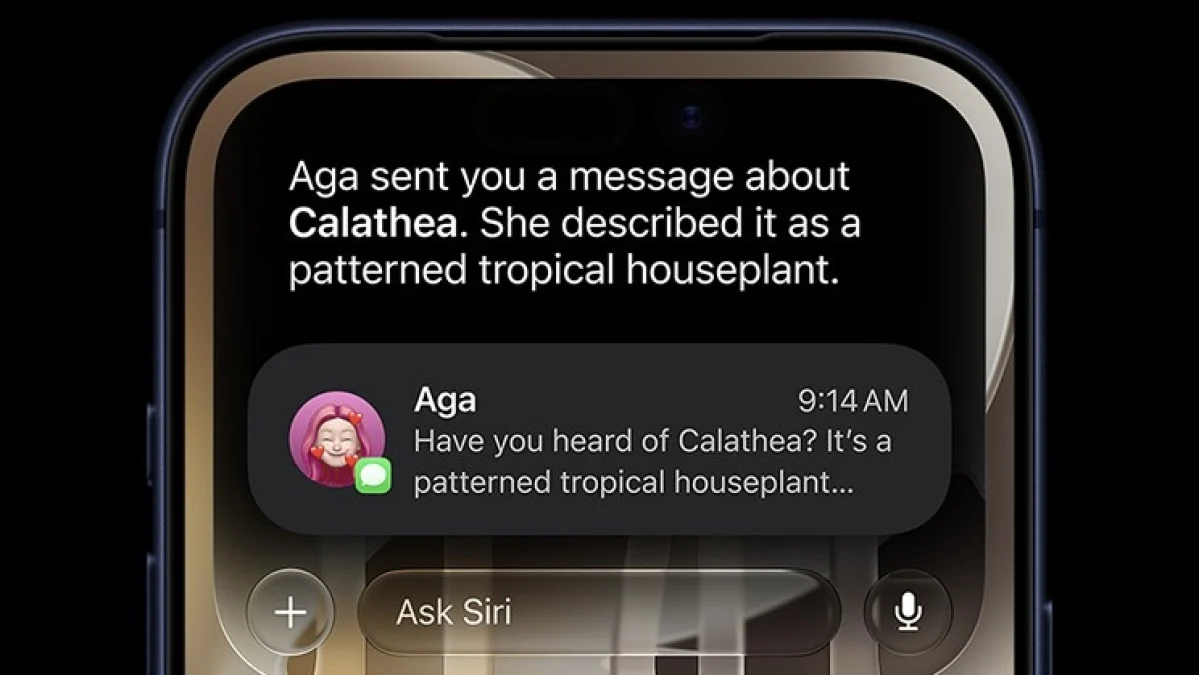
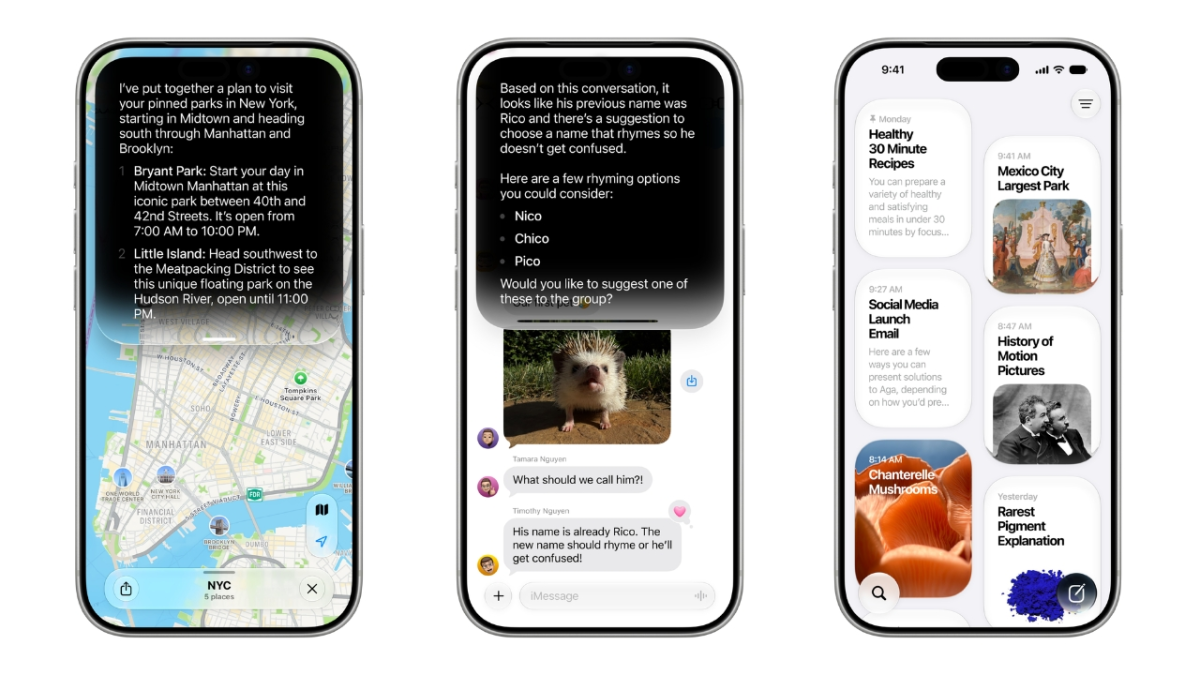
Think of this new Siri as the backbone of your iPhone’s brain: it can read the room on your screen, reach into emails, photos, and messages, and answer open-ended questions much like an AI chatbot. It’s wired into core parts of iOS — you can trigger it with “Hey Siri,” the side button, a swipe from the Dynamic Island, or through Spotlight search, so it’s around whenever you need it. In early testing, Siri AI handled practical tasks better than the old assistant, like finding specific photos, summarizing busy group chats, adding calendar events from texts, and even looking up nutrition for what your camera sees. This setup is ideal if you enjoy testing new features and can tolerate the occasional glitch, not if you rely on your phone to be flawless every day.
Check Your iPhone and Back Up Before You Dive In
Before you chase Siri AI beta access, make sure your hardware is eligible and your data is safe. Siri AI only runs on devices that support Apple Intelligence, which includes iPhone 15 Pro and newer models as part of a wider list of recent iPhones, iPads, Macs, and other devices. On iPhone, that cutoff is non‑negotiable: older phones can install iOS updates but will not get Siri AI. According to one explainer, “you need a device that can run Apple Intelligence to try out Siri AI.”
There’s another caveat: Siri AI lives inside beta versions of iOS 27, iPadOS 27, and macOS 27. Betas are test software, so you should expect occasional app crashes, odd bugs, and battery quirks. While recent developer betas have been fairly stable, even experts say the public beta should be approached with caution if you need your device to run perfectly without errors. Before you enroll, make a secure backup of your important photos, messages, and files so you can recover easily if something goes wrong during installation or if you decide to roll back. Treat this like lending your phone to a friend who might rearrange the furniture a bit: mostly fine, but you want your valuables locked away first.
Step-by-Step: Install iOS 27 Public Beta and Join the Siri Waitlist
Once you’re comfortable with the risks and know your iPhone is compatible, you can walk through the process to install the iOS 27 public beta and get onto the Siri AI waitlist. The order here matters: Siri AI won’t appear until your device is on the beta and you’ve opted in to the waitlist inside settings.
- Back up your iPhone using iCloud or a computer so you have a safe copy of your data before installing any beta software.
- Enroll your Apple ID in the public beta program and install the iOS 27 public beta on your compatible iPhone, following the on‑screen prompts until the update finishes.
- After your phone restarts into iOS 27, open Settings and confirm that you’re running the latest beta version shown under General > Software Update.
- In Settings, go to Apple Intelligence & Siri, the new hub for AI options in the beta.
- Tap “Try the new Siri (Beta)” to opt in; this adds your account to Apple’s Siri AI waitlist for phased access.
- Keep using your phone normally while you wait; once Apple flips the switch for your account, Siri AI features will start working without you needing another big update.
This waitlist is Apple’s way of controlling a staggered rollout so the new assistant can be tested incrementally, even though the public beta is available to millions of users. Reports from early testers show that approval times range widely: some people see access within minutes, while others wait several days. One article notes that it can take roughly five to ten days, and suggests that enrolling your Apple Account in the free tier of Apple’s developer program may help shorten the delay, though there’s no guarantee. Either way, once you’ve tapped that button in settings, you’re in line — and from there the new Siri should appear automatically, ready to handle both on‑device tasks and general questions before the full release.
What It’s Like Using Siri AI in the Public Beta
When your waitlist slot comes through, the main difference you’ll notice is how often Siri becomes the quickest way to get something done. Because it can access information on your device like emails, photos, and messages, and respond to what’s on the screen, Siri AI can help with tasks that used to require hopping between apps. For example, you can ask it to find images from a particular trip, summarize a noisy group thread, or add a calendar event from a text you were sent, all in natural language. It can also answer things you’d normally search for, such as details on upcoming local events or recent headlines.
You still use familiar triggers — “Hey Siri,” the side button, or the Dynamic Island gesture — and now the assistant also ties into Spotlight so you can ask almost any question straight from search. There’s a standalone Siri app as well, which feels familiar if you’re used to chat-style AI tools, though that may be less important since Siri is woven through the system. Underneath, Apple’s new foundation models run on your device and in a Private Cloud Compute environment, with designs tuned for Apple Silicon and built from proprietary data alongside distilled versions of another company’s Gemini model. In practice, that technical work shows up as faster, more context‑aware answers, even if the occasional beta bug or error message still pops up from time to time.
Is the Siri AI Beta Worth It?
If you love trying new features and your iPhone is on the compatible list, the iOS 27 public beta is a reasonable way to get early Siri AI beta access without messing with developer builds. The public beta is generally easier to recommend this cycle than in some past years, thanks to relatively stable developer betas, but it’s still not the same as the polished release that will arrive later. You’ll trade a bit of reliability for months of hands‑on time with Apple’s redesigned assistant and the chance to see how it fits into your daily routine before everyone else.
If your phone must behave perfectly — maybe it’s a work device or your only connection to the outside world — you’re better off waiting until the official iOS 27 launch, which is expected in September. But if you’re comfortable backing up, installing beta software, and joining the waitlist, you’ll get to watch Siri evolve into something closer to the central nervous system of your iPhone, helping with everything from quick reminders to in‑depth answers grounded in what’s happening on your screen. The main thing to watch for is how the assistant handles your day‑to‑day tasks; if it earns a permanent spot in your habits during the beta, you’ll be more than ready when the final version lands.





