

A Small Card with a Big Quality-of-Life Win
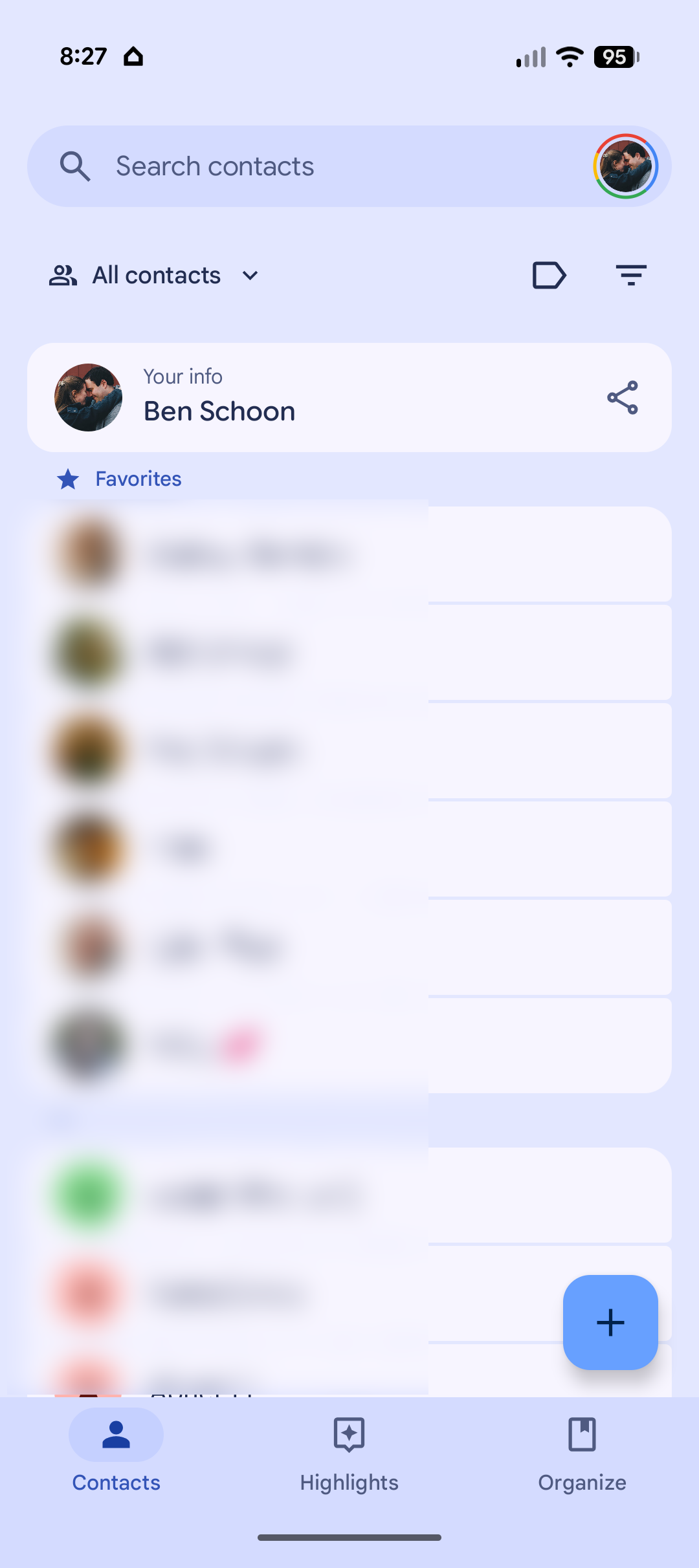
Google Contacts’ new “Your info” card is a built‑in self-contact profile placed at the top of the Android Contacts app that displays your own phone number, email addresses, and other key details so you can quickly view and share them without digging through system settings or hidden menus.
This is the sort of feature that feels obvious the moment you see it—and embarrassing that it took this long. The Google Contacts your info card sits above even your starred contacts, making your own details the first thing you see when you open the app. For years, Android users have had to tap through device settings or scroll around for their own number, while iPhone owners enjoyed a prominent “My card.” Google is finally closing that gap, and the payoff is immediate: fewer awkward pauses when someone asks for your number, fewer screenshots of random settings pages, and a contact management experience that treats you like a first-class contact instead of an afterthought.
How ‘Your info’ Makes Phone Number Sharing Less Awkward
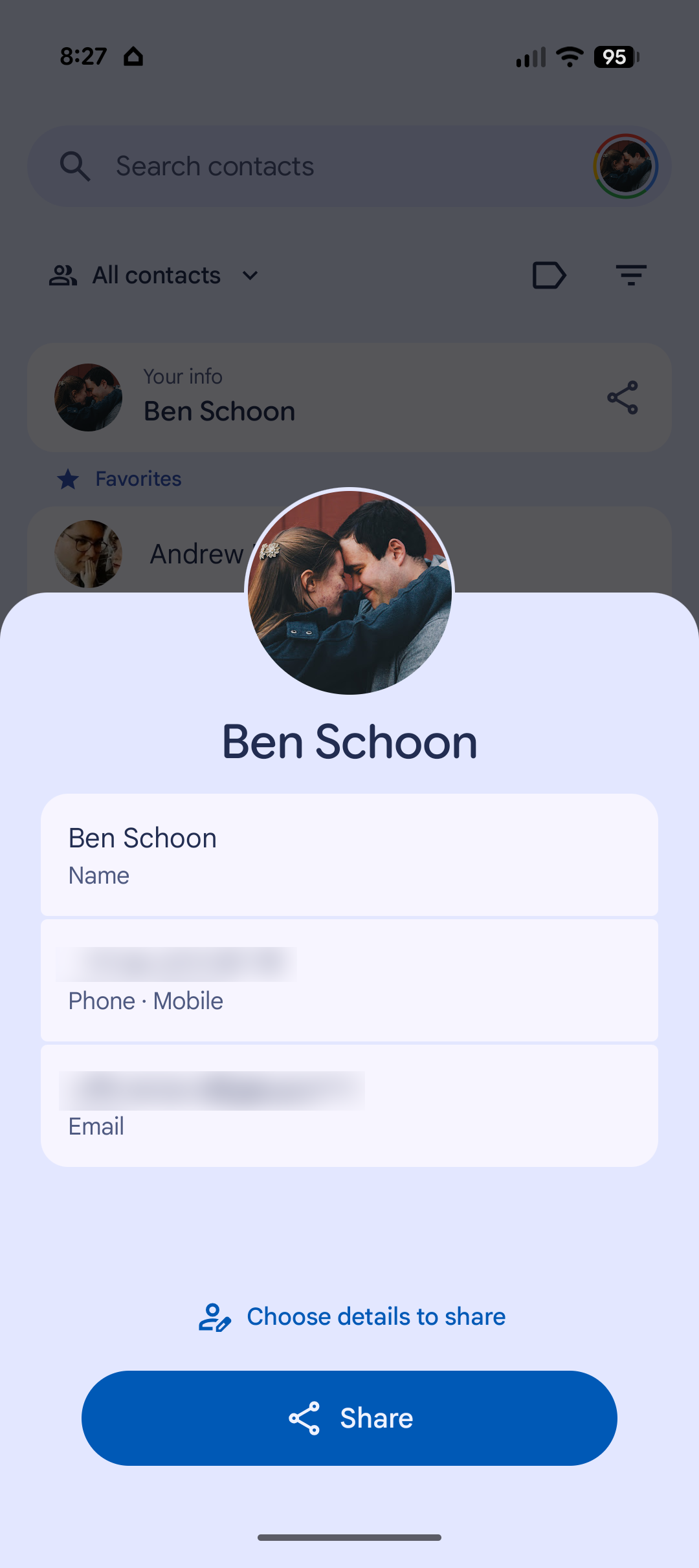
The practical benefit of the Google Contacts your info card is straightforward: faster, cleaner phone number sharing without friction. Your info is a section where you can fill in details like your phone number and email address, then pass that information along to someone else by going there, so the whole process becomes much quicker. This is contact management features done right—focused on the everyday problem of “How do I give this person my details without fumbling?”
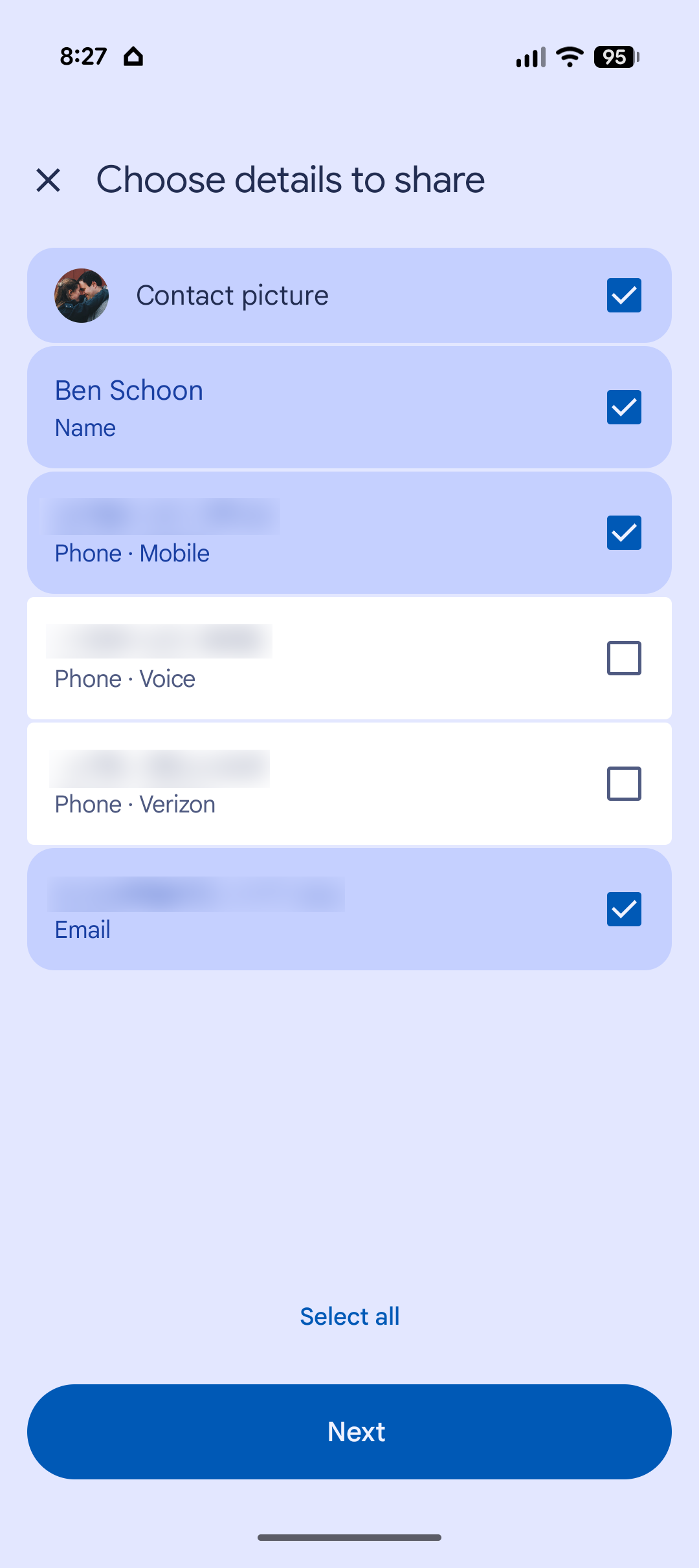
A dedicated share button on the card sends your info as a VCard, and you can limit what data is shown if you do not want to overshare. Inside the card, your profile picture, phone numbers, email addresses, and any extra fields you add are all grouped neatly. The number tied to your device is labeled as your “device number” and appears first, and that is the only number shared by default when you tap share. That default is smart: it respects that many people juggle multiple numbers but usually want to hand out the one tied to the phone in their hand.
Under the Hood: A Quiet but Important Contacts App Upgrade
Underneath the clean UI, this update signals a broader rethink of how the Android Contacts app should work. According to one source, “Your info” is starting to roll out in version 4.83.13.940538822 of Google Contacts, where it appears as a hub for your personal details. Another report notes that the same version, 4.83.13.940538822, now shows Your info at the very top of the contacts list. Those consistent version numbers are a clear sign this is a deliberate step in a larger contact management refresh instead of a quiet background tweak.
The design mirrors the long-standing “My card” model that many users know from other platforms, but with some thoughtful Android-specific touches. Putting your self-contact above favorites shifts the mental model of the app: it is no longer only a place to look up other people, but also a central hub for your own identity. For people who rely on modern contact management features—like shared work profiles, multiple numbers, or rich VCard metadata—this makes the Contacts app feel less like a neglected system utility and more like a real user-facing tool.
Laying the Groundwork for Tap to Share and Beyond
The timing of the Your info rollout is not an accident. Google has been hard at work building AirDrop-like Tap to Share features for Android, with a clear focus on making it easier to share your information with others. Your info is the obvious foundation for that: a single, structured place where your phone number, emails, and other details live, ready to be shared with a tap. In the company’s own framing, this feature is designed to make it easier to share your information with others, and going to Your info lets you do it quickly.
Tap to Share itself is not shipping yet—one report states that Tap to Share will not be available anytime soon—but when it arrives, sharing your information should be as easy as tapping to make a contactless payment with your phone. That is the real promise here: Your info is not only a convenience today; it is the user-facing surface of a future where phone number sharing and contact exchange are fast, standard, and less dependent on clunky QR codes or typing digits by hand. The Android Contacts app finally looks ready for that future.
Conclusion: A Long-Overdue Fix That Makes Contacts Feel Modern
For an opinionated take, this change is overdue—but welcome. Your own contact information belongs front and center in any modern contacts app, and the new Google Contacts your info card at the top of the list finally reflects that reality. It addresses a daily annoyance for users who could never remember where their phone number was buried, and it gives a cleaner, more private way to handle phone number sharing than waving your entire settings screen at a stranger.
The update rolling out in version 4.83.13.940538822 is a subtle but important sign that Google is serious about improving its contact management features, not just its flashy messaging apps. Once Tap to Share arrives, this self-info hub will become even more valuable, but even on its own, the Your info card turns a basic system app into something that respects your identity as much as your contacts. The bottom line: the Android Contacts app finally treats you like your most important contact.





