


What WhatsApp usernames are and why they matter
WhatsApp usernames are unique handles that let people start conversations with you on WhatsApp without needing your phone number, giving you more control over what you share and how new contacts can reach you while still keeping your account linked to a valid mobile number.
Think of the new WhatsApp usernames feature as a bridge between your existing chats and a more private way to meet new people or talk to businesses. Instead of giving out your phone number each time, you can share a handle that works across both iPhone and Android. WhatsApp is gradually activating usernames for a limited number of users on stable and beta versions of the app, so not everyone will see it at once.
There is one big caveat: usernames do not replace phone numbers. You still must register with a mobile number, and existing chats continue to show phone numbers as before. This is a privacy upgrade, not a full identity reset. If you already use other Meta apps, you may also be asked to confirm that you own the matching account before using a similar username.

How the rollout works and what you need before you start
WhatsApp rolled out a username reservation system so users could claim a unique handle before the full feature went live. Now, the company is activating those reserved usernames for a limited set of accounts on both the official release and beta builds. If you are in this first wave, you will see a banner at the top of your chat list telling you that your username is active and ready to share with new contacts.
You cannot use WhatsApp without a phone number, even with usernames: a mobile number remains mandatory for registration, and your existing conversations still show phone numbers as before. That means usernames mainly change how new people can find and message you. For people who worry about handing out their number to strangers, online sellers or customer support agents, this is a meaningful privacy upgrade that decouples your identity from your phone number in new chats.
According to one early report, the rollout is limited to “a very limited number of users” on both iPhone and Android, and it will expand gradually over the coming weeks. So if you do not see the banner yet, it likely means WhatsApp has not flipped the switch for your account.
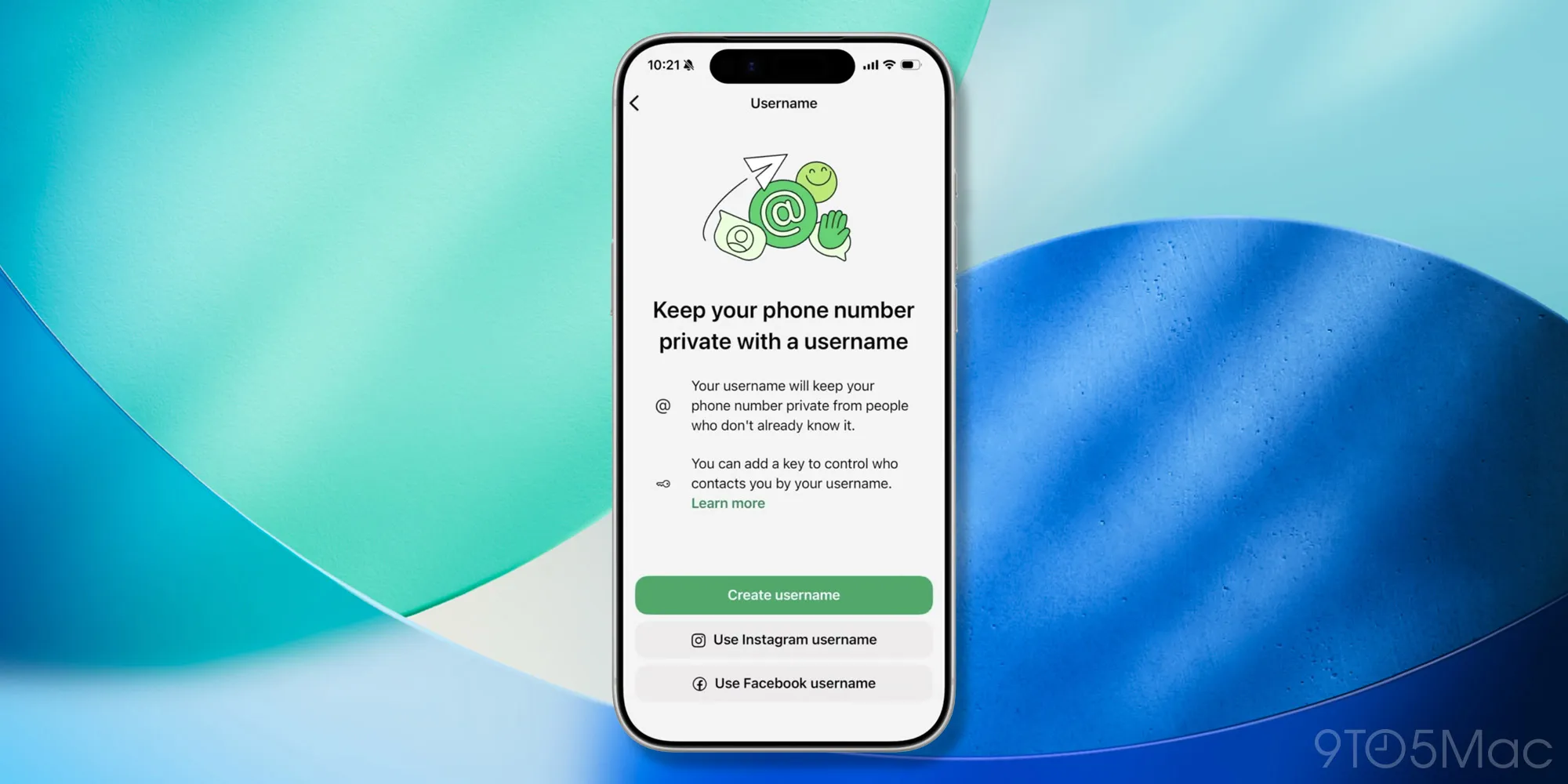
Step-by-step: how to reserve, activate and manage your WhatsApp username
Once you are included in the rollout, setting up and using your username is quick. The key is to move in order: first check access, then reserve or edit your handle, then adjust privacy controls.
- Open WhatsApp and look for a banner at the top of your Chats tab saying your username is active; if you do not see it, go to Settings > Account > Username (or Settings > Profile) to check whether the Username section is available and whether it reports that usernames are coming soon or ready to use.
- If the section is available, create or reserve your preferred username by entering a unique handle; if you choose a name that matches an existing account on another Meta platform, be prepared to verify that you control that account.
- Adjust who can contact you with your username by choosing whether anyone who knows it can reach you or, where offered, enabling an extra 4-digit PIN or username key that new contacts must enter along with your handle before they can start a conversation.
- Save your settings; once your username is active, share it with new contacts or businesses instead of your phone number, and watch for in-chat system messages informing your existing contacts when you create or change your username.
- If you change your mind, return to the same Username section at any time to edit or delete your handle; deleting your username restores your phone number as the primary identifier for starting new conversations.
Following these steps ensures that when your username goes live, it behaves the way you expect. The biggest gotcha is assuming usernames alone will hide you from everyone: people who already have your number, share a group with you or have messaged you before can still contact you without the extra key. Usernames are about safer introductions, not about disappearing from your existing network.
Privacy benefits, safeguards and what changes in your chats
Once enabled, usernames let people start new conversations with you without sharing your mobile number. You can hand out a handle instead of your digits when dealing with businesses, online marketplaces or new acquaintances, which reduces the exposure of your personal number and makes adding contacts feel less permanent. For many users, this is the missing middle ground between full anonymity and giving out a private phone number.
WhatsApp adds extra privacy controls on top. Some accounts get an optional “username key” that forces new contacts to know both your username and a key before they can message you. There are also limits on unsolicited messages, protections against username guessing, and more context about first-time senders to help you spot suspicious accounts. On the impersonation front, usernames matching high-profile Meta accounts may require proof of control to prevent scams and misuse of public figure names.
What does this change in your day-to-day chats? Existing conversations stay the same: they still show phone numbers, and you still need a number to register. The difference shows up when you start or receive new chats from people who do not already have your number, and when WhatsApp sends a small in-chat message to your contacts if you create or change your username so they know it is you.
Is claiming a WhatsApp username worth it?
If you often message people you do not know well, share your details with online sellers, or chat with businesses, claiming a WhatsApp username is worth doing early. You get a simple, memorable handle to share instead of your phone number, while still keeping your existing chats and account structure intact.
The main thing to watch is that the rollout is still limited, so you might need to be patient if you see the “usernames are coming soon” message. When your account is enabled, take the time to choose a handle you are comfortable sharing broadly and to decide whether you want the added protection of a username key or PIN for new contacts. Treated as a privacy upgrade rather than a complete replacement for phone numbers, usernames make WhatsApp feel more flexible and safer for new connections.





