
What makes an analog keyboard worth paying for?
An analog keyboard is a gaming keyboard whose switches can detect and respond to different levels of key travel, enabling finely tuned actuation points, rapid reset behavior, and controller‑like gradual input instead of simple on‑off key presses, and its real value depends on how precisely you can adjust those analog responses and how reliable the supporting software feels over time.
Among today’s adjustable gaming keyboards, the MelGeek Made68 Ultra V2 and Turtle Beach Command Series KB7 look similar on paper: both use magnetic Hall‑effect switches and promise custom activation, rapid trigger behavior, and remapping for advanced control. In practice, they target different buyers. The Made68 Ultra V2 is a compact, wired analog board with “all the analog features you could wish for” aside from controller emulation, built around meticulous analog keyboard adjustability and a solid, retro chassis. The KB7 is a larger, premium command hub with a 4.3‑inch touch screen and modular keypad support but is heavily dependent on its control software. If you want maximum precision and consistent performance, the Made68 Ultra V2 is the safer bet; if you crave a feature‑packed desk center and can tolerate flaky software, the KB7 still has appeal.
MelGeek Made68 Ultra V2: analog precision over everything
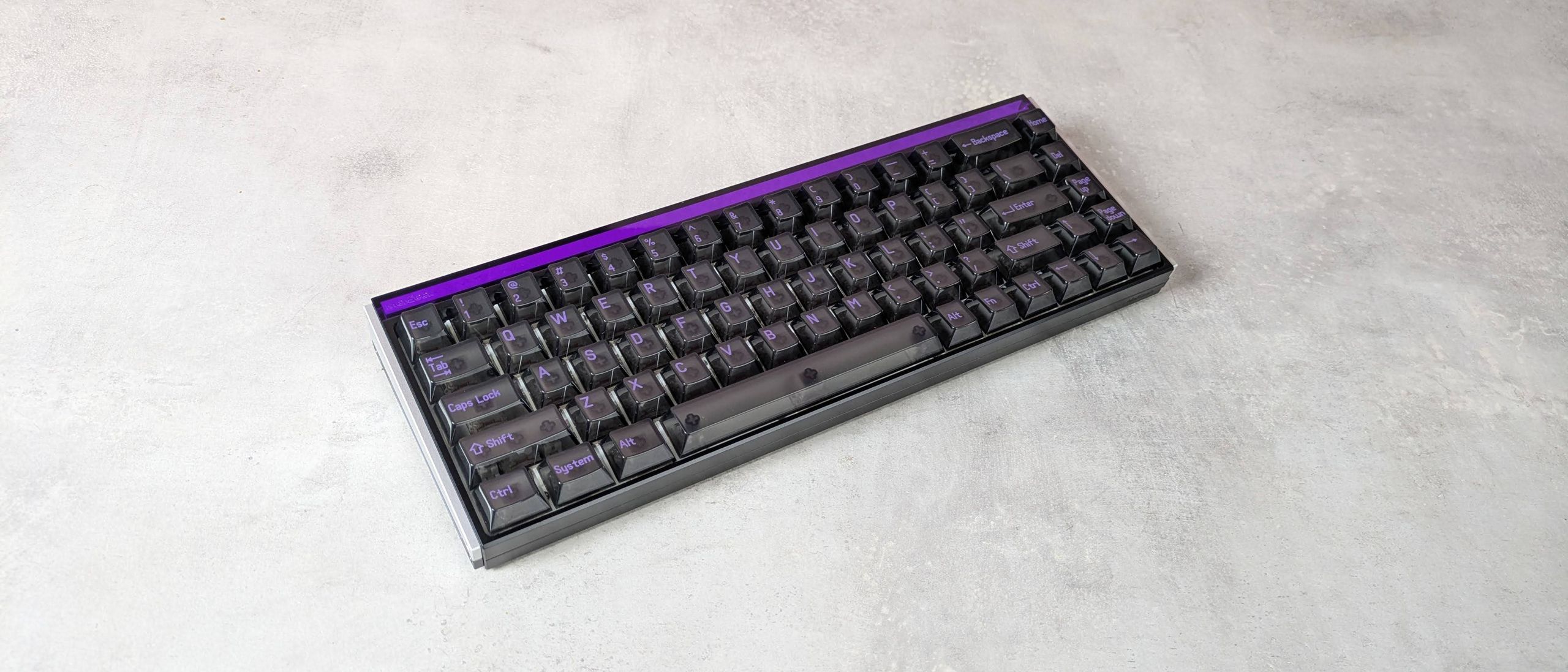
The MelGeek Made68 Ultra V2 is a wired analog keyboard with a compact TKL‑style 68‑key layout and a thick, planted chassis that favors stability over portability. Its headline feature is analog keyboard adjustability: you can set actuation between 0.1mm and 3.3mm and even tune the bottom deadzone from 0mm to 0.07mm, a level of control the reviewer notes they have not seen on other keyboards. A dedicated mode button jumps you straight into a fast web app where you can adjust bindings and analog curves, and “aside from controller emulation, the Made68 Ultra V2 has all the analog features you could wish for”.
On the desk, this board feels like a tank: heavy, very solid, and slightly angled toward the user because it lacks flip‑out feet. Keypresses are firm and snappy, with a satisfying thunk and enough dampening to avoid harshness. That makes it as suitable for typing as for gaming, especially if you rely on rapid trigger behavior for shooters. The main trade‑offs are ergonomics and price. The translucent keycaps do not let legends shine through clearly, FN shortcuts are unlabeled, and at USD 219 (approx. ₱12,200) the Made68 Ultra V2 costs more than many rivals from bigger brands. You are paying a premium for world‑class analog control and sturdy build rather than extras like controller emulation or extensive on‑board displays.
| Spec | MelGeek Made68 Ultra V2 | Turtle Beach Command Series KB7 |
|---|---|---|
| Approx. price (USD) | USD 219 (approx. ₱12,200) | USD 279 (approx. ₱15,600) |
| Layout / size | Compact 68‑key TKL‑style | Full‑size gaming keyboard with keypad support |
| Dimensions | 12.6 × 4.6 × 1.6 in / 319 × 117 × 40 mm | Not stated |
| Switch type | KOM Lite / Flip King magnetic Hall‑effect | Low‑profile Titan Hall‑Effect switches |
| Analog adjustability | Actuation 0.1–3.3mm; bottom deadzone 0–0.07mm; rapid trigger options | Custom activation; rapid trigger; macro recording; react‑tap; remapping at hardware level |
| Software approach | Fast web app launched via rear Mode button | Desktop SWARM II software with serious reliability issues |
| Extras | RGB, rear and side light bars; retro translucent design | 4.3‑inch color touch screen; Action Bar; USB‑A passthrough; detachable palm rest; modular keypad support |
Turtle Beach Command Series KB7: powerful hardware, shaky software
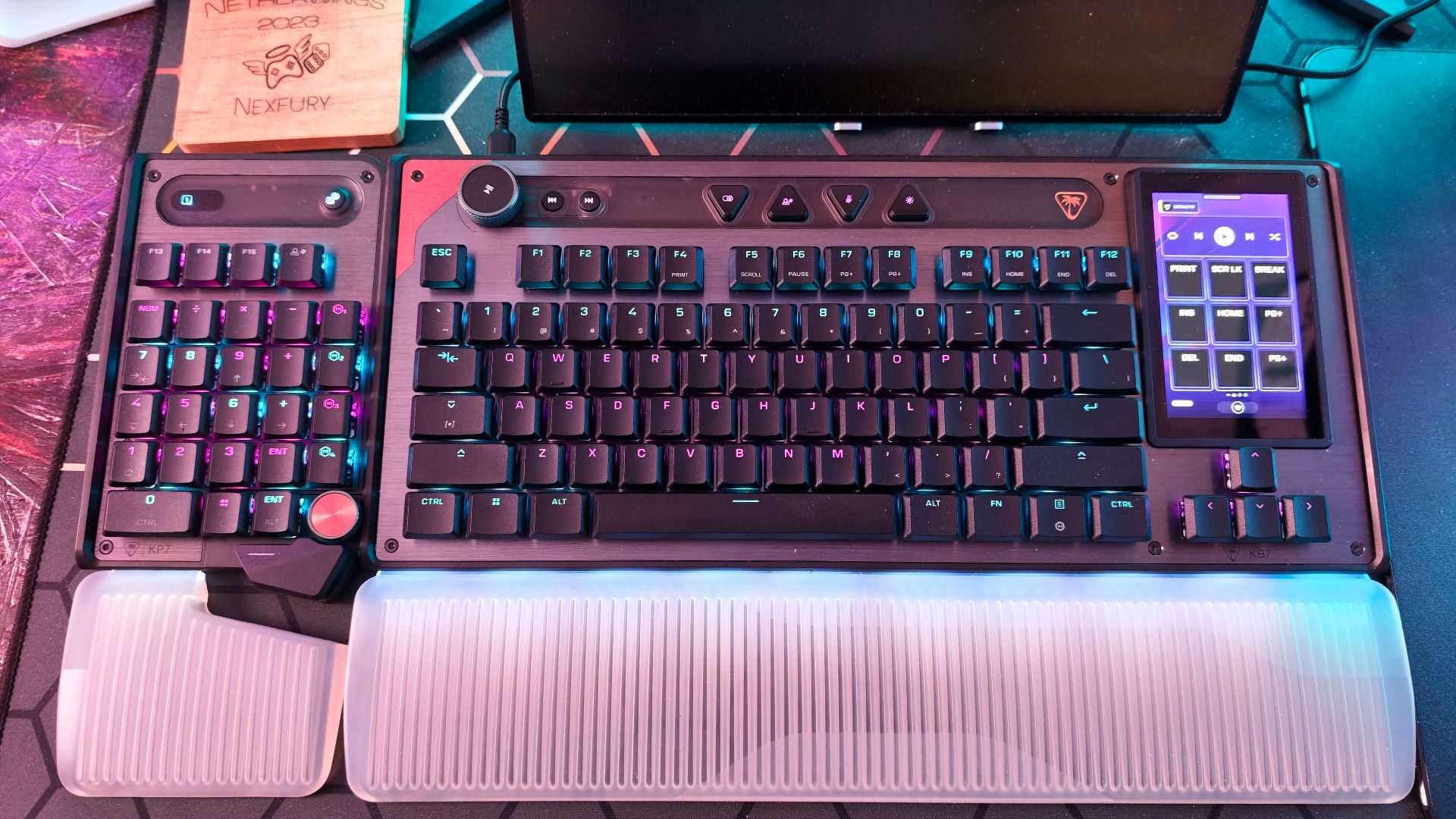
The Command Series KB7 aims to be more than an adjustable gaming keyboard. It arrives with a subtly styled aluminum top plate, low‑profile Titan Hall‑Effect switches, a soft illuminated palm rest, and an Action Bar for media, lighting, and mic controls. A 4.3‑inch full‑color touch screen and USB‑A passthrough turn it into a desk control center, and a slide‑lock system lets you attach the separate KP7 keypad on either side for left‑ or right‑handed setups. At the hardware level, those Titan switches enable custom activation, rapid trigger response, macro recording, react‑tap, and key remapping, and they “work well at the hardware level”.
Everything falls apart once you open the SWARM II software. The reviewer notes that “everything good about the KB7 is tainted by poor software support,” with shoddy implementation turning an impressive design into an abysmal user experience. Lighting profiles refuse to stay locked, and the wider programming tools feel unreliable enough to undermine the whole analog feature set. Despite its strengths, the keyboard “is hampered too much by its software support to justify its $279 price tag” (approx. ₱15,600). If you need consistent analog behavior and dependable profiles, this is a serious problem. The KB7 makes sense only if you prioritize its screen, action bar, and modular keypad concept over software stability and are willing to live with bugs.
Price, software, and the real value of analog adjustability
Analog keyboards appeal to players who want fine‑tuned input control beyond traditional mechanical switches, especially those who need nuanced movement, rapid resets, or different actuation depths per key. At this level, analog keyboard comparison is less about raw specs and more about how usable that adjustability feels. The Made68 Ultra V2 delivers exceptional, precise tuning and a stable web app, but it is “more expensive than many of its rivals” among wired analog models. Competing boards like the Huntsman V3 Tenkeyless 8KHz and Apex Pro TKL Gen 3 undercut it on price while matching or beating it in some areas of build and controller emulation.
The KB7 takes the opposite path: its price climbs even higher on the promise of an all‑in‑one command deck, yet its software severely limits what you can reliably do with custom activation and lighting. This contrast underscores a key lesson for adjustable analog keyboards: hardware features mean little without reliable software. When programmable technology sits at the core of the product, “everything hinges on the software experience”. In that sense, both boards share a caveat: you pay a premium, and in each case at least one major area—either price competitiveness or software reliability—holds the product back from universal recommendation. For most buyers chasing analog control as a competitive edge, stable software and consistent behavior should outrank flashy extras.
Buy if / Skip if
- Buy the MelGeek Made68 Ultra V2 if you want maximum analog keyboard adjustability with actuation and deadzone tuning that feels tailored to each key.
- Skip the MelGeek Made68 Ultra V2 if you care more about lower price or controller emulation than ultra‑fine analog control and heavy build.
- Buy the Turtle Beach Command Series KB7 if you value a full‑size command hub with touch screen, action bar, and modular keypad support above all else.
- Skip the Turtle Beach Command Series KB7 if you need dependable software, stable lighting profiles, and reliable analog programming for competitive play.
- Buy the MelGeek Made68 Ultra V2 if you prefer a compact, sturdy wired board where the software quietly enables customization instead of getting in the way.
- Skip the MelGeek Made68 Ultra V2 if you dislike thick, heavy keyboards without adjustable feet or clearly labeled function shortcuts.
- Skip the Turtle Beach Command Series KB7 if you expect the high price to guarantee polished software and long‑term reliability for complex macros and profiles.