
Windows 11 vs SteamOS on Steam Machine: The Real Story
Windows 11 vs SteamOS on Steam Machine performance is a comparison between two operating systems that deliver almost identical gaming framerates on the same AMD-based mini PC, while diverging in synthetic CPU benchmarks and day-to-day user experience, so the right choice depends more on which games, apps, and interface you care about than on raw speed numbers alone. In benchmark testing, Windows 11 posts a noticeable lead in multi-core workloads like Geekbench, but SteamOS counters with a console-like interface and tight gaming optimizations that make Steam Machine gaming feel more appliance-like than a traditional desktop. Bottom line: competitive gamers tied to strict anti-cheat titles have a practical reason to pick Windows, while most players and couch users are better served leaving SteamOS in place for its integrated, low-friction experience.
| Spec / Test | Windows 11 on Steam Machine | SteamOS on Steam Machine |
|---|---|---|
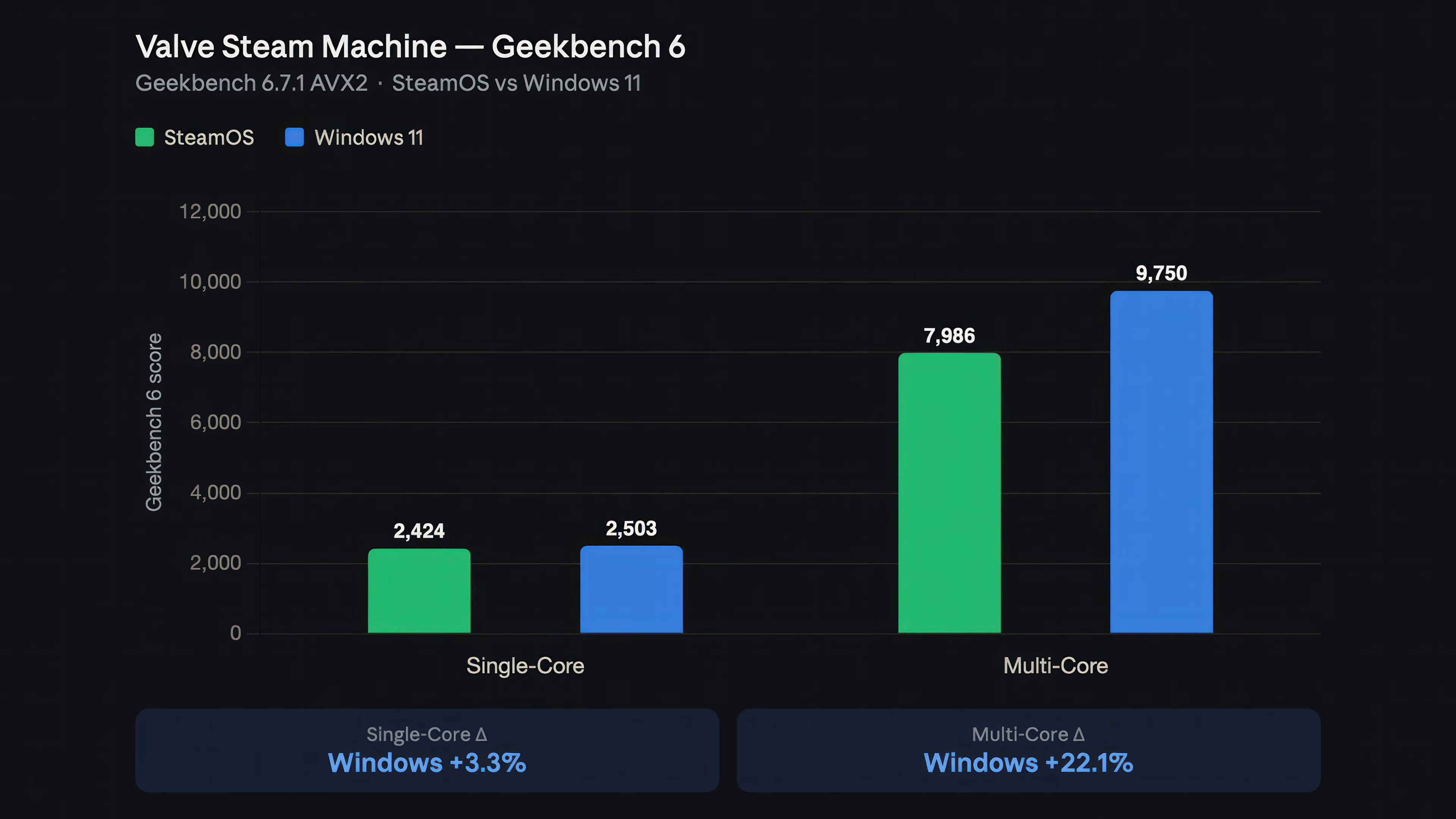
| Geekbench 6 single-core | 2,503 points (≈3.3% ahead) | 2,424 points |
| Geekbench 6 multi-core | 9,750 points (≈22% ahead) | 7,986 points |
| Time Spy overall score | 9,245 points; graphics 9,954, CPU 6,588 | Not supported; comparable gaming performance inferred from frame tests |
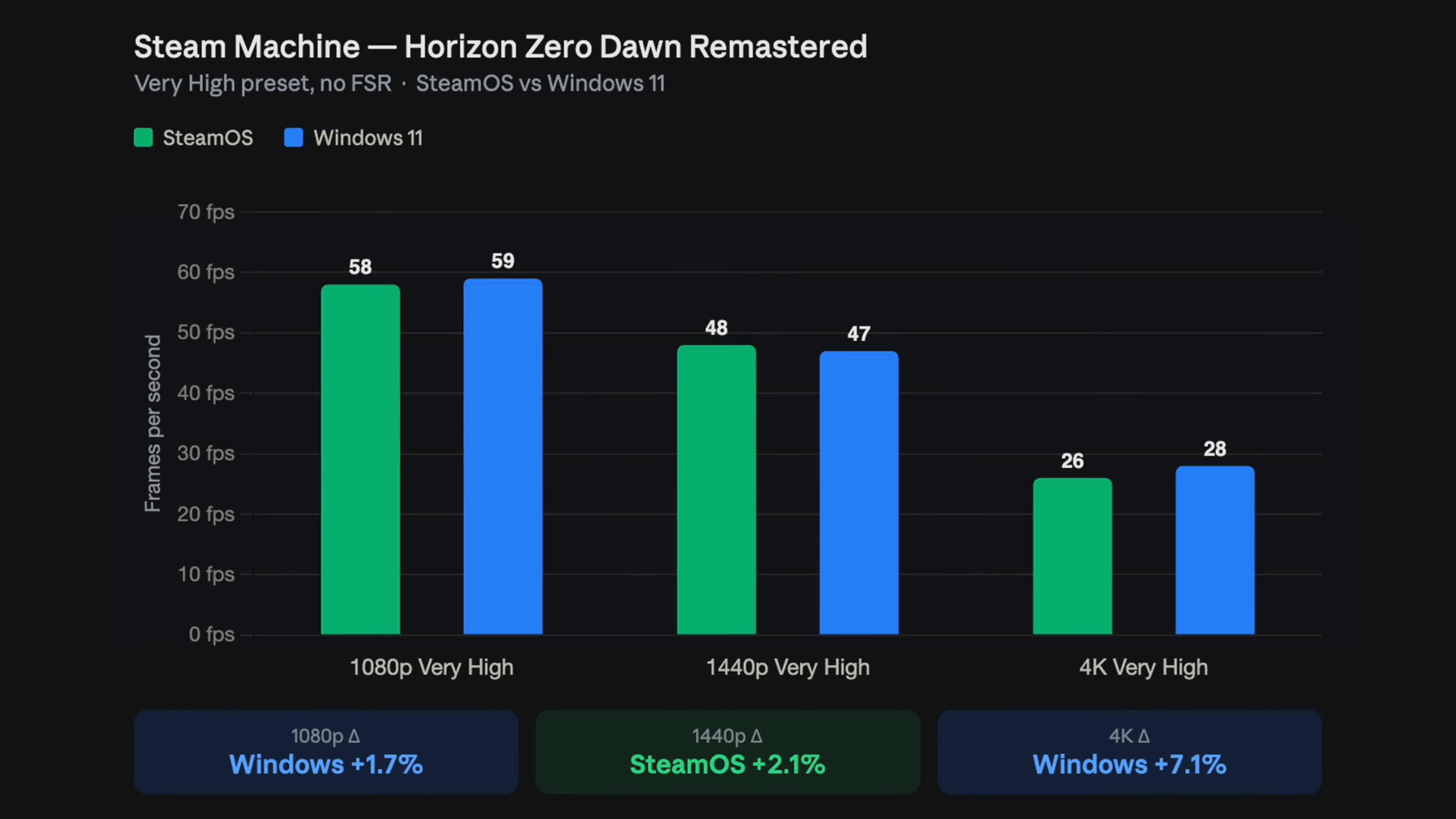
| Horizon Zero Dawn (1080p, Very High) | 59 fps | 58 fps |
| Shadow of the Tomb Raider (1440p, Very High) | 84 fps | 86 fps |
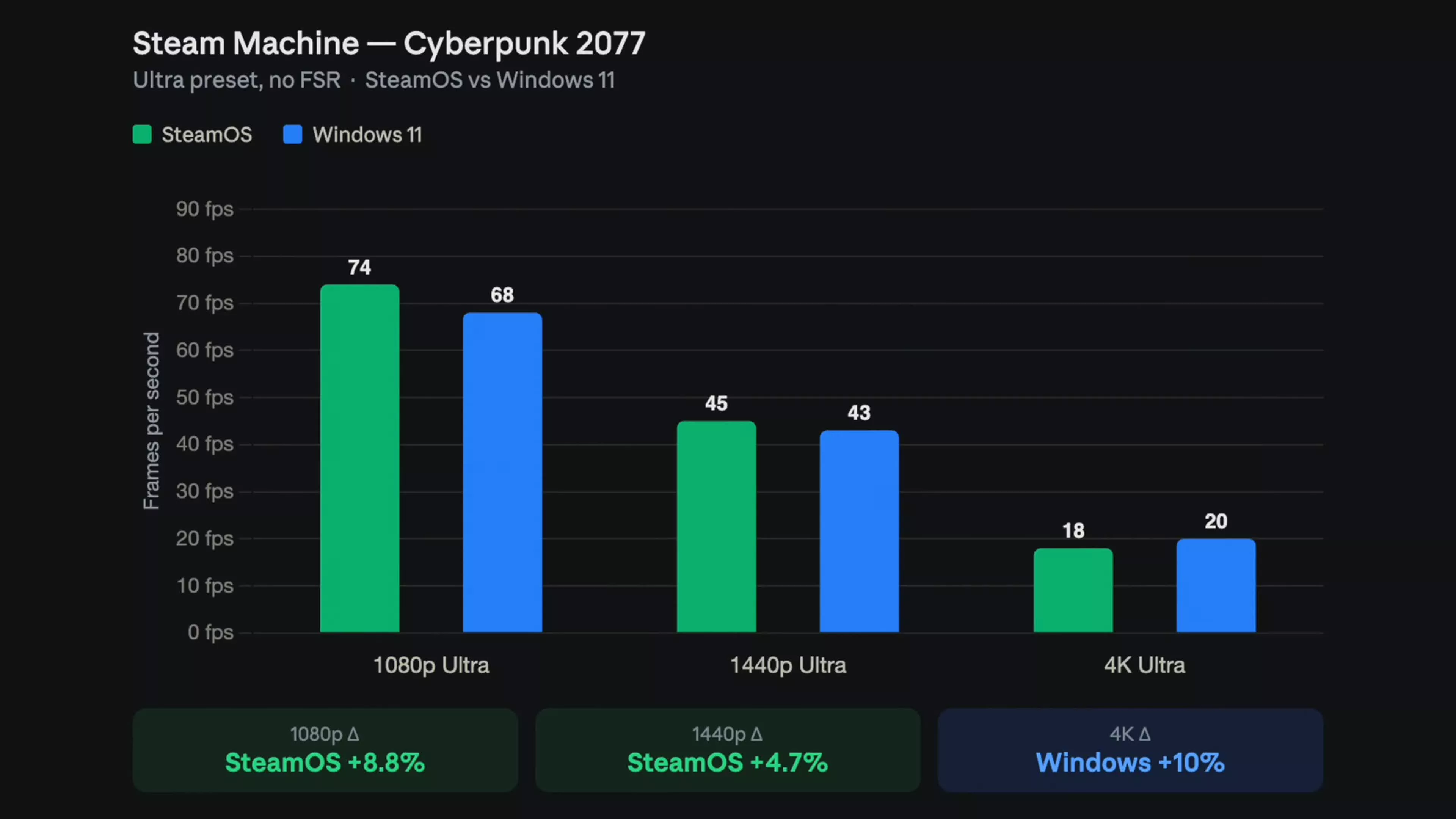
| Cyberpunk 2077 (1080p, Ultra) | 68 fps | 74 fps (≈8.8% ahead) |
| Cyberpunk 2077 (4K, Ultra) | 20 fps (≈10% ahead) | 18 fps |
Synthetic Benchmarks: Windows 11’s CPU Edge vs SteamOS Optimizations
On Steam Machine performance tests, Windows 11 clearly leads in synthetic CPU benchmarks, but that advantage says more about desktop workloads than gaming. In Geekbench 6, Windows scores 2,503 in single-core and 9,750 in multi-core, versus SteamOS at 2,424 and 7,986 respectively — a small 3.3% bump for single-core but a large 22.1% gap in multi-core work. Windows-only tools like Cinebench R24 show the semi-custom AMD chip scoring 99 points single-core and 554 multi-core, placing it near mainstream desktop CPUs and confirming the Steam Machine’s strong general performance. However, SteamOS ran Geekbench from desktop mode, which does not push the CPU governor into the highest clocks unless something demands it, whereas Gaming Mode would normally raise clocks via Valve’s GameMode daemon. That nuance matters if you care about productivity rendering, compiling, or streaming on the same box; Windows 11 is the better fit for heavy multi-threaded tasks, while SteamOS stays tuned around in-game responsiveness and low-friction updates rather than benchmark bragging rights.
Gaming Benchmarks Comparison: Near-Parity Framerates, Different Feel
For Steam Machine gaming, the headline is simple: Windows 11 and SteamOS deliver nearly identical gaming framerates in most titles, with differences of only a few frames in either direction. ETA Prime’s testing across Horizon Zero Dawn Remastered, Shadow of the Tomb Raider, and Cyberpunk 2077 at 1080p, 1440p, and 4K native (no FSR) shows a near tie: across nine game-and-resolution combinations, Windows leads in five while SteamOS leads in four. In practice, every result sits within about two frames per second, except Cyberpunk at 1080p Ultra where SteamOS holds an 8.8% advantage with 74 fps vs 68 fps on Windows; at 4K Ultra, Windows flips the script with 20 fps vs 18 fps, a 10% lead that is moot without upscaling because neither result is playable as-is. Real-world play in titles like Forza Horizon 6, Red Dead Redemption 2, and Mortal Kombat 1 shows similarly solid numbers on Windows 11, but those wins are not large enough to outweigh SteamOS’s console-style interface and faster jump from boot to game.
User Experience, Drivers, and Shared Caveats
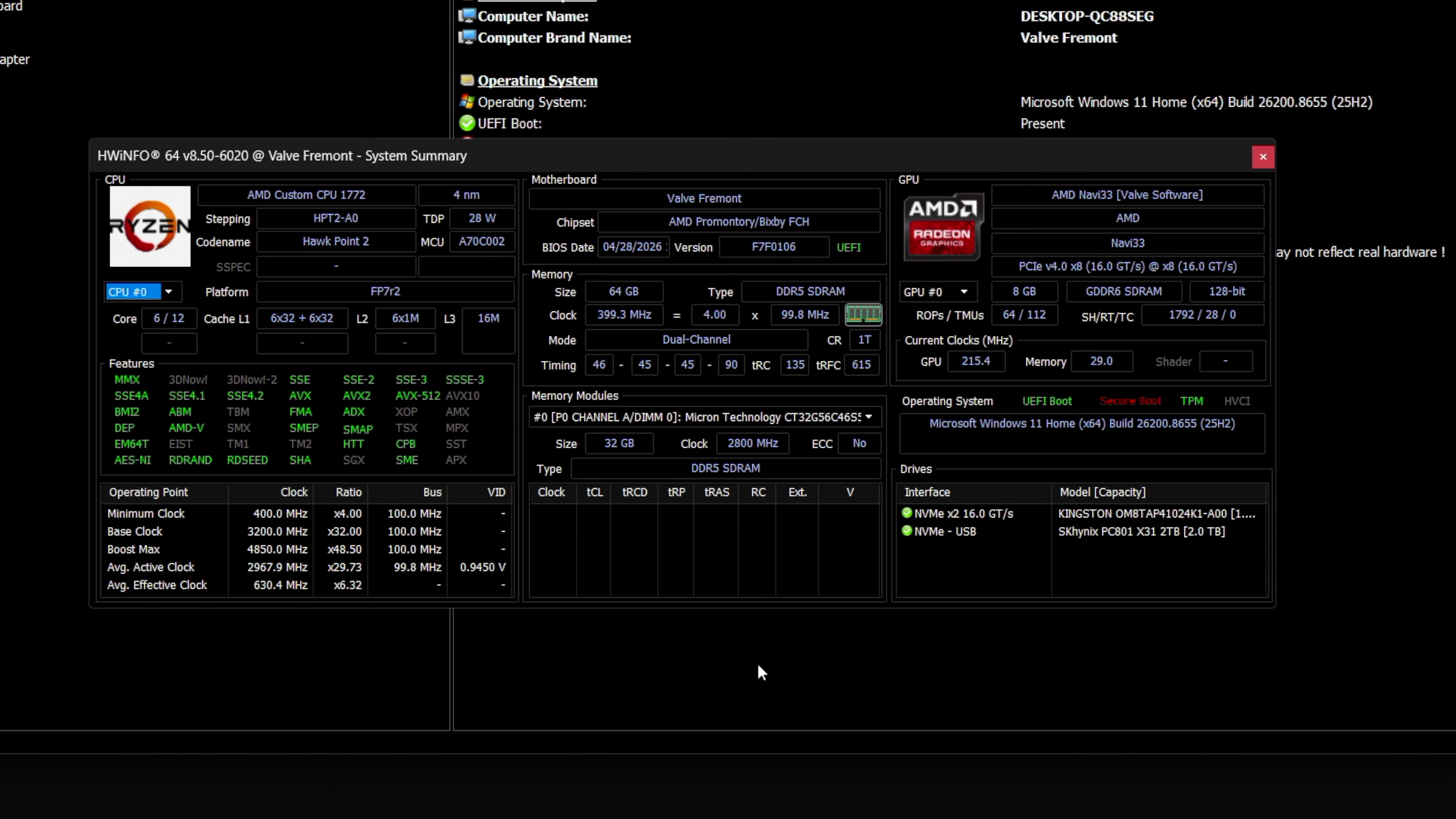
SteamOS maintains superior user experience and optimization on Steam Machine despite comparable raw performance metrics. Its console-style front end lets you launch and manage PC games without a mouse or keyboard, while Valve steadily patches features and performance, including its Mesa-based graphics stack that ships updates with every SteamOS release. Windows 11 installation, by contrast, is straightforward but less tightly integrated: Valve provides GPU, Wi‑Fi, Bluetooth and SD reader drivers, and Windows handles audio natively, so most hardware works correctly once the OS is installed. However, there is no dual boot, so putting Windows on a Steam Machine means wiping SteamOS and later restoring from Valve’s recovery image if you regret the decision. You also need an Ethernet cable during setup because Wi‑Fi drivers come in only after Windows is already running. Both paths share caveats: SteamOS’s Geekbench run was in desktop mode rather than Gaming Mode, meaning its CPU clocks did not fully ramp, and the Cyberpunk 2077 tests did not clarify whether ray tracing was active, which previously exposed weaknesses on SteamOS.
Buy if / Skip if
- Buy the Steam Machine with SteamOS if you want a console-like experience, quick access to games, and performance that matches Windows within a few frames in most titles.
- Skip the Steam Machine with SteamOS if your must-play games depend on strict anti-cheat systems like Riot Vanguard or kernel-level protections that do not run on Linux.
- Buy the Steam Machine with Windows 11 if you plan to run multi-core heavy workloads like rendering, compiling, or productivity suites, where Geekbench and other synthetic tests show around 22% higher multi-core scores.
- Skip the Steam Machine with Windows 11 if you mainly care about seamless living-room gaming, since Valve does not provide full Windows support, dual boot, or the same level of front-end polish.
- Buy the Steam Machine with SteamOS if you value ongoing OS-level gaming optimizations, Mesa driver updates, and a front end tuned for controller-first Steam Machine gaming rather than desktop management.
- Skip the Steam Machine with Windows 11 if you are hoping for a dramatic Steam Machine performance uplift; benchmark data shows Windows winning some tests and resolutions, SteamOS winning others, and most differences falling inside normal error margins.