
Fake SSDs: The Silent Threat in an Otherwise Premium Build
Fake SSD detection is the process of checking that a solid-state drive is genuine by examining its physical details, verifying its identity with software, and stress-testing its performance so that counterfeit storage cannot quietly enter a system and cause data loss or hardware instability later on.
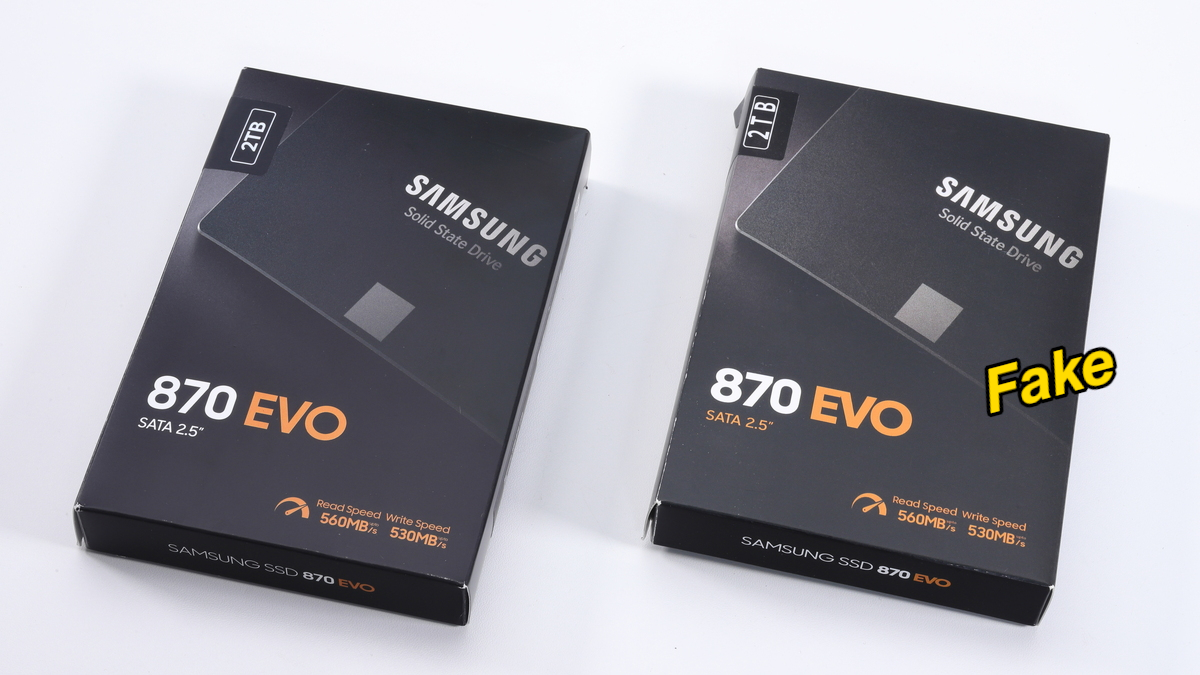
Counterfeit Samsung SSDs are not a niche problem; they are a growing threat in a storage market already facing “a worrying wave of fake products.” The most dangerous part is how polished some forgeries have become. An almost perfect copy of a Samsung 870 EVO 2TB SATA SSD has appeared, with packaging, labels, and physical design so close to the original that many builders will not spot the difference at a glance. These drives are not harmless knock-offs. Some can destroy their own storage area and become unusable, taking your data with them. If you care about your build, you must treat SSD authenticity check as a standard step, not an optional paranoia exercise.
Why Counterfeit Samsung SSDs Are So Dangerous
The counterfeit Samsung 870 EVO story is a perfect illustration of why fake storage is more than a minor annoyance. A clone 870 EVO 2TB looked and behaved like a real drive: Windows detected it as a 2TB SATA SSD, and early benchmarks using CrystalDiskMark showed read speeds of 492 MB/s and write speeds of 467 MB/s, which are normal numbers for this class of SSD and help hide the fake at first. In other words, a quick benchmark is not enough for fake SSD detection.
Under stress, the illusion collapses. When tested at full capacity with tools such as H2testw, write operations suddenly stopped after about 117,227 MB—roughly 120 GB—and the process froze. After a restart, the drive was no longer detected and all stored data was effectively gone. Another teardown of a fake 870 EVO revealed a RayMX RM1135T memory controller and two unmarked NAND chips instead of Samsung’s proprietary controller and DRAM cache, confirming the use of cheap, inferior components. Some fakes are “complete junk—there’s no other way to put it.”
How to Spot Fake Storage with Your Eyes
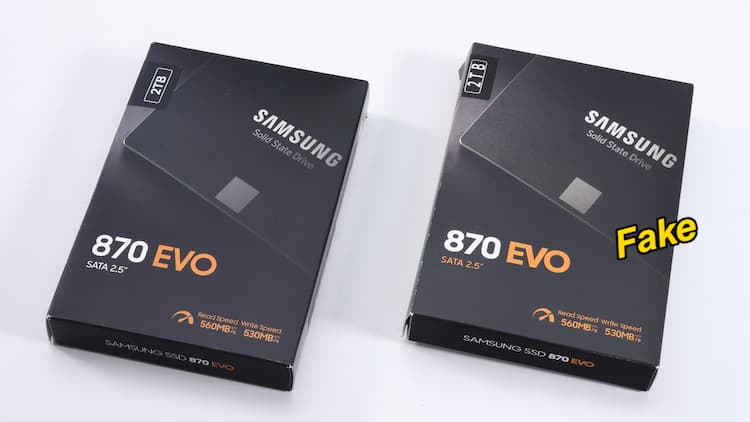
Your first SSD authenticity check should be a slow, deliberate visual inspection. Counterfeit Samsung SSDs can imitate logos and typography, but small manufacturing details tend to betray them. Investigations into fake 870 EVO units found that, while the packaging looks very similar, capacity labels were slightly misaligned and the overall color of the box appeared a bit desaturated compared to genuine stock. These are subtle tells, but any inconsistency between what you see in official product photos and the box in your hands should raise suspicion.
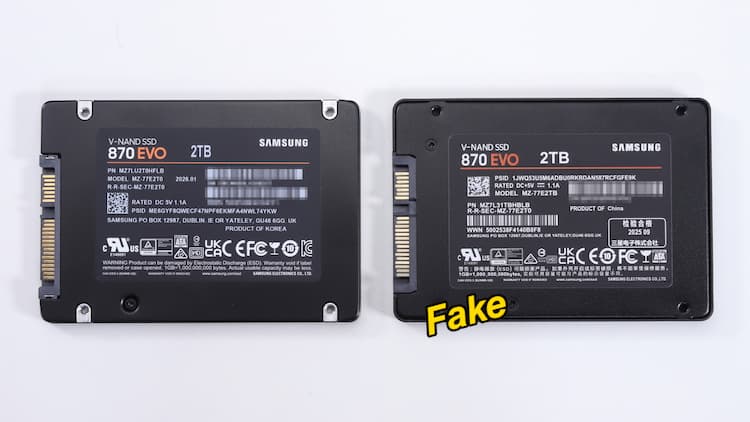
The drive shell itself exposes more clues. On known fakes, the locations of mounting screws did not match the original model. Labels showed misaligned serial numbers, broken or odd-looking QR codes and barcodes, and sloppy compliance logos. None of these alone prove a fake, but together they form a pattern. A genuine high-end SSD should have sharp printing, clean alignment, and hardware that lines up exactly where reference images say it should. When your eyes keep snagging on “off” details, treat that as a warning, not a coincidence.
Benchmarking and Stress Tests: Catching Fakes Before They Fail
Visual checks are necessary, but not sufficient. A smart counterfeit Samsung SSD can pass a quick CrystalDiskMark run with respectable speeds—492 MB/s read and 467 MB/s write in one documented case—so relying on superficial benchmarks is a mistake. To understand how to spot fake storage, you need to test how the drive behaves when pushed beyond light use.
Full-capacity write tests are where many fakes expose themselves. Tools such as H2testw can write across the entire reported capacity. On the fake 2TB 870 EVO, the drive worked only until around 120 GB of data had been written, after which write speed dropped to 0 KB/s and the process froze. Once the PC rebooted, the SSD was no longer properly detected and all data became inaccessible. That pattern—a drive that looks fine under light load but collapses under sustained writes—is a red flag that you are dealing with a small, low-quality SSD disguised as a high-capacity model.
Use Software Authentication Before You Trust Any SSD
No matter how careful you are with visual checks and benchmarks, the cleanest SSD authenticity check is to ask the vendor’s own tools whether the drive is real. According to one investigation, users are advised to check their SSD using the official Samsung Magician software, which can verify through a digital signature whether the drive is “Samsung Authenticated” or a fake copy. This step turns the vague art of fake SSD detection into a clear yes-or-no answer backed by the manufacturer.
The lesson is blunt: treat any unverified SSD as untrusted until it passes both a software authenticity test and at least one full-capacity write test. Counterfeit Samsung SSDs are already convincing enough that you cannot rely on intuition or a single benchmark run. When some fakes can destroy their own storage area and become completely unusable after only about 120 GB of writes, assuming your drive is genuine is an expensive form of optimism. Assume nothing, test everything, and only then commit your operating system and valuable data.