


Copilot PC Insights: An AI Mechanic For Your Windows 11 Machine
Copilot PC Insights is an AI-powered Windows 11 diagnostics feature that reads live system data like CPU, RAM, storage, and connected devices to explain why a PC is slow and suggest performance fixes in everyday language. Microsoft is testing this new Copilot capability as part of its push to turn the assistant into a central Windows helper rather than a web-only chatbot. Instead of sending confused users through Task Manager, Settings, and Windows Security, Copilot PC Insights aims to become a single conversational front door for PC performance troubleshooting. On paper, that sounds like the kind of help Windows has always lacked: a human-style explanation of what those resource graphs mean and what to do about them. In practice, though, the way this feature works—and the system resources it consumes—raises questions about whether it fixes more problems than it creates.
What Copilot PC Insights Can See—and Why That Matters
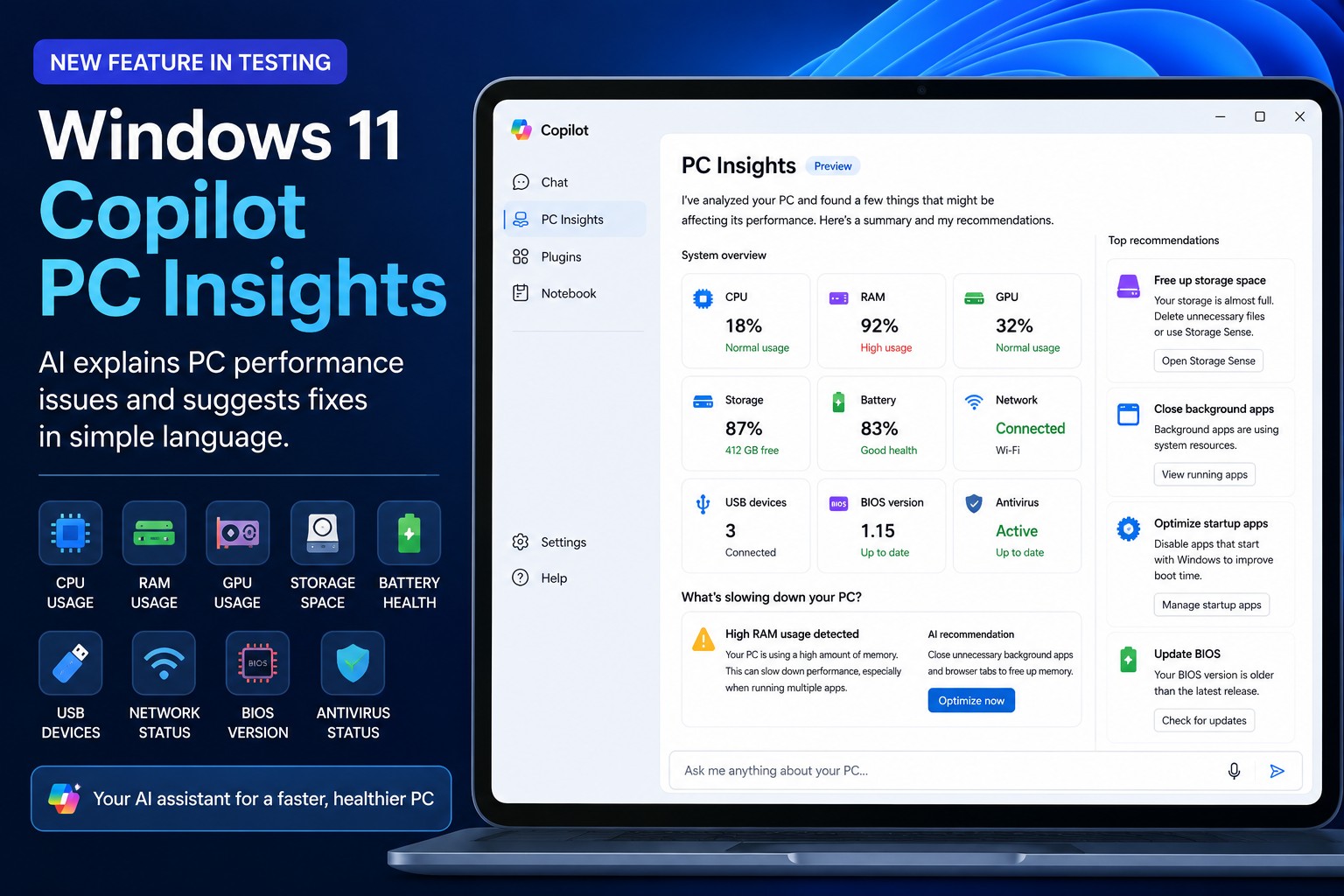
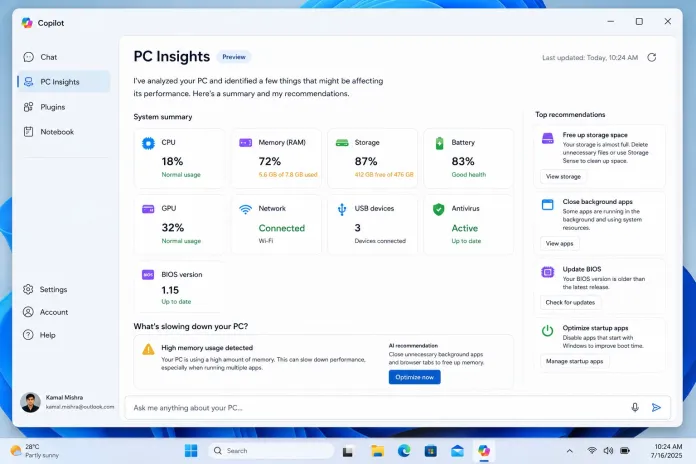
The pitch behind Copilot PC Insights is straightforward: give the AI real-time visibility into your hardware and system status, then let it translate that into clear advice. After you grant permission, Copilot can read CPU usage, RAM usage, GPU utilization, available storage, battery health, connected USB devices, network status, BIOS version, and antivirus protection. It can also see printers, webcams, external drives, Bluetooth, Wi‑Fi, and the size of key folders such as Downloads and Documents. With that data, you can ask questions like “Why is my PC running slowly?” or “Do I have enough space for a 100 GB game?” and get a tailored answer plus plain-language suggestions for cleanup or upgrades. This is PC performance troubleshooting reframed as conversation instead of detective work through obscure menus—a genuine usability win, especially for people who rarely open Task Manager.
The Irony: An AI Diagnostics Tool That Eats Your RAM
For a feature built to highlight system resource issues, Copilot PC Insights arrives with a glaring one of its own. Copilot for Windows ships as a full web app bundled with its own private copy of the Edge browser code and can consume up to 1GB of RAM while idle. Tests show Copilot regularly sitting among the top memory-hungry processes in Task Manager, right next to heavy productivity apps. In other words, the tool that explains your slowdowns is also contributing to them. That is more than a minor inconvenience on low‑RAM machines, where an extra gigabyte can mean the difference between a responsive desktop and constant stutter. Microsoft rebuilt Copilot this way after briefly running it as a native WinUI app, and the result is an “AI assistant” that looks suspiciously like another big browser process glued to the side of the OS. The design feels misaligned with the feature’s purpose.
Optional By Design—But Users Already Smell Bloat
To its credit, Microsoft is treating Copilot PC Insights as an opt-in add‑on, not a mandatory background watcher. The feature is being tested in the Copilot app and is rolling out gradually, starting with a limited audience, with no firm timeline for wider availability. It only has read access for now, meaning it can diagnose but not close processes, delete files, or repair the system itself. Copilot asks for permission before each check, and users can choose whether to always allow diagnostics. Even so, early sentiment hints at skepticism. The feature may be useful for people who do not want to move through technical menus, but it is unclear whether it will become popular; less experienced users may not feel they need it and advanced users may stick with Task Manager and traditional tools. Microsoft has already removed some Copilot entry points from built-in apps after complaints about bloat, reinforcing that users are wary of AI features that feel stapled on rather than thoughtfully integrated.
A Helpful Idea Undermined By Heavy Implementation
Conceptually, Copilot PC Insights is exactly the kind of Windows 11 AI diagnostics tool that makes sense: it translates technical metrics into guidance and reduces the friction of PC performance troubleshooting. The problem is not the idea; it is the execution. An assistant that burns up to 1GB of RAM to tell you your RAM is nearly full borders on self-parody. Microsoft has spent the past year turning Copilot into a deeply integrated Windows assistant, but integration without efficiency risks alienating the very people who need help the most. If PC Insights is to earn trust, it must evolve into something closer to a lightweight system component than a browser-sized sidecar. Until then, the best advice for many users may be ironic: if your PC feels sluggish, one of the first things you should consider closing is the tool that claims to diagnose why it is sluggish.





