
Counterfeit SSDs: A silent threat hiding in plain sight
Counterfeit SSDs are fake storage drives that imitate branded models so closely in packaging, labels, and reported capacity that they appear genuine to buyers and operating systems, yet use inferior controllers and flash memory that can misreport capacity, corrupt data, and fail catastrophically after limited use. That’s not a theoretical risk; the market is already seeing fake Samsung 870 EVO 2TB SATA SSDs that look almost perfect but can destroy your data once pushed beyond their real limits. If you are a PC builder, this is a security problem, not a minor annoyance. A single fake Samsung SSD in your system can take a boot drive, game library, or work projects down in one hit, with no early warning. Some clones even deliver normal performance in benchmarks, which tricks buyers into trusting them before the failure happens. Treat storage authenticity as part of your threat model, right alongside backups and antivirus.
Why fake Samsung SSDs are so dangerous
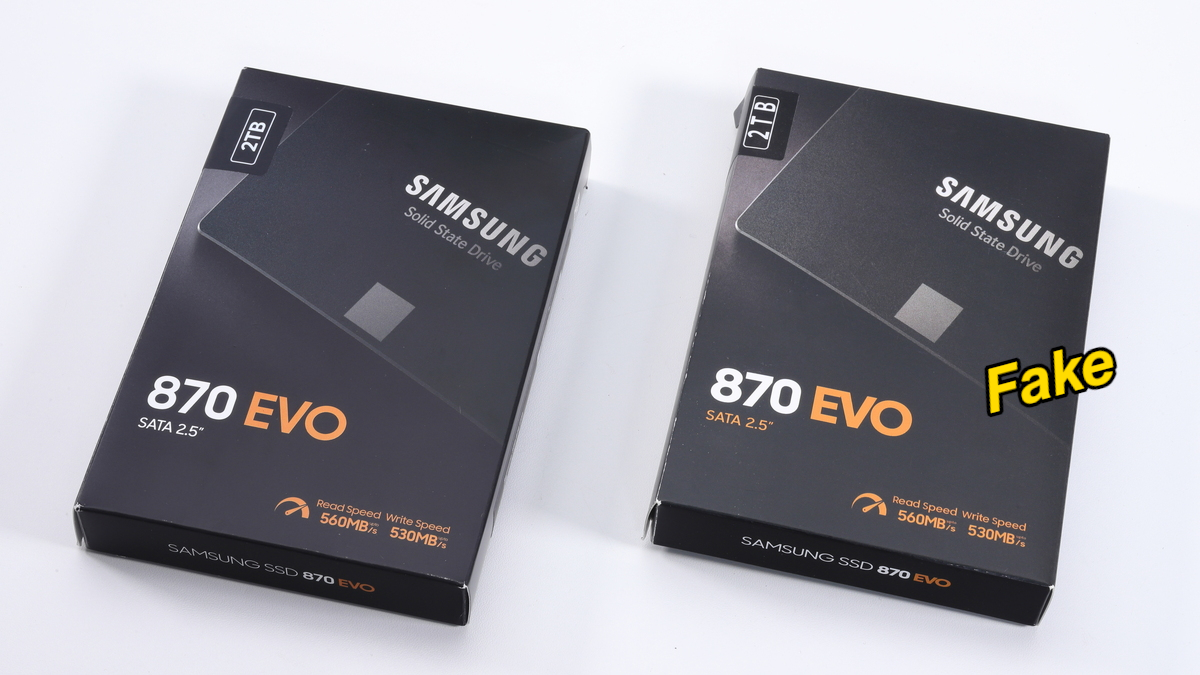
The new wave of fake Samsung 870 EVO drives is dangerous precisely because it is convincing. A recent investigation found an almost perfect copy of the popular 870 EVO 2TB SATA SSD, with packaging, labels, and physical design closely matching the original. Windows detects these clones as fully working 2TB drives and early tests show read speeds around 492 MB/s and write speeds around 467 MB/s, which is exactly what buyers expect from a real SATA SSD. Under the surface, though, the hardware is bargain-bin. Opening the drive reveals a low-cost RayMX RM1135T controller paired with two unbranded NAND chips instead of Samsung’s proprietary controller, genuine NAND, and DRAM cache. According to Akiba PC Hotline, the fake becomes unusable after writing roughly 120 GB of data, corrupting its own storage area and disappearing from the system entirely. In other words, you might be holding what is effectively a 120 GB SSD disguised as a 2 TB model.
How to spot fake drives before you install them
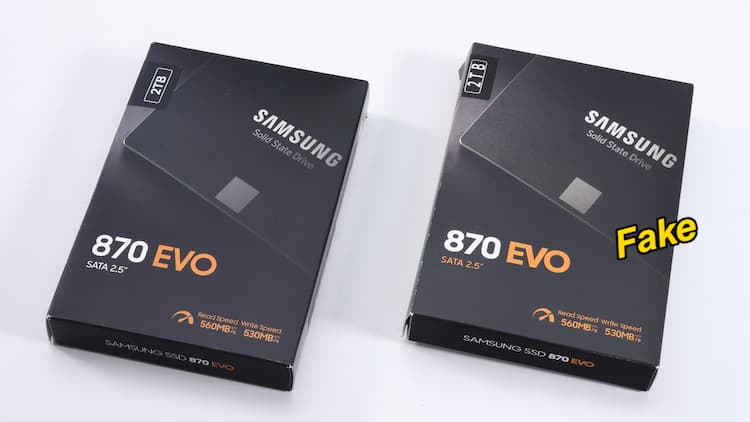
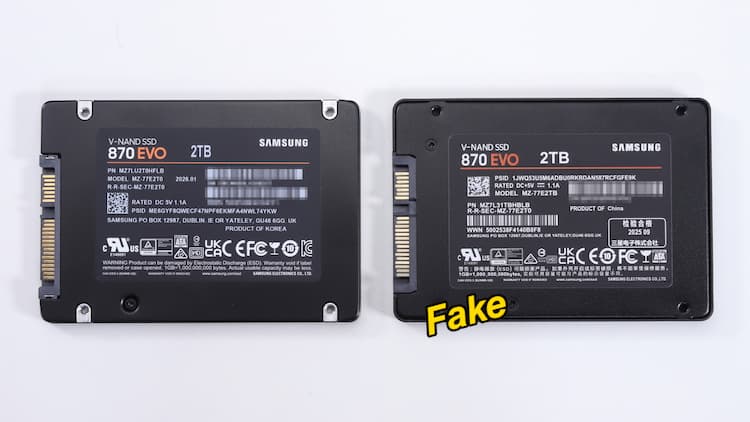
You cannot rely on a quick benchmark or Windows recognition to perform counterfeit SSD detection; the clone 870 EVO SSDs look legitimate in both respects. Instead, start with a ruthless visual inspection. Compare the box and label against official product photos: fakes often reveal themselves through slightly desaturated packaging colors, misaligned capacity markings, and sloppy label printing. On the drive itself, look for mounting screw locations that differ from the original, serial numbers that don’t line up cleanly, and QR codes or barcodes that appear fuzzy or misplaced. Compliance logos are another giveaway; clones frequently have incorrect sizing or spacing that breaks the visual rhythm of the label. Treat any inconsistency as a red flag. While these checks are not perfect, they often expose a fake Samsung SSD before you trust it with an operating system or irreplaceable files. And remember: if a drive’s externals are careless, its internals are almost certainly worse.
Testing and verifying a Samsung SSD once it’s in your PC
Even if a drive passes your visual checks, treat it as untrusted until you verify both its identity and its real capacity. Basic health tools and CrystalDiskMark-style benchmarks are not enough; the fake 870 EVO clones deliver normal sequential speeds and look fine in early performance tests, which hides the fraud. To stress the drive, use a full-capacity write test tool such as H2testw. The known fakes freeze after writing around 117,227 MB—about 120 GB—when the write speed drops to 0 KB/s and the process hangs. After that failure, restarting the PC often reveals the ugly truth: the SSD may no longer be detected and all stored data can be lost. To confirm authenticity for Samsung-branded SSDs, run the official Samsung Magician software, which can verify through a digital signature whether a drive is “Samsung Authenticated” or a fake copy. If Magician refuses to authenticate a drive, pull it from service immediately.
What PC builders should do now
For PC builders, treating SSDs as a security boundary is no longer optional. Counterfeit Samsung 870 EVO SSDs demonstrate that a fake drive can look real, benchmark well, and then annihilate your data the moment it crosses its hidden capacity limit. The lesson is blunt: if you do not have a process for how to spot fake drives, you are gambling with every new storage purchase. Adopt a checklist. Inspect packaging and labels for misalignments and color issues. Validate serial numbers and barcodes; be suspicious of anything that looks off. Run full-capacity write tests before trusting a drive with important data, and use Samsung’s own Magician tool to authenticate branded SSDs via digital signature. Most importantly, never assume that normal performance or OS detection means a drive is genuine. Counterfeit SSD detection is now part of basic build hygiene. Treat storage authenticity like backups: boring until the day it saves you.