
Fake Samsung SSDs: A Storage Time Bomb for PC Builders
Fake Samsung SSD detection is the process of inspecting, testing, and digitally verifying solid-state drives that claim to be Samsung-branded in order to identify counterfeit storage drives that imitate genuine models but hide inferior components and unreliable capacity, preventing data loss and hardware failure in new or upgraded PC builds.
Counterfeit Samsung 870 EVOs and other models are no longer obvious knock-offs; they arrive in packaging and housings that are almost indistinguishable from the real thing. The market is facing a wave of fake products that can pass basic benchmarks, display normal capacities, and appear healthy in common tools while quietly setting you up for catastrophic failure. If you are a PC builder and you treat SSDs as a commodity, you are handing attackers the easiest possible way to turn your storage into a time bomb. Storage fraud is no longer about losing some performance; it is about losing every byte you care about.
Why Counterfeit SSDs Are So Dangerous: Good Benchmarks, Bad Reality
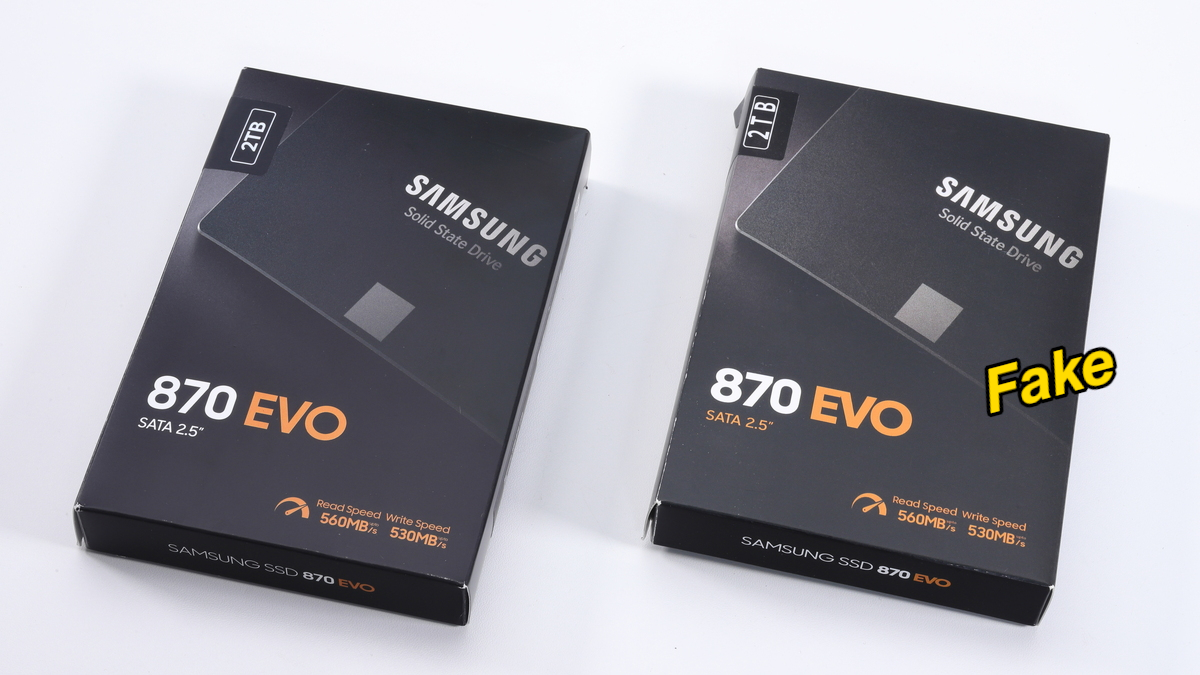
The most unsettling part of these counterfeit storage drives is how normal they look and behave—until they die. One reviewed fake Samsung 870 EVO 2 TB appeared visually close to the original; only subtle packaging differences like slightly desaturated box colors and misaligned capacity labels gave it away. On first use, it delivered read speeds of 492 MB/s and write speeds of 467 MB/s, which is exactly what you would expect from a SATA SSD, and Windows detected it as a fully working 2 TB drive.
The trap springs when you perform full-capacity storage health verification. During a complete write test with tools such as H2testw, the fake drive stalls after about 120 GB written, write speeds collapse to 0 KB/s, and the process freezes. After a reboot, the SSD may no longer be detected at all and the data already written can be lost permanently. In other words, this drive behaves like a tiny SSD—likely 120 GB—masked as a 2 TB unit and then self-destructs its own storage area. That is not a nuisance; it is a total data-loss event.
Visual Red Flags: How to Inspect Samsung SSDs Before You Buy
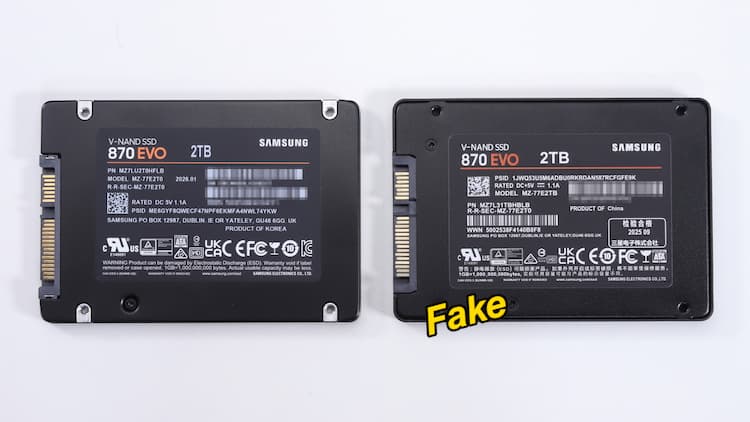
If you build PCs or buy drives in the secondary market, treat visual inspection as your first SSD authentication guide. Counterfeits can be “visually identical… or almost”, so you need to look for the “almost”. Packaging that looks slightly off—such as desaturated colors compared to official photos or misaligned capacity labels—is an early warning sign. Inside, the drive shell itself can betray the fake: mounting screw locations that do not match reference images, labels with misaligned serial numbers, or sloppy QR codes and barcodes are all signs of trouble.
Compliance logos and printing quality matter too. On genuine Samsung drives, these elements are crisp and consistently aligned; on counterfeits, they can be blurred, shifted, or incorrectly spaced. If anything on the label feels low-effort, assume the hardware behind it may be worse. For builders, the opinionated rule should be simple: if the shell does not match known-good photos down to screw holes and typography, do not trust it with your data.
Why Basic Health Tools Can Lie: Do Deeper Storage Verification
Relying on quick benchmarks or surface-level health tools is no longer enough for fake Samsung SSD detection. The examined counterfeit 870 EVO produced perfectly normal CrystalDiskMark results—492 MB/s read and 467 MB/s write—which helped mask the fraud during early tests. Common monitoring utilities that report SMART health percentages or simple pass/fail results are only seeing the story the controller wants to tell. Counterfeit controllers can behave well under low-capacity, burst workloads and still collapse when you push them to their declared size.
Real storage health verification for suspicious drives means running full-capacity tests with tools such as H2testw and checking whether all advertised space can be written and read back reliably. In the fake 870 EVO case, the drive failed catastrophically after about 120 GB of writes and then became unusable. That single test exposes lies that benchmarks cannot. If a drive claims terabytes, you have to make it prove it. Otherwise, you are accepting a counterfeit’s promise on faith, and faith is not a strategy for data safety.
Use Vendor Tools for Authentication—and Treat Suspicion as a Stop Sign
The last line of defense in any SSD authentication guide is the vendor’s own tooling. Users are advised to check suspicious or newly purchased Samsung SSDs with the official Samsung Magician software, which can verify through a digital signature whether the drive is “Samsung Authenticated” or a fake copy. If Magician does not recognize the drive as authentic, you should treat it as hostile hardware, not a bargain.
Disassembly of one counterfeit 870 EVO showed a RayMX RM1135T controller and two unbranded NAND chips instead of Samsung’s proprietary controller, NAND memory, and DRAM cache. That is how extreme the component downgrade can be. Counterfeit Samsung 870 EVO SSDs look real but can destroy your data. The takeaway for PC builders is blunt: if a Samsung SSD cannot prove its identity through official tools and full-capacity testing, it does not belong anywhere near a system you care about.