
Steam Machine as a gaming OS testbed
A Steam Machine gaming OS comparison is an evaluation of how Windows 11 and SteamOS perform, feel, and behave on the same Valve mini PC in real games, synthetic benchmarks, and everyday use so players can decide which operating system better matches their priorities. On this hardware, the headline is simple: in games, SteamOS vs Windows 11 is almost a draw, but the experience and setup costs are not. Windows turns the Steam Machine into a flexible small Windows gaming PC with slightly higher synthetic performance and broader app support, while SteamOS keeps the box feeling like a plug‑and‑play console with strong Steam integration. If you mainly sit on the couch and play Steam titles, SteamOS is still the default; if you need Windows‑only software or stricter anti‑cheat titles, Windows 11 becomes compelling.
Benchmarks: where Windows 11 wins and where it does not
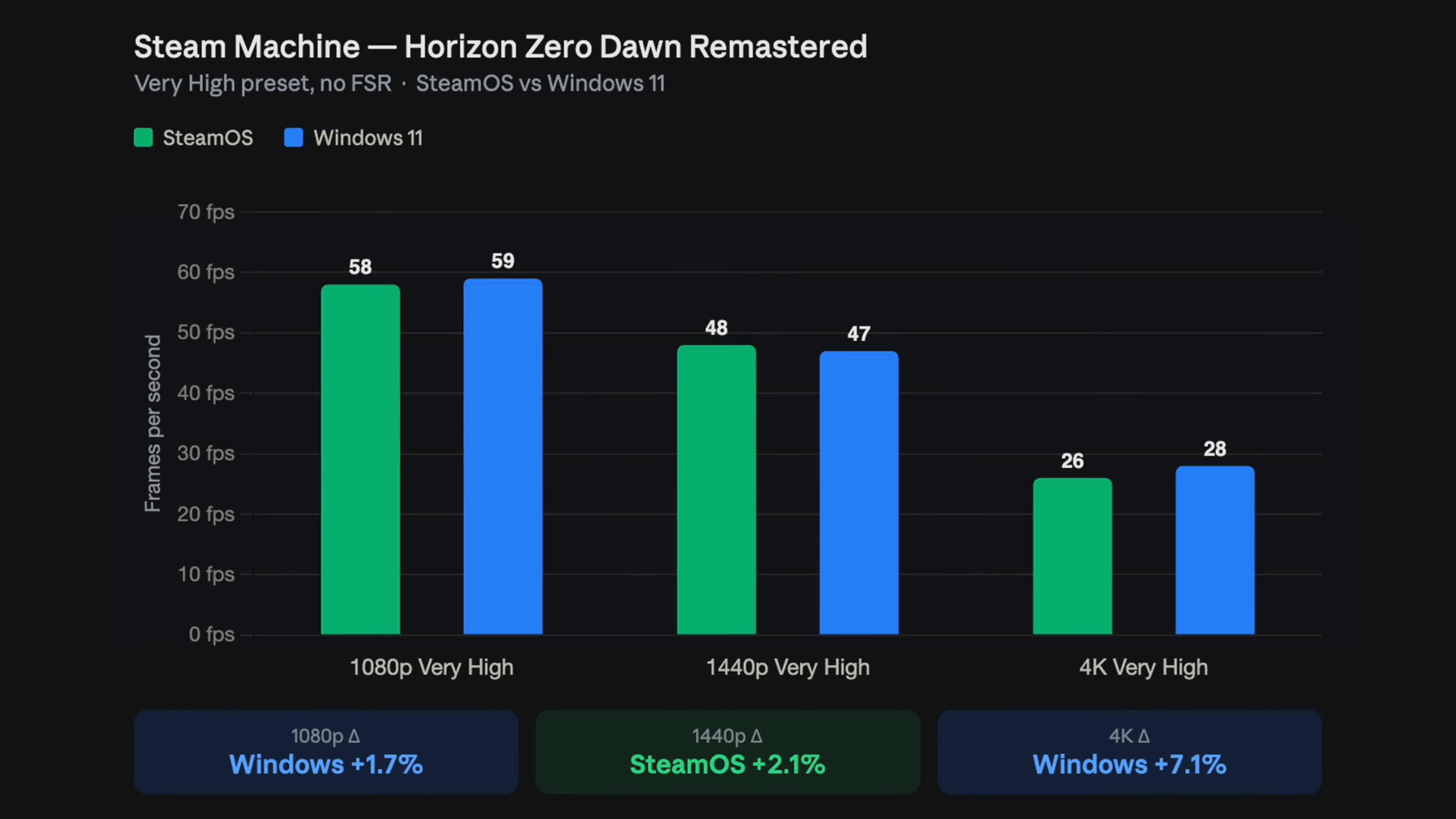
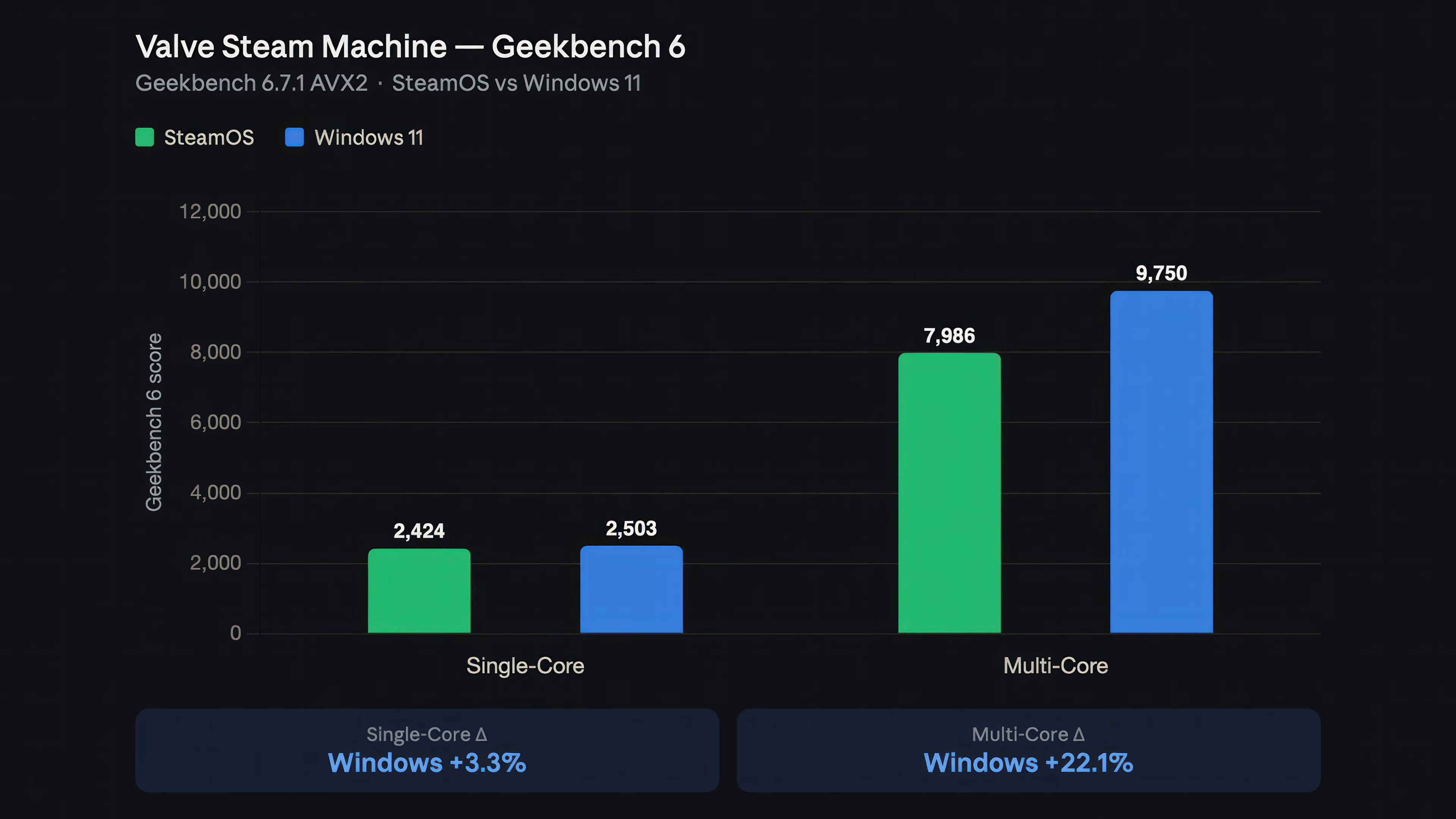
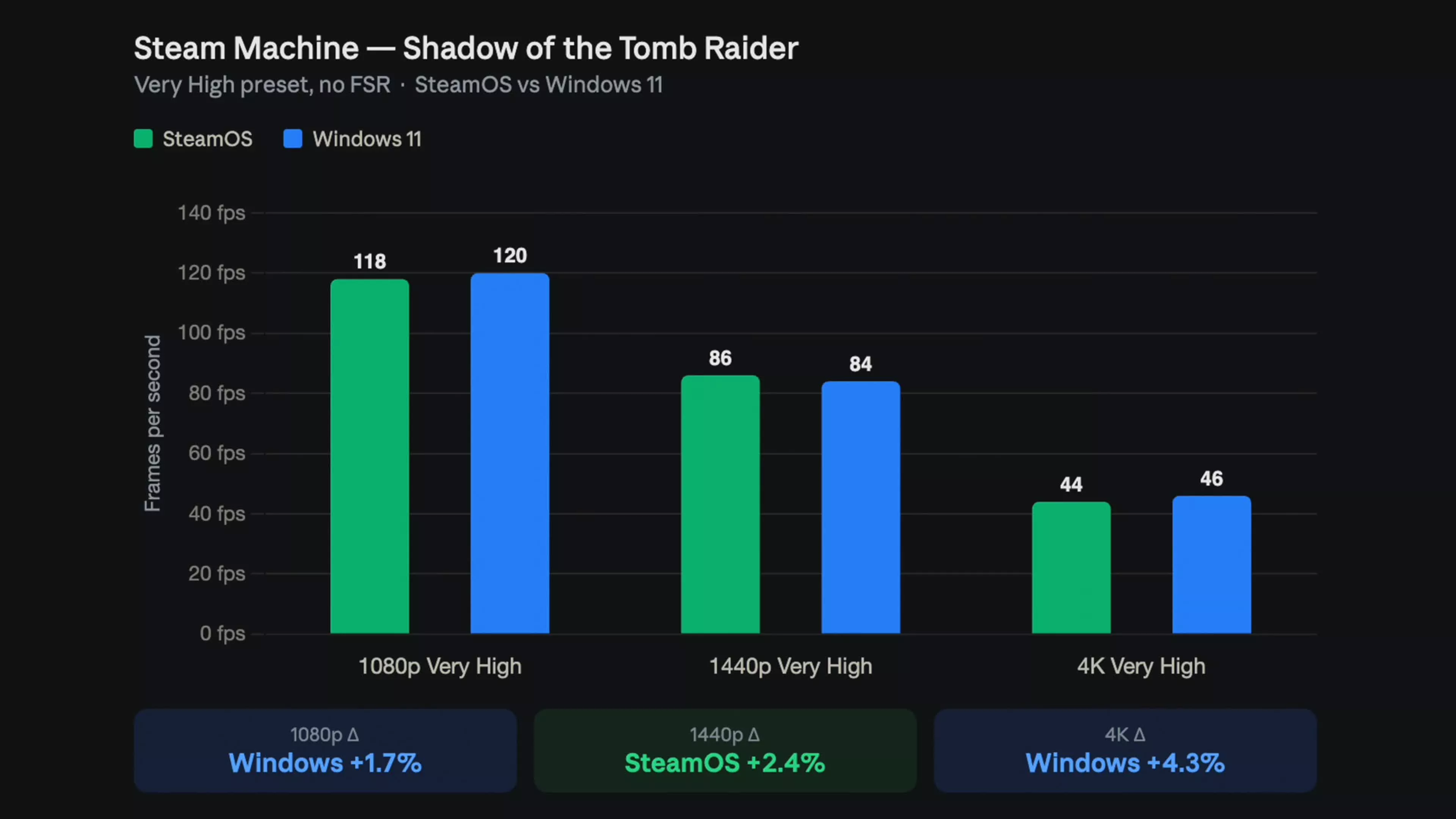
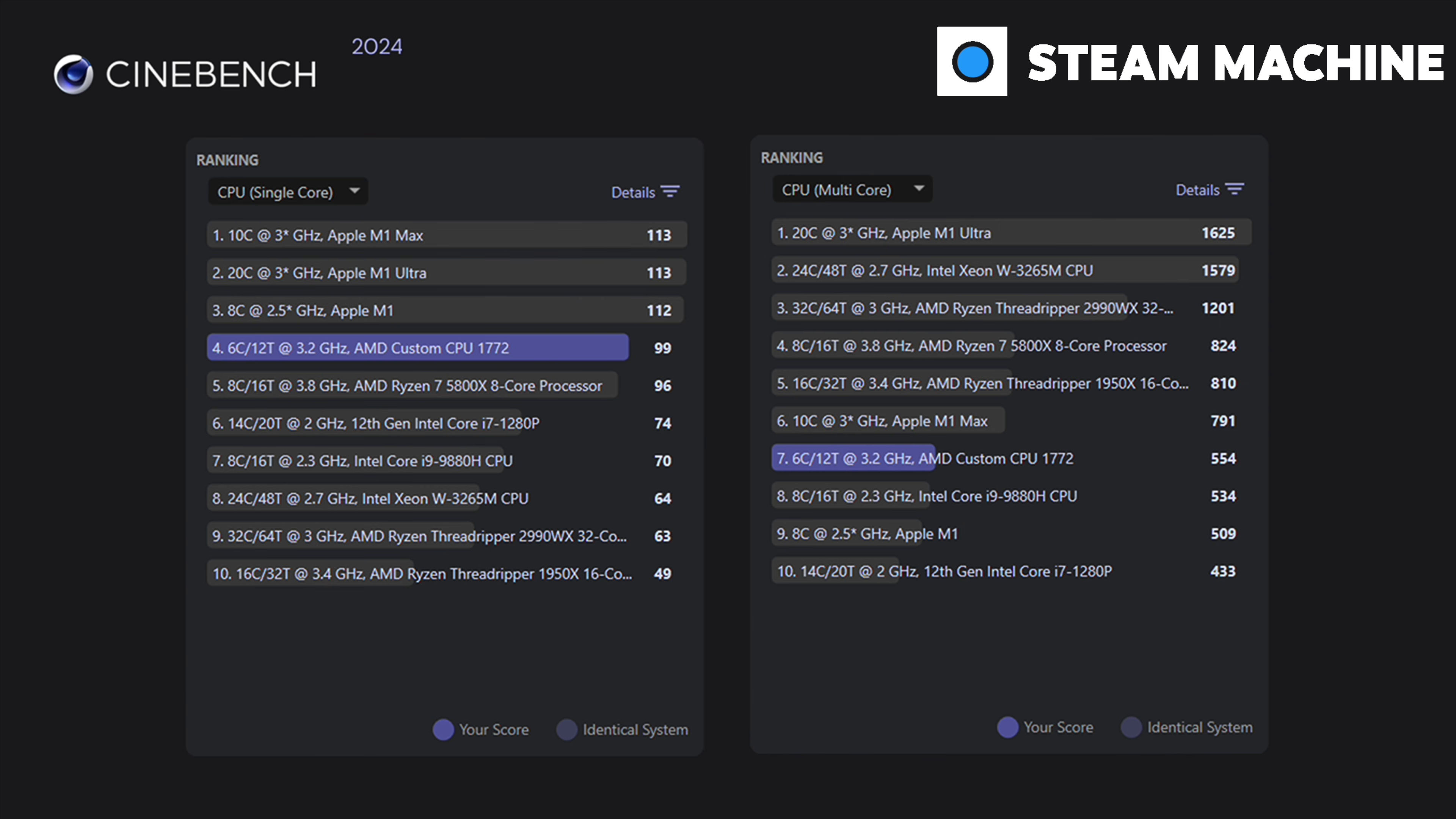
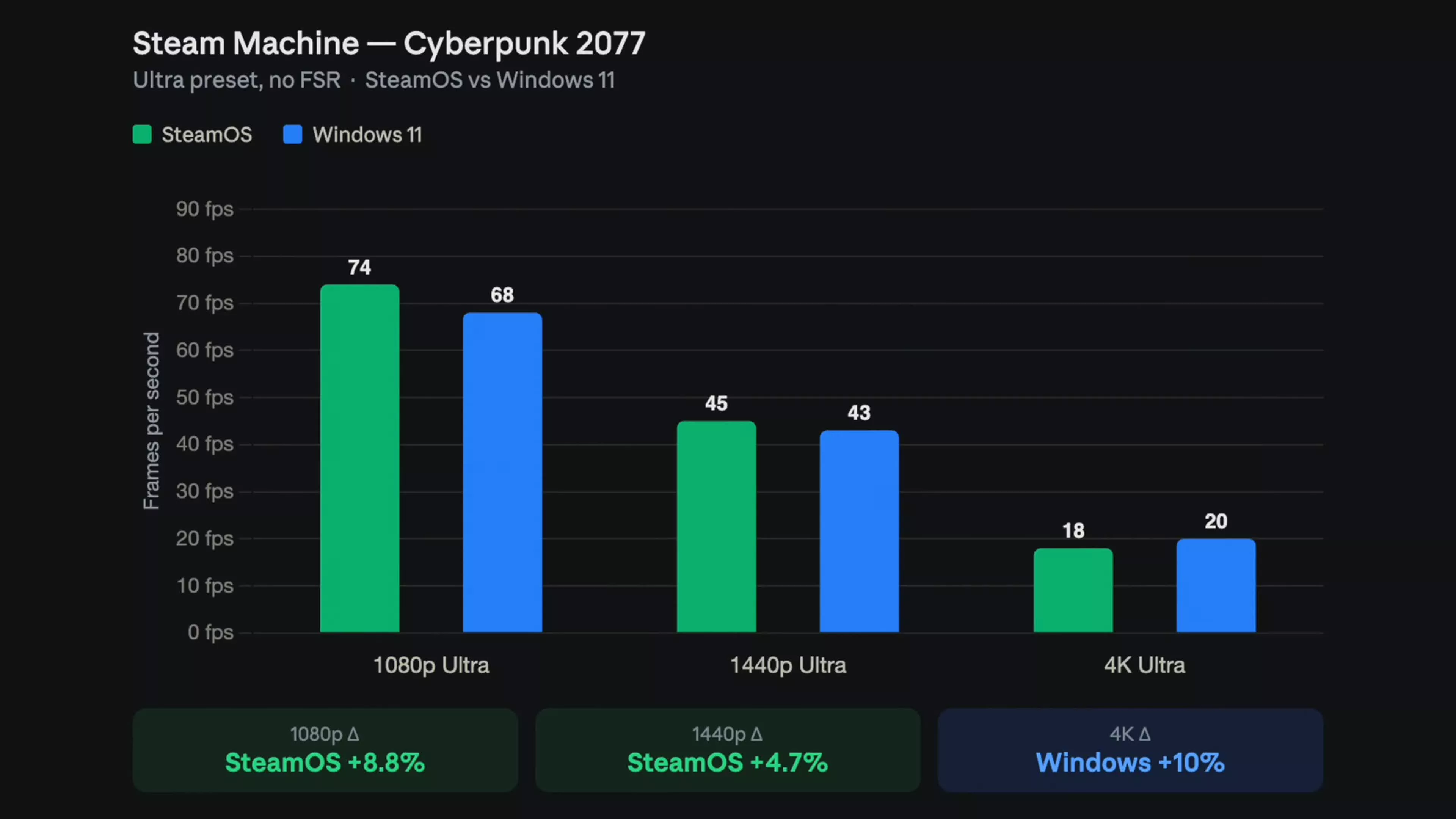
Steam Machine Windows performance looks impressive in synthetic tests, but far more modest in real games. In Geekbench 6, Windows 11 delivers about 3.3% higher single‑core and roughly 22% higher multi‑core scores than SteamOS, a clear win for compute‑heavy workloads. Cinebench results on Windows show 99 points single‑core and 554 multi‑core, putting the custom Zen 4 chip in the same conversation as desktop-class CPUs while sipping far less power. Time Spy on Windows reaches 9,245 overall, with a graphics score of 9,954 and CPU score of 6,588. Yet in games, the story flattens out: in Shadow of the Tomb Raider, Cyberpunk 2077 and Horizon Zero Dawn Remastered, frame rates differ by only a few fps at most resolutions.
| Benchmark / Game | SteamOS | Windows 11 |
|---|---|---|
| Geekbench 6 (single / multi) | 2,424 / 7,986 | 2,503 / 9,750 |
| Shadow of the Tomb Raider (FHD / QHD / 4K fps) | 118 / 86 / 44 | 120 / 84 / 46 |
| Cyberpunk 2077 (FHD / QHD / 4K fps) | 74 / 45 / 18 | 68 / 43 / 20 |
| Horizon Zero Dawn (FHD / QHD / 4K fps) | 58 / 48 / 26 | 59 / 47 / 28 |
| 3DMark Time Spy (score) | N/A (not tested) | 9,245 (GFX 9,954 / CPU 6,588) |
Real gaming performance: a near tie with tiny twists
In real Steam Machine benchmarks, SteamOS and Windows 11 sit so close that most players will never feel a difference. Across nine combinations of three games and three resolutions, Windows wins five runs while SteamOS wins four, with gaps usually inside normal testing error margins. Shadow of the Tomb Raider tilts mildly toward Windows at 1080p and 4K, while SteamOS pulls ahead at 1440p. Cyberpunk 2077 favors SteamOS in native 1080p and 1440p by up to around 8%, but Windows claws back at 4K, where both OSes average about 20 fps anyway. Horizon Zero Dawn Remastered is nearly a wash, with each OS trading 2–8% leads depending on resolution. One quotable summary from the data is: “Windows finished ahead in five, SteamOS in four… it’s almost a tie, with Windows showing minor improvements in 4K.”
Experience, drivers and the cost of switching
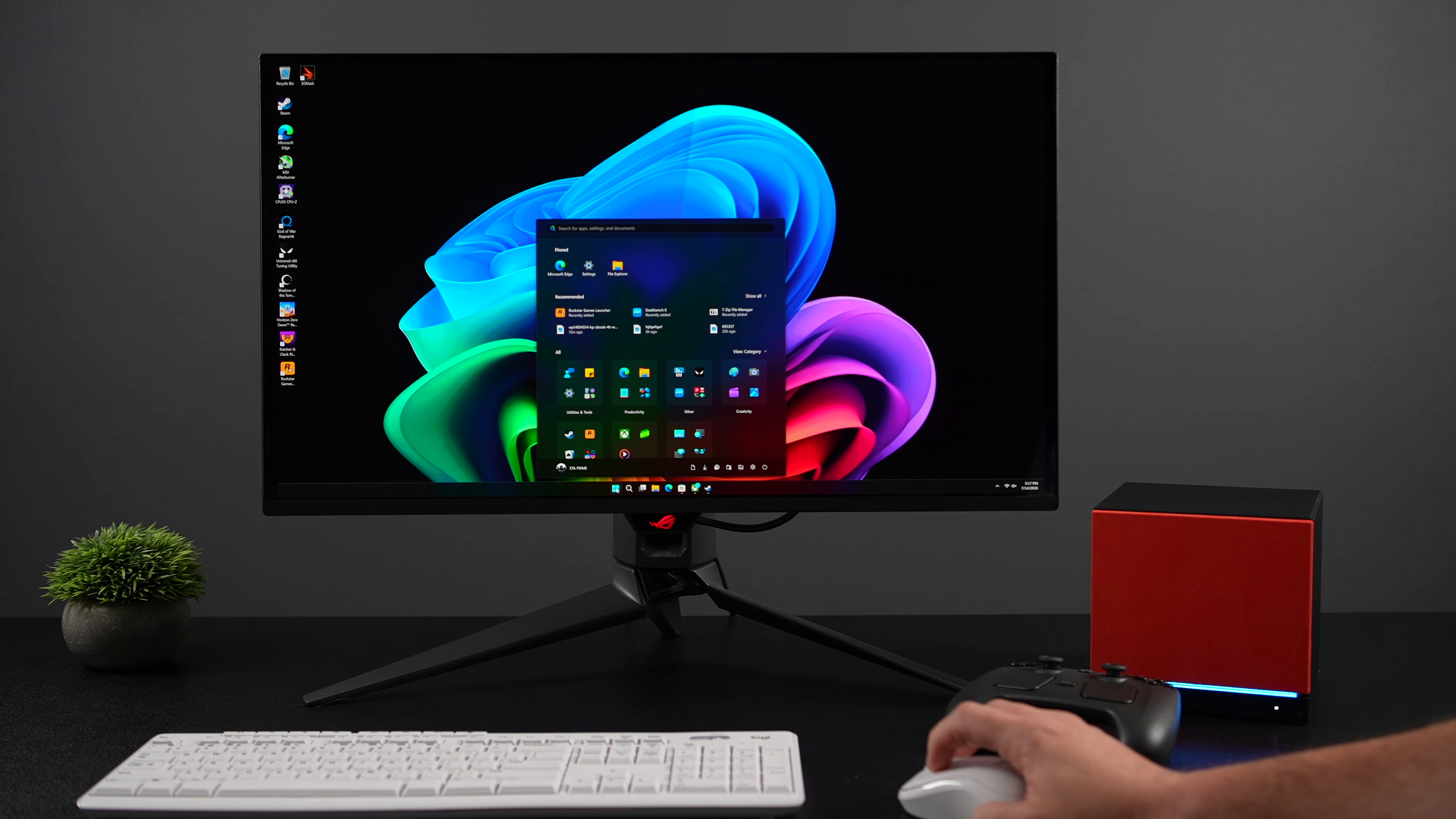
On paper, SteamOS vs Windows 11 is a near‑draw in games, but the lived experience is not. SteamOS ships tuned for this hardware, using an open‑source Mesa graphics stack that Valve funds and updates with every SteamOS release, and wraps it in a couch‑friendly, console‑style interface. Windows 11, by contrast, runs a more general desktop OS with all the usual background services, updates and UI complexity. Installing Windows is also disruptive: there is no official dual‑boot yet, so putting Windows on the internal drive wipes SteamOS, and going back means a full SteamOS recovery reinstall. During setup, you even need Ethernet since the Wi‑Fi driver only loads after Windows is running. The GPU and APU use a semi‑custom AMD part, and Valve’s Windows package rests on a locked OEM Adrenalin driver from November 2024, which you cannot freely swap for retail drivers.
Who should choose SteamOS or Windows 11?
The right gaming OS comparison on Steam Machine depends more on your library and lifestyle than on raw frames. If you live inside Steam, want the box to behave like a console, and value quick sleep‑resume gaming, SteamOS is the better fit. It provides a polished console‑style experience with competitive gaming performance and Linux‑based optimizations that sometimes beat Windows in modern titles. If you need Windows‑only launchers, mods, productivity apps or multiplayer games with strict anti‑cheat that do not support Linux, the small multi‑core boost and wider compatibility of Windows 11 make sense. Valve’s official Windows drivers now cover GPU, Wi‑Fi, Bluetooth and SD reader, so Windows 11 can run the Steam Machine as a capable Windows gaming PC without missing hardware features. However, one source sums up the overall case bluntly: “We wouldn’t recommend it. The performance case isn’t there.”
- Buy the Steam Machine with SteamOS if you want a console-like, couch-first experience and do not need Windows-only games or apps.
- Skip the Steam Machine with SteamOS if your core games rely on strict anti-cheat or Windows-only launchers that Proton cannot handle reliably.
- Buy the Steam Machine with Windows 11 if you need broader software compatibility, from non-Steam launchers to productivity tools and media apps.
- Skip the Steam Machine with Windows 11 if you are not willing to wipe your drive, reinstall SteamOS later, and deal with a more complex desktop-style interface.
- Buy the Steam Machine with Windows 11 if you plan to use the mini PC as a general-purpose desktop where Geekbench and Cinebench gains matter more than a few fps.
- Skip the Steam Machine with Windows 11 if you primarily care about a seamless gaming experience and the small performance differences do not justify the setup hassle.