
Counterfeit SSDs: A Hidden Storage Security Risk
Counterfeit SSDs are fake storage drives that imitate branded models in looks and reported capacity while using inferior hardware that can corrupt data, fail under load, and leave systems unable to detect the drive, turning a normal upgrade into a serious storage security incident. This is no longer a fringe problem. The storage market is facing a worrying wave of fake products, and fake Samsung drives built to mimic the popular 870 EVO line show how sophisticated these scams have become. Some counterfeits deliver deceptively solid performance in short benchmarks, encouraging a false sense of safety before failing catastrophically when filled with data. If you treat SSD purchases as harmless bargains rather than critical infrastructure decisions, you’re giving counterfeiters the perfect opening to compromise your backups, workstations, and even servers.
What Fake Samsung 870 EVO Drives Reveal About Modern Counterfeits
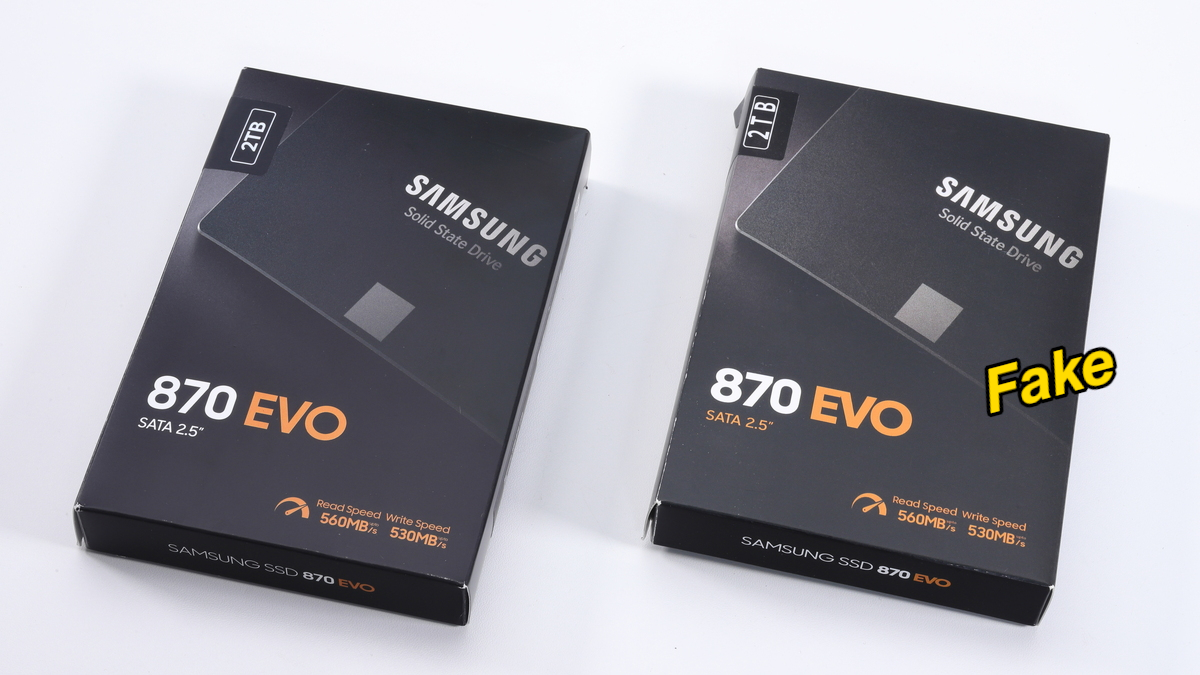
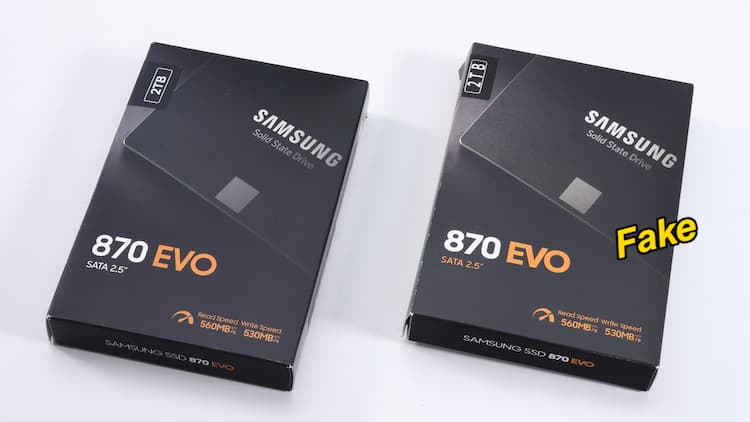
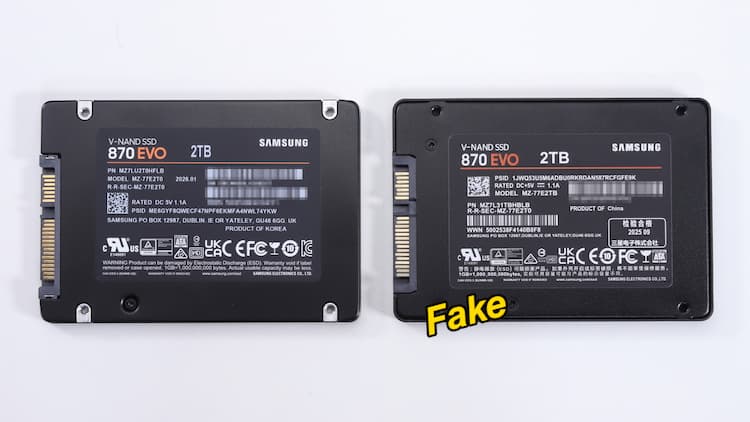
The recent fake Samsung 870 EVO 2TB SATA SSD case is a near-perfect lesson in modern counterfeit SSD detection and why appearances are no longer enough. At first glance, the counterfeit model looks very similar to the original—packaging, labels, and physical design closely copy the genuine product and are nearly identical to the original. Only subtle cues give it away: slightly desaturated box colors, misaligned capacity labels, and mounting screw locations that do not match the real drive. Label mistakes are equally telling, with misaligned serial numbers plus questionable QR code and compliance logos. Yet when connected, Windows correctly recognizes a 2TB SATA SSD, and tools like CrystalDiskMark show read speeds of 492 MB/s and write speeds of 467 MB/s—exactly what you’d expect from a normal SATA drive. In other words, the fake passes both the eye test and the quick benchmark test, which means buyers must adopt deeper SSD authentication habits.
How Misrepresented Capacity Leads to Catastrophic Data Loss
The most alarming trait of these fake Samsung drives is how they handle capacity and reliability. During full-capacity testing—using tools such as H2testw—the counterfeit 870 EVO writes smoothly until around 117,227 MB (about 120 GB), then the write speed suddenly drops to 0 KB/s and the process freezes. After a restart, the SSD is no longer properly detected, and the data that was written is inaccessible, indicating the drive damaged its own storage area and became unusable. According to one review, “it’s as if the SSD tried to write beyond its actual capacity. Most likely, it’s a 120 GB SSD disguised as a 2 TB model.” Internally, the scam is clear: instead of Samsung’s proprietary controller, NAND, and DRAM cache, the opened drive reveals a low-cost RayMX RM1135T controller with two unmarked generic NAND chips. Some counterfeits are complete junk, and this misrepresented-capacity design turns everyday use into a time bomb for your data.
Practical Counterfeit SSD Detection and Authentication Steps
The lesson from these fake Samsung drives is simple: treat SSD authentication as a routine security step, the same way you’d verify software downloads. Visual inspection is only a starting point. Look for subtle packaging differences, misaligned labels, odd screw positions, and suspicious QR or compliance logos. Run more than a quick benchmark; perform at least partial capacity tests and watch for sudden stalls after tens of gigabytes of writes, which may signal misreported capacity and looming data loss. Most importantly, use vendor tools when they exist. To avoid buying one of these fake drives and risking both your data and your money, users are advised to check their SSD using the official Samsung Magician software; the tool can verify via digital signature whether a drive is “Samsung Authenticated” or a fake copy. Skipping these basic checks means choosing convenience over storage security—and trusting unknown hardware with your most valuable files.
Why Buyers Must Treat SSD Purchases as a Security Decision
When the storage market faces a wave of fake products, counterfeit SSDs stop being a niche oddity and become a mainstream risk. The fake 870 EVO case shows that scammers can build drives that look authentic, report inflated capacities, and deliver convincing benchmark scores before failing violently under normal use. That is a storage security failure, not a minor inconvenience. The conclusion is blunt: your next SSD purchase is a security decision. If you do not invest the small effort to validate hardware identity and behavior, you are granting low-quality flash and mystery controllers full access to your data, backups, and operating systems. Today’s counterfeits may be “a work of art—except when you try to get the most out of it”, but once they cross that hidden limit, they can destroy your data entirely. Build counterfeit SSD detection and authentication into your buying routine, and you turn a growing market risk back into a manageable problem.