
What this Steam Machine gaming OS comparison is really about
A Steam Machine Windows 11 performance comparison examines how closely Microsoft’s desktop operating system can match SteamOS in real-world gaming, synthetic benchmarks, and everyday use on Valve’s compact living-room PC. In tests of games like Shadow of the Tomb Raider, Cyberpunk 2077, and Horizon Zero Dawn Remastered, Windows 11 and SteamOS on the Steam Machine deliver nearly identical framerates, staying within a few frames of each other in most scenarios. That means the decision is less about raw Steam Machine performance and more about whether you want SteamOS’s streamlined console-style experience or Windows 11’s wider PC ecosystem. If you care about anti-cheat-heavy multiplayer, productivity apps, or mod-heavy libraries, Windows 11 gains appeal; if you want a couch-friendly, console-like experience with competitive performance, SteamOS stays compelling.
Gaming performance: SteamOS vs Windows 11 in real titles
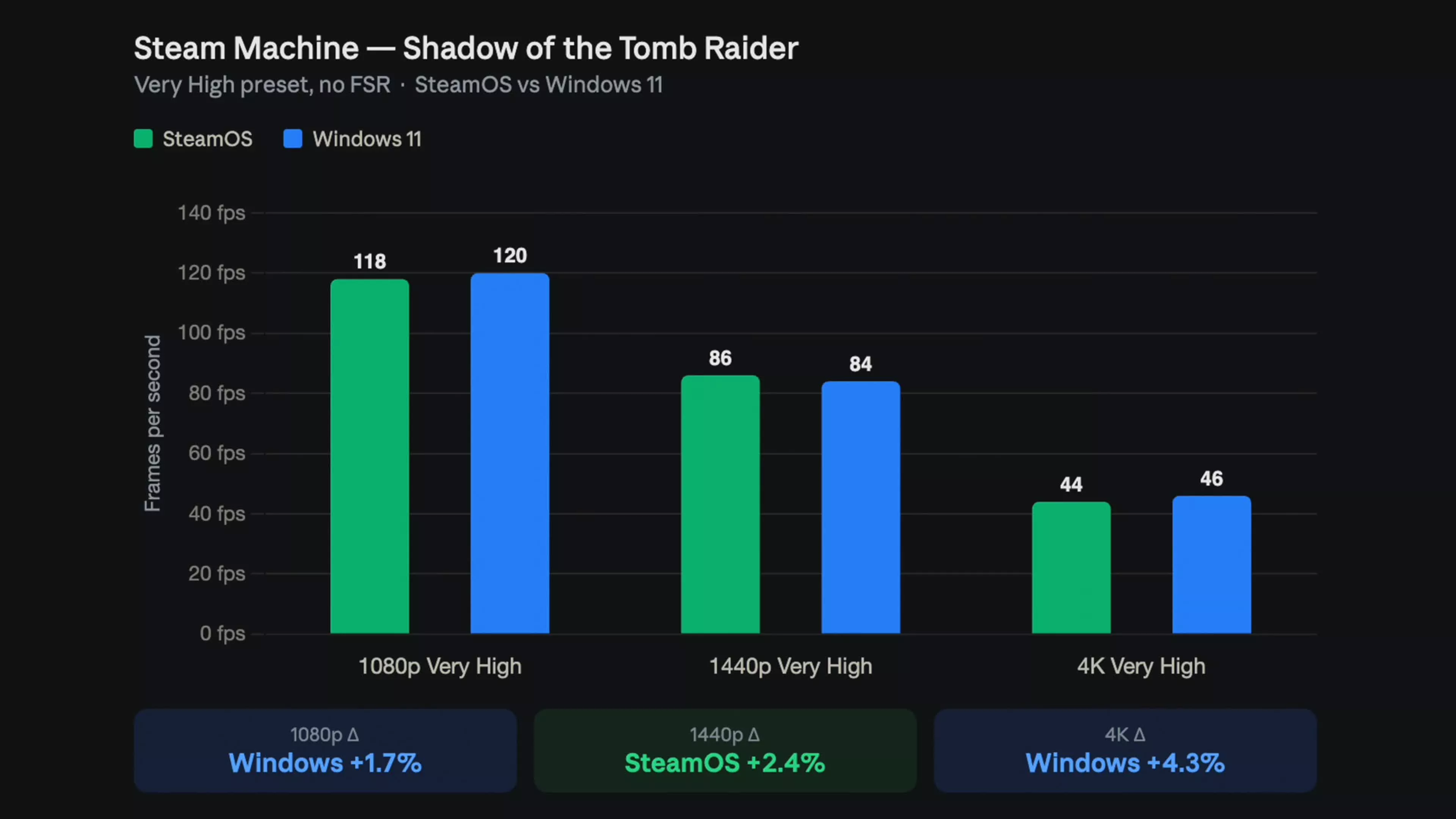
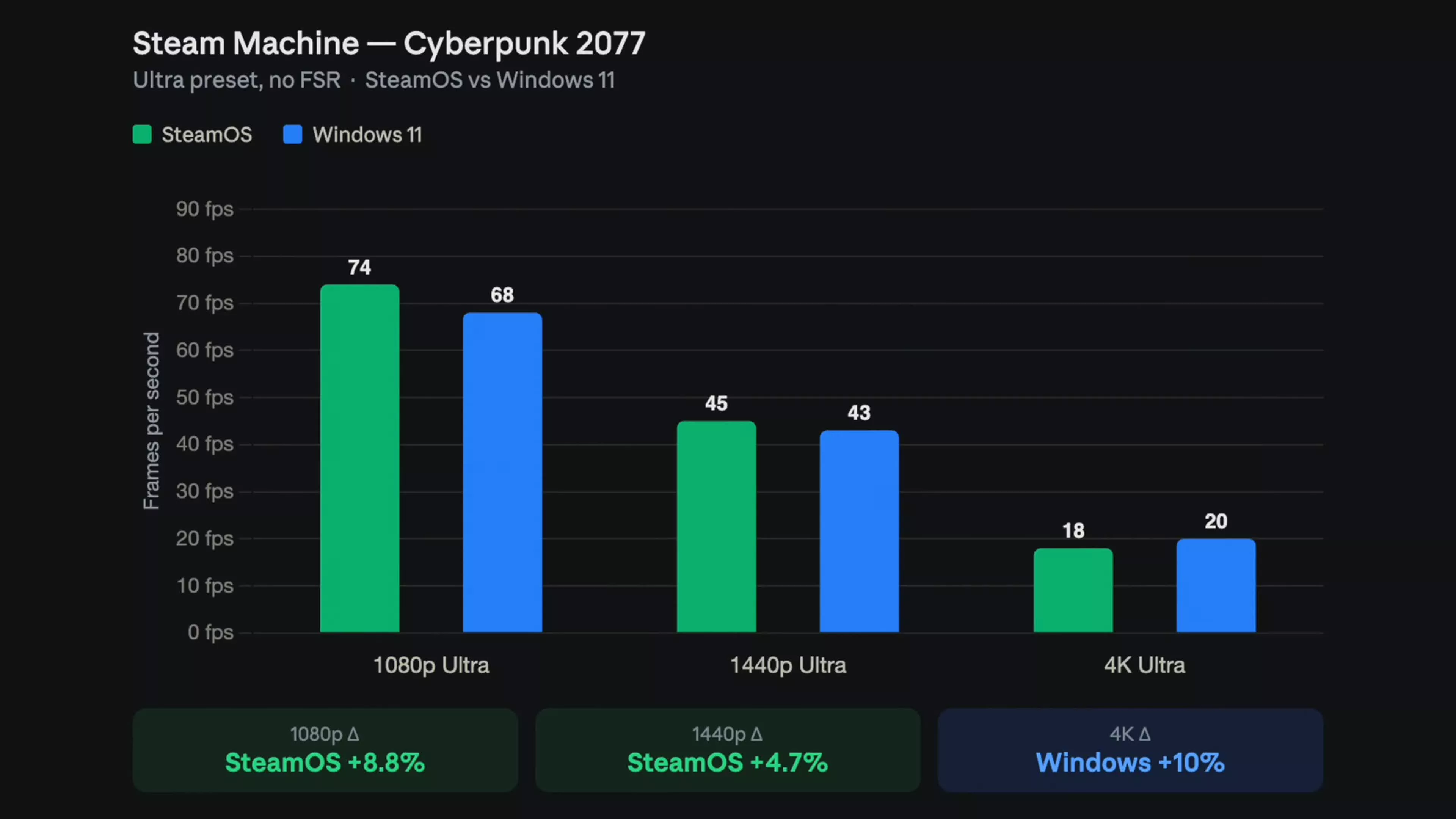
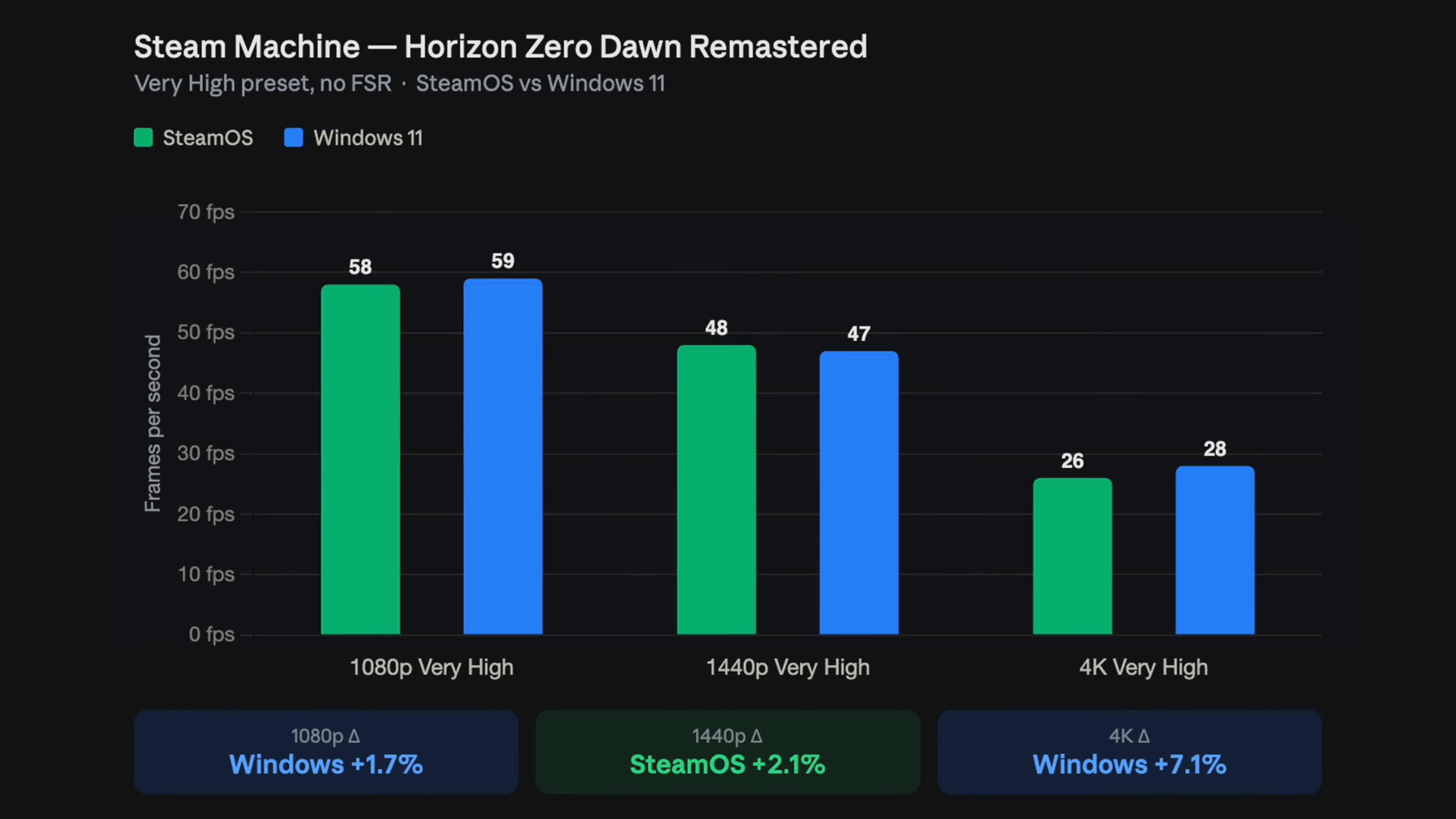
In this gaming OS comparison, the headline result is simple: gaming performance is far more balanced than you might expect. ETA Prime’s benchmarks show that in Shadow of the Tomb Raider, Cyberpunk 2077, and Horizon Zero Dawn Remastered, Steam Machine Windows 11 and SteamOS remain within a few frames of each other. SteamOS pulls ahead in Cyberpunk 2077 at ultra settings in native 1080p, where its advantage can exceed 8% in some runs. Shadow of the Tomb Raider leans slightly toward Windows at 1080p and 4K, though SteamOS nudges ahead at 1440p. Horizon Zero Dawn Remastered sees small swings either way depending on resolution. In other words, neither OS delivers a consistent win across all games and resolutions. For most players, those minor differences are invisible once you enable adaptive sync or cap framerates to match a TV or monitor.
Synthetic benchmarks and CPU performance
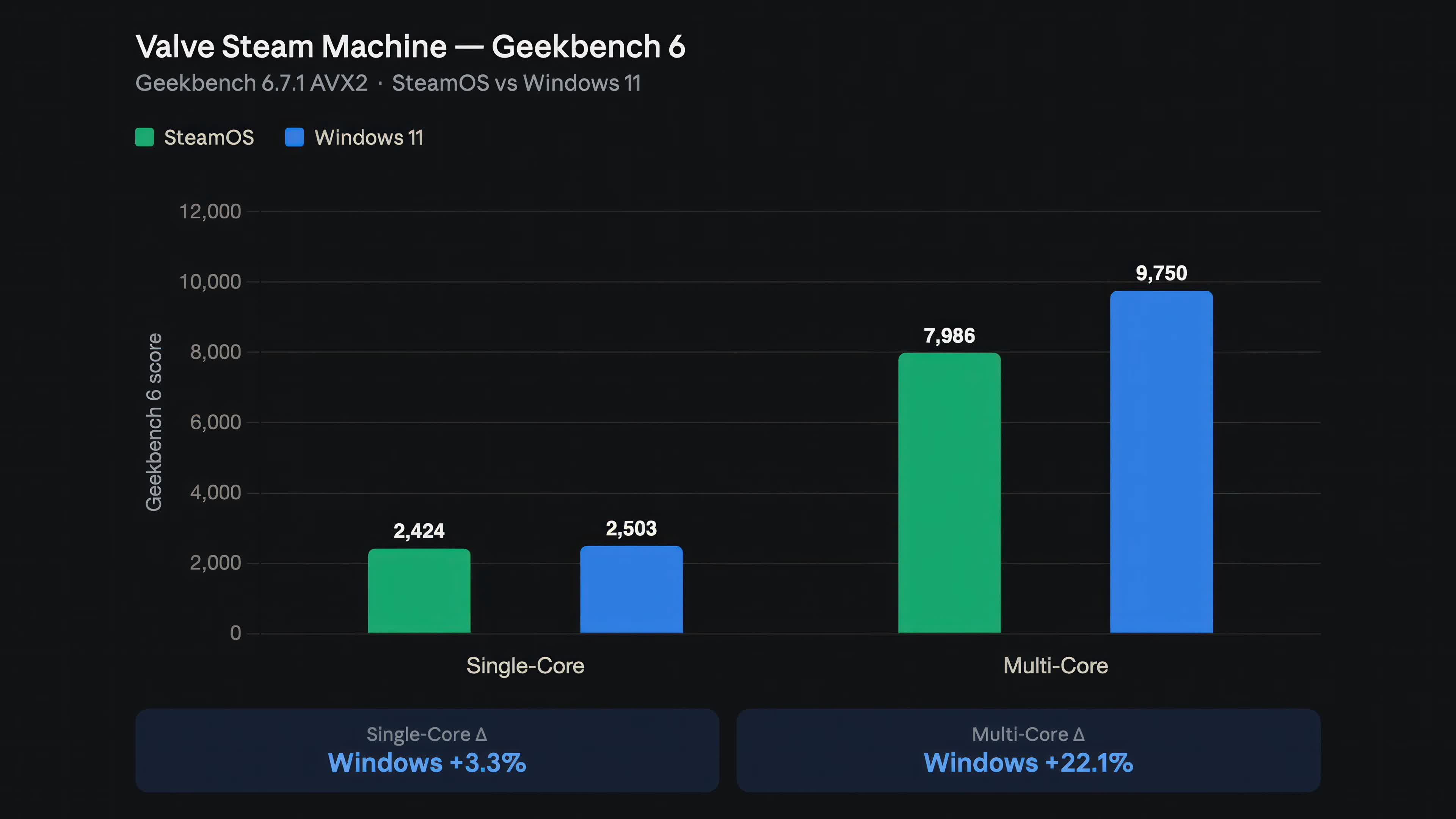
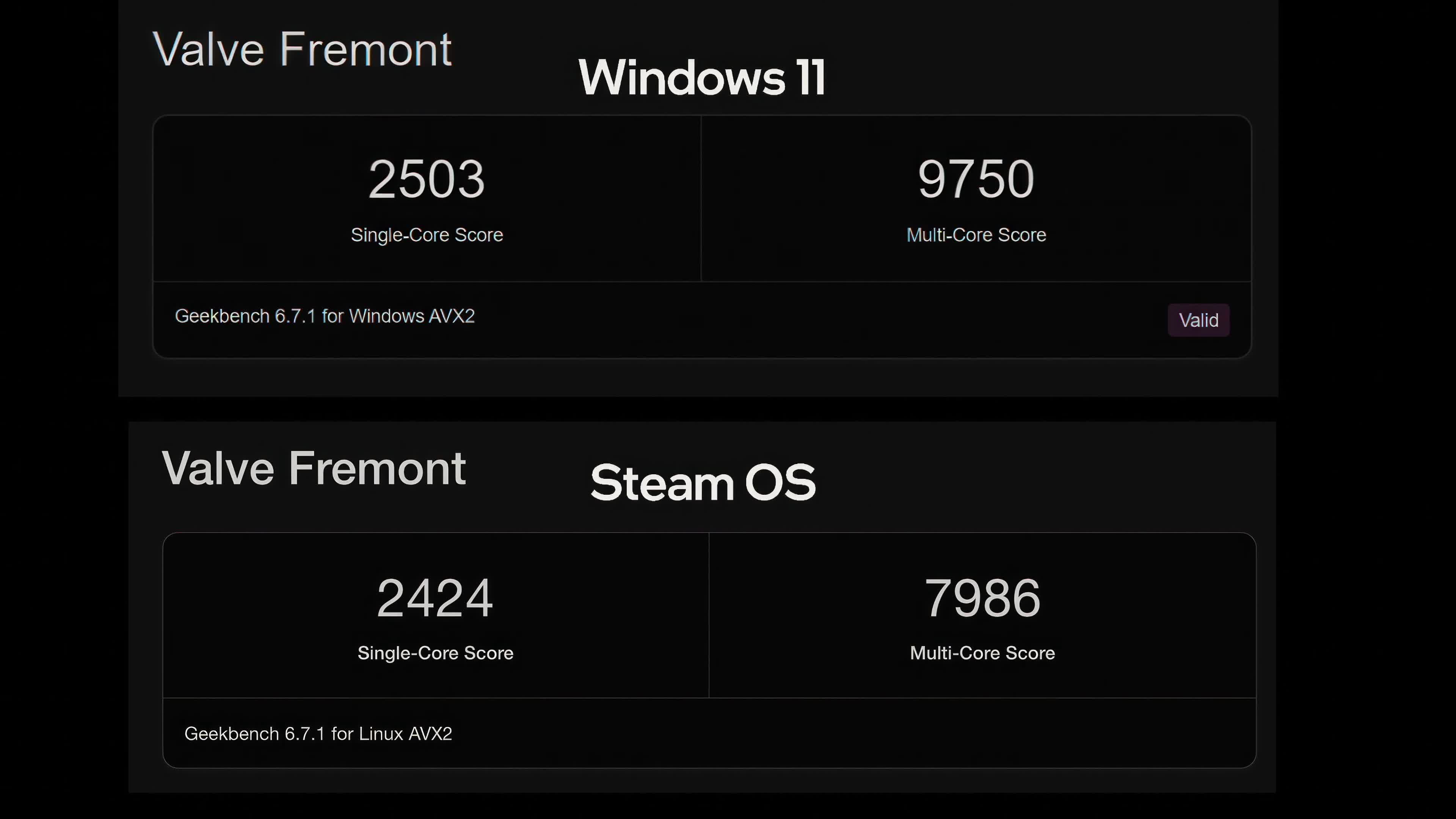
Synthetic tests show a clearer divide, but the gains matter more for creators than for pure gaming. Geekbench 6 reports approximately 22 percent higher multi-core performance under Windows 11, while single-core performance remains virtually unchanged. One quotable takeaway is that “Windows 11 delivers a 22% Geekbench 6 multi-core uplift over SteamOS on the same Steam Machine hardware, while gaming framerates remain within a few frames.” Cinebench places Valve’s custom Zen 4 CPU just behind Apple’s M1 series, but its six-core design holds back multi-core scores compared to chips like the Ryzen 7 5800X and M1 Ultra. That same limitation appears against the Ryzen 5 5600X despite the matching core count. Native 4K in demanding titles like Cyberpunk 2077 remains beyond the practical capabilities of this hardware, with both OS configurations averaging roughly 20 frames per second. For Steam Machine performance, that means the CPU is adequate for living-room gaming, but not a workstation-class workhorse.
| Metric | SteamOS | Windows 11 |
|---|---|---|
| Geekbench 6 single-core | Similar performance | Similar performance |
| Geekbench 6 multi-core | Baseline score | ≈22% higher than SteamOS |
| Cyberpunk 2077 4K average | ≈20 FPS (native 4K not practical) | ≈20 FPS (native 4K not practical) |
| Game framerate gap (most tests) | Within a few FPS of Windows | Within a few FPS of SteamOS |
Drivers, ecosystems, and day-to-day experience
Valve’s official Windows drivers turn the Steam Machine into a capable Windows gaming PC while keeping full hardware support and stability. Those drivers were released so owners could install software and games that SteamOS does not yet support, including multiplayer titles with strict anti-cheat systems. On Windows 11, you gain broader software compatibility, access to the wider Windows gaming ecosystem, and stronger results in several productivity workloads. SteamOS, by contrast, focuses on a polished, console-style interface that works well without a mouse or keyboard. Valve aims to enhance SteamOS’s features and performance with constant patches, but for now its straightforward user experience remains its primary advantage over Windows 11. The crucial point is that Valve views the Steam Machine as a PC, and these Windows drivers reinforce that philosophy by letting you choose the operating system that best matches your mix of gaming, desktop work, and media use.
Which OS should you choose for your Steam Machine?
Because SteamOS vs Windows gaming performance is so close, your choice should follow your use cases rather than benchmark bragging rights. The benchmarks show that operating system choice depends largely on intended use, rather than producing a clear winner. Windows 11 is now a practical alternative for those wanting desktop software compatibility and access to traditional PC gaming ecosystems. SteamOS remains equally compelling if you care about gaming first and prefer Valve’s streamlined, console-like environment. The shared weaknesses matter too: native 4K in heavy games like Cyberpunk 2077 is not realistic on this hardware under either OS, with both averaging around 20 FPS. For most players, the smartest approach is to decide whether a couch-friendly interface or maximum software flexibility matters more, knowing your Steam Machine performance will stay within a few frames either way.
- Buy the Steam Machine with SteamOS if you want a console-style interface that launches games without a mouse or keyboard and keeps things simple on the TV.
- Skip the Steam Machine with SteamOS if you depend on multiplayer titles with strict anti-cheat systems that are not yet supported on Linux-based platforms.
- Buy the Steam Machine with Windows 11 if you need broader software compatibility, desktop apps, and access to the wider Windows gaming ecosystem alongside near-identical framerates.
- Skip the Steam Machine with Windows 11 if you dislike managing Windows updates and would rather treat the box like a plug-and-play console focused purely on games.
- Buy the Steam Machine with either OS if you are satisfied with 1080p or 1440p gaming and accept that native 4K in heavy titles like Cyberpunk will average around 20 FPS regardless of OS.