

What Copilot PC Insights Is—and Why It Matters
Copilot PC Insights is an experimental Windows 11 diagnostics feature that lets users ask Microsoft’s AI assistant natural-language questions about hardware, system resource monitoring, and performance issues, then receive answers based on real-time data from their own PC rather than generic troubleshooting advice.
Microsoft is testing PC Insights inside the Copilot on Windows app as an opt-in tool that hooks into Windows APIs to read CPU, RAM, GPU, storage, battery health, antivirus status, and connected peripherals. The pitch is simple: instead of digging through Task Manager, Device Manager, and three different Settings pages, you ask, “What is my current CPU usage?” or “Do I have enough space for a 100 GB game?” and Copilot replies in plain English. In theory, this is AI performance troubleshooting done right—Windows 11 diagnostics that are tailored to your machine instead of being copy‑pasted from a help article.
The catch is that Copilot itself runs as an Edge-based web app on your desktop, and Microsoft’s own documentation admits it may not always provide complete or accurate information during this testing phase. For a feature that lives or dies on trust, that disclaimer is hard to ignore.

How PC Insights Changes Windows 11 Diagnostics
PC Insights’ real shift is convenience: it replaces a maze of utilities with questions you can type in plain language. Microsoft says the idea is to let customers “conversationally ask Copilot questions about their Windows PC and receive clear responses based on their device’s state without having to dig through system settings.”
Once granted permission, Copilot can read current CPU, RAM, and GPU use, total and free storage, and even break down folder sizes in locations like Downloads and Documents. It can report on USB devices, printers, webcams, external drives, network adapters, Bluetooth and Wi‑Fi status, BIOS details, and battery condition. When you ask why your system is slow, it can point to high memory usage, low free disk capacity, or sustained CPU or GPU load instead of telling you to “restart your PC.”
Today, though, PC Insights is read‑only. It cannot close runaway processes, delete files, or change settings; it only explains what is happening. According to one report, “it’s not difficult to envision” Microsoft eventually letting Copilot apply certain fixes once it has flagged issues. For now, think of it as a talkative overlay on top of Task Manager, not a replacement for hands‑on troubleshooting.

The Bloat Problem: When the Doctor Makes the Patient Sicker
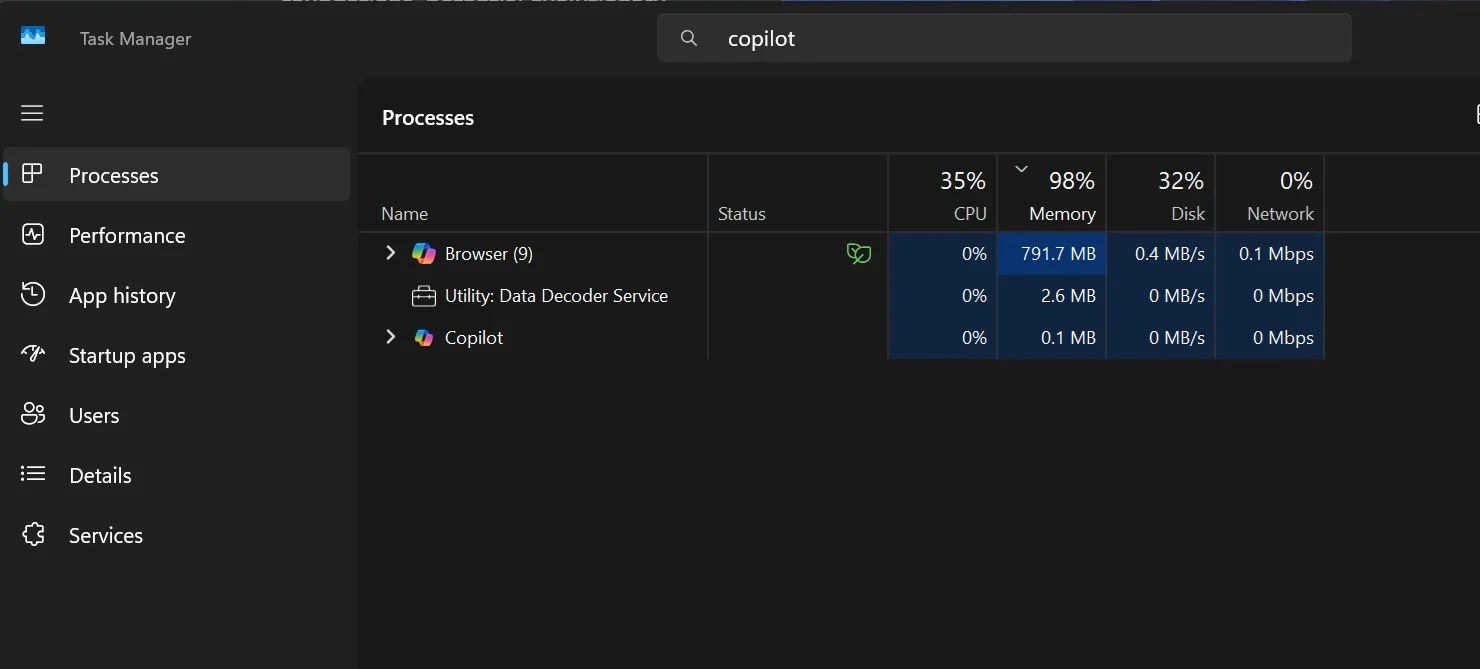
If PC Insights were a lightweight shell over existing tools, it would be easy to recommend. The problem is that Copilot itself is heavy. It runs as an Edge-based web application, and independent testing reported the Copilot app consuming 791.7 MB of RAM at idle, suggesting it can reach up to 1 GB of system RAM usage in total. For a feature that is supposed to help diagnose slow machines, that is an uncomfortable number.
Microsoft has talked about making Windows 11 “leaner and meaner” in response to complaints that it feels bloated compared with other operating systems. Yet here we are with an AI assistant that can become one of the more memory‑intensive background processes on the system. One frustrated user summed it up perfectly: “Oh hey it’s like Task Manager except instead of lightweight and authoritative, it’s bloated and might be lying to me.”
That quote captures the core tension. System tools need to be trusted, precise, and as close to invisible as possible. Copilot PC Insights, in its current form, risks being the opposite: a visible, chatty, resource‑hungry process that might contribute to the very performance problems it claims to analyze.
Trust, Privacy, and the Limits of AI Performance Troubleshooting
Even if you can tolerate the extra RAM usage, there’s the question of reliability. Microsoft openly states that Copilot “may not always provide complete or accurate information,” especially while PC Insights is still experimental. With AI already known for hallucinating, that warning should make anyone think twice before treating Copilot’s answers as authoritative Windows 11 diagnostics.
To its credit, Microsoft is being careful about access. PC Insights is optional and must be explicitly enabled; each time Copilot wants to query system or file information, it asks for permission, and users can allow access once or always. By default, it sees only metadata like folder sizes unless you grant broader rights. That design calms some privacy fears but does not erase them—handing an AI assistant a live feed of your system telemetry is a big trust leap.
This feature also arrives at a moment when Microsoft is under pressure to improve Windows 11’s performance and consistency. PC Insights is clearly part of that push: instead of shuffling users off to Task Manager or Resource Monitor, the assistant can give contextual answers based on live telemetry. The risk is that users start treating those answers as gospel when, by Microsoft’s own admission, they are still a work in progress.

Should You Use Copilot PC Insights Today?
PC Insights is not widely available yet; it is an opt-in, experimental feature rolling out gradually through the Copilot app, and there is no announced general availability date. Microsoft says it will improve the experience over time and may add new capabilities, including potential future actions to fix problems Copilot identifies.
If you are curious about AI performance troubleshooting and your machine has plenty of RAM, PC Insights could be worth enabling as a secondary view into your system. It can surface which processes and components are affecting performance and answer questions like “Is my antivirus running?” or “What graphics card do I have?” without forcing you through nested menus.
If you care more about predictable, low‑overhead system resource monitoring, though, this is not the tool to bet on yet. Traditional utilities remain more reliable and far lighter. Until Copilot proves it can deliver accurate, timely Windows 11 diagnostics without eating a gigabyte of memory or hedging every answer with caveats, PC Insights is best treated as an interesting experiment rather than a new standard.




