
Windows Search Update: From Ad Box to Actual Tool
The latest Windows Search update is a redesign of the built‑in search box in Windows 11 that removes clutter, strips promotional content, prioritizes local results, and adds clearer privacy controls so the feature behaves more like a fast app and file launcher than an advertising surface or web news feed.
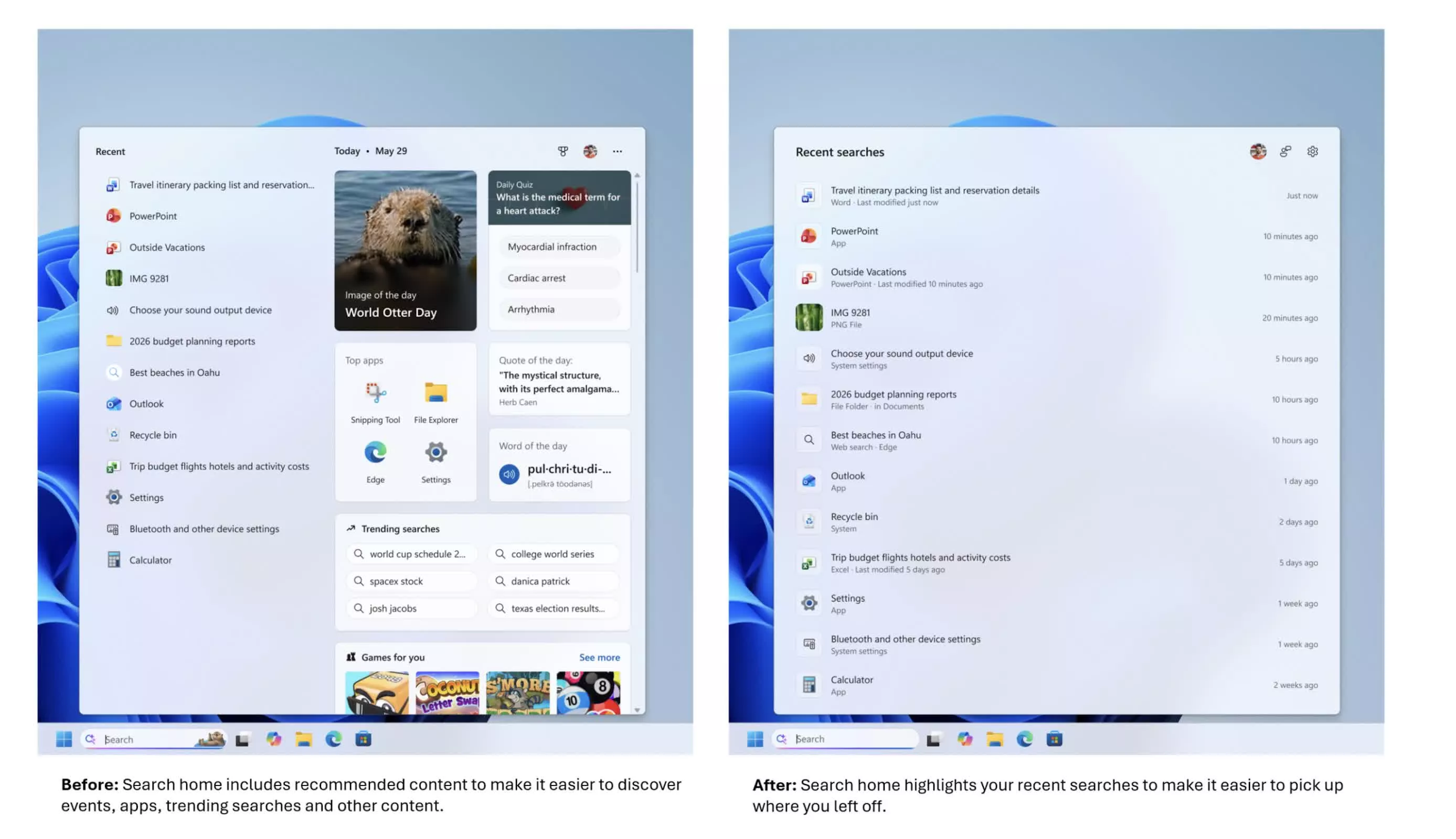
Microsoft is rolling out a redesigned Windows Search interface to Windows Insiders in the Experimental channel, after enabling it in build 26300.8697 that introduced Windows 11 26H2. This is not a cosmetic tweak; it is the cleanup power users have been asking for. Open Search without typing anything and the home screen now looks clean and distraction‑free, focusing on recent searches instead of tiles asking what day it is, quizzes, search trends, or recommended games. For a feature that had become a billboard for MSN‑style content, the message is clear: Search is going back to doing its job.

Goodbye MSN Tiles and Search Ads, Hello Local‑First Results
The headline change is brutal in the best way: the MSN clutter is gone. The image of the day, daily quizzes, trending searches, top apps, and “Games for you” that padded out the panel have been removed, replaced by your own recent searches so you can pick up where you left off. This Windows Search cleanup finally ends the charade of treating a utility box like an entertainment hub.
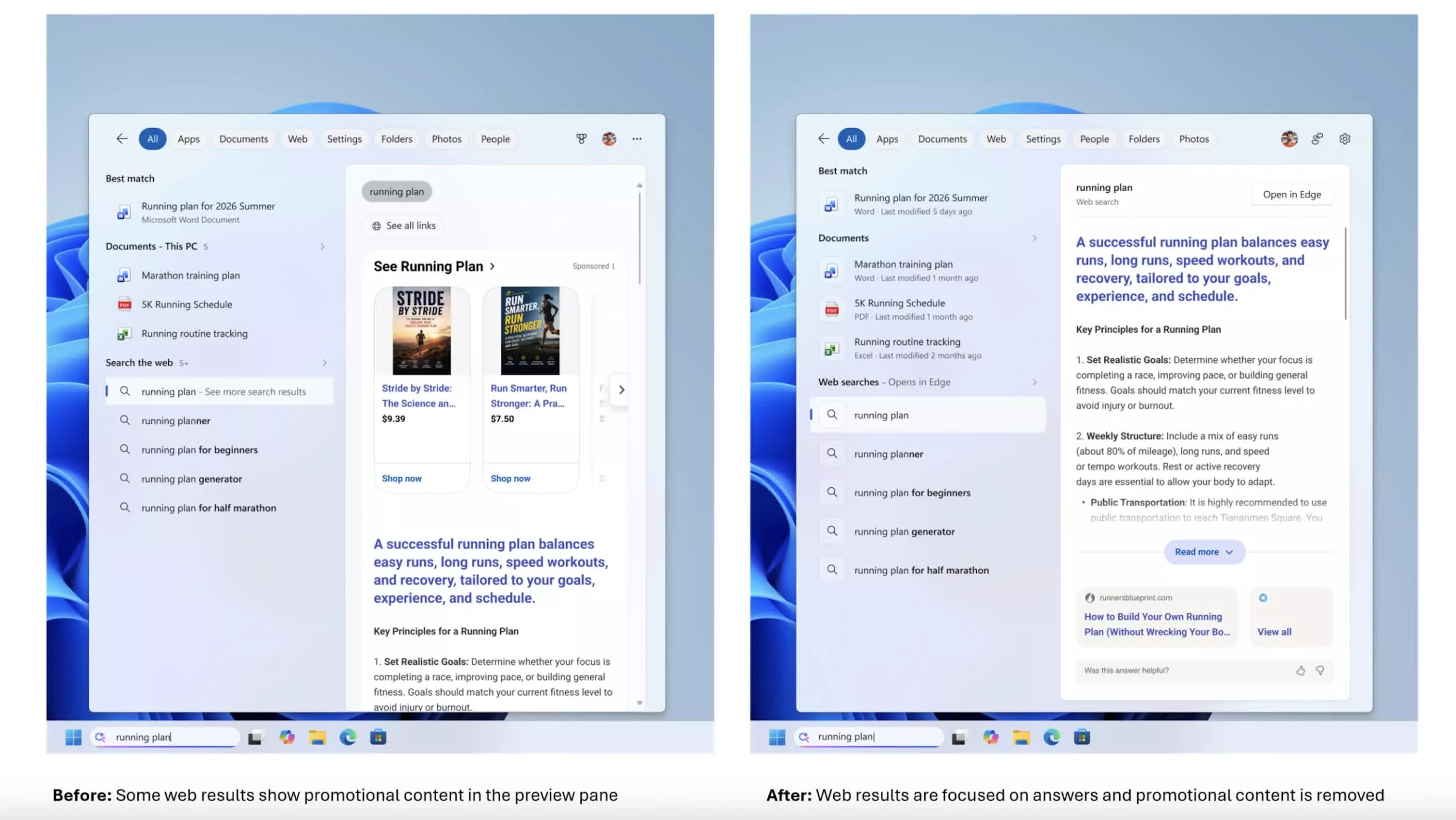
Web results also lose their sponsored shopping tiles and other promotional cards, so previews now jump straight to the relevant answer with source links, instead of opening with product‑related suggestions. In practical terms, Microsoft has decided to remove search ads from this surface, turning Search back into a tool instead of a funnel. Results are labeled more clearly as an app, setting, file, web result, or Microsoft Store suggestion, so you know what a click will do before you commit. For everyday use, that clarity matters more than any animated tile ever did.
Toggles, Typos, and a Local‑First Philosophy
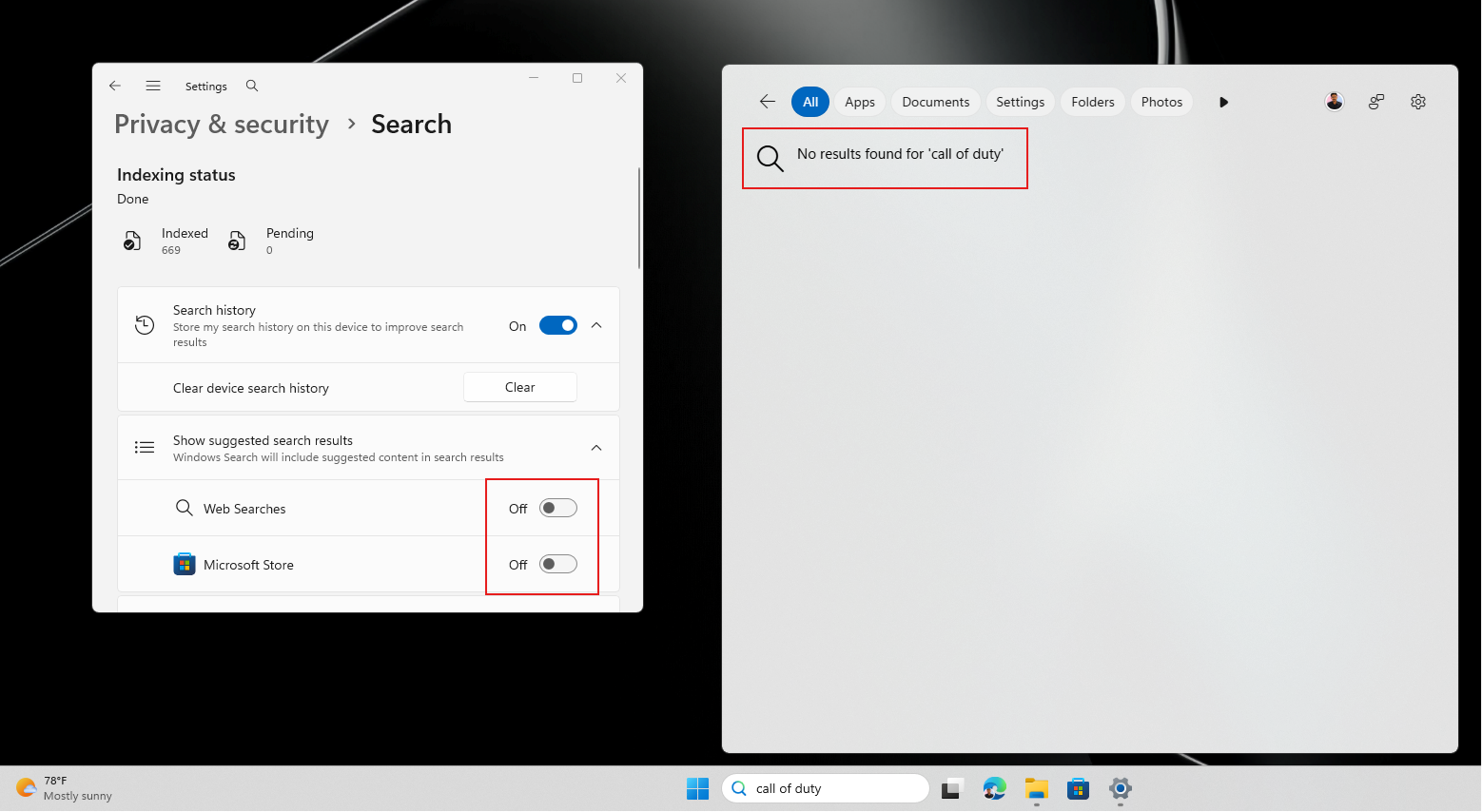
The real power shift is control. A new “Show suggested search results” section under Settings > Privacy & Security > Search exposes two separate toggles: one for Web Searches, one for Microsoft Store suggestions. You can keep Store suggestions while disabling Bing, or switch both off for a strictly local launcher that focuses on apps, files, and settings. When those are disabled, queries with no local match now return nothing instead of trying to push you online, which is the right outcome for a privacy‑minded workflow.
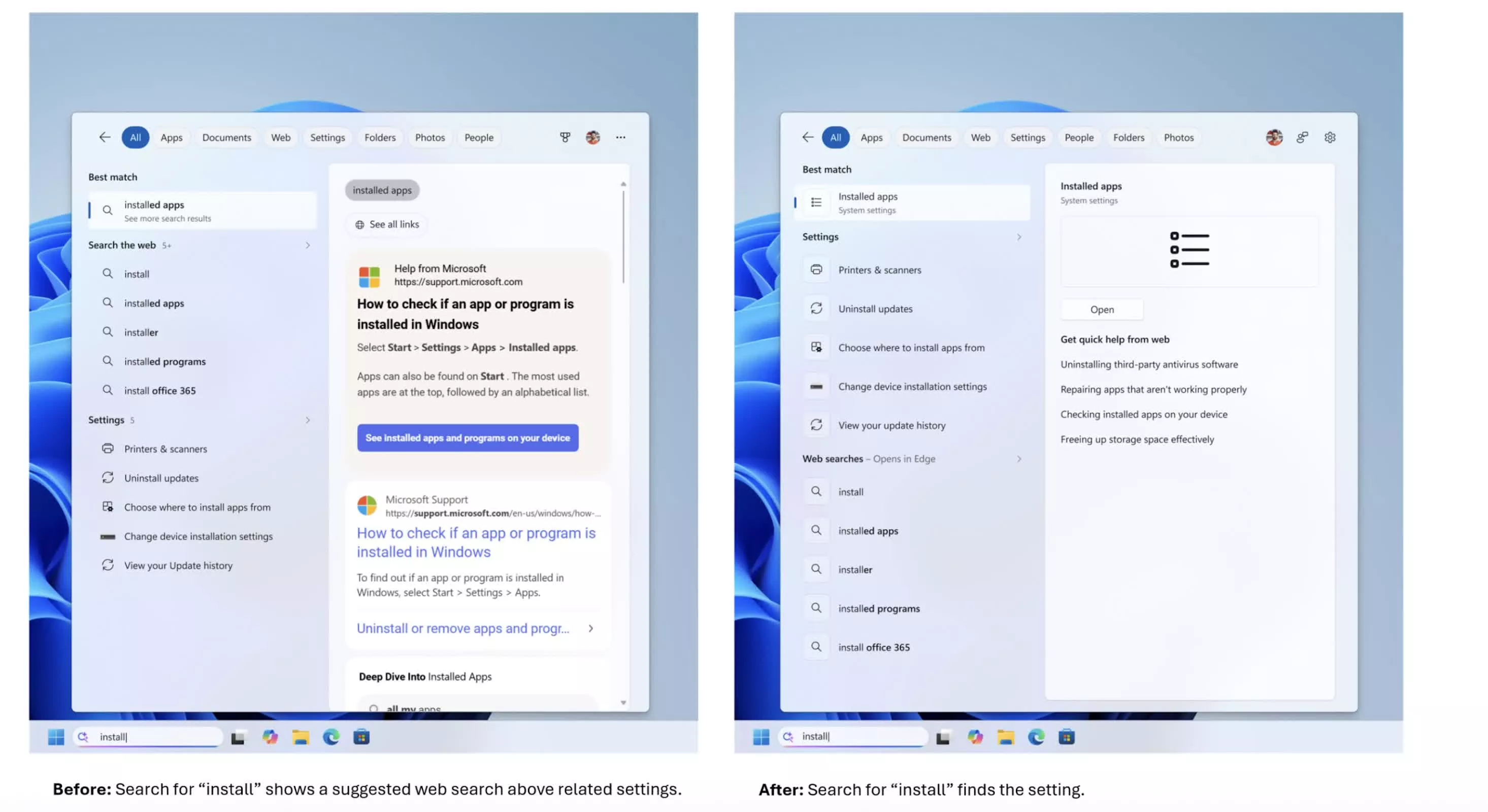
Behind the interface, ranking has been rebalanced so local matches win. Apps, settings, and files are more likely to appear ahead of web or Store entries when they are a strong fit. Search now handles typos, extra letters, and partial words, meaning “utlook,” “pwerp,” or “tskm” still surface Outlook, PowerPoint, and Task Manager. This makes Search feel like an intelligent launcher at last instead of a brittle Bing front‑end. According to one hands‑on report, “a Search box that just finds your stuff should not feel like a breakthrough, yet here we are.”
Speed and File Search: Small Details, Big Quality‑of‑Life Gains
This Windows 11 search redesign is not only about aesthetics and ads; it also tackles performance and readability. Since the June 2026 update, Search now returns file results after two characters instead of three, and substring matching lets you pull up a compound name like StartMenuComparisonMay by typing “menu” or “may”. That sounds minor, but for people who live in long directory trees or use short codes in filenames, those keystrokes add up.
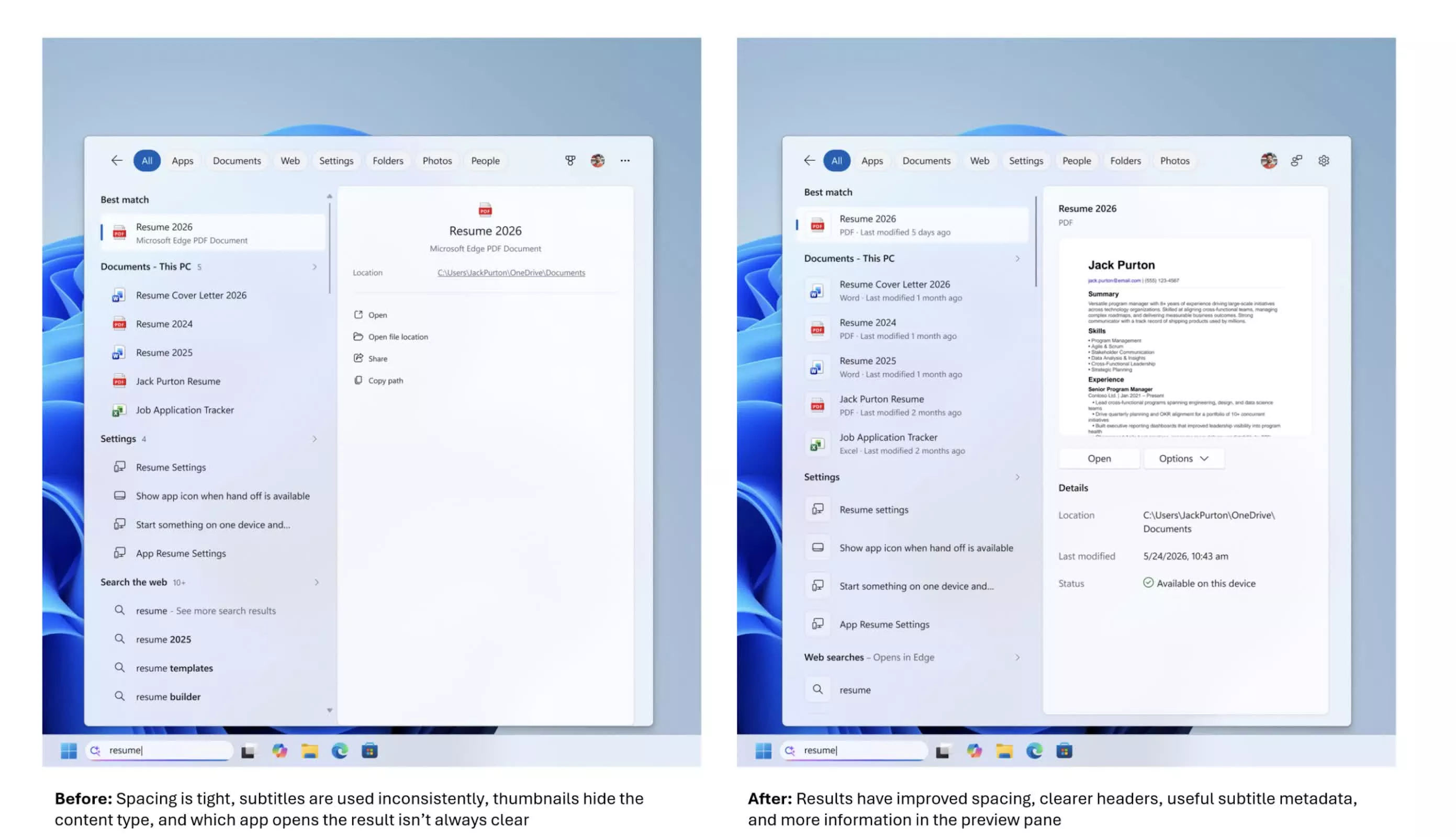
Results themselves breathe more. Spacing is looser, headers are cleaner, and subtitles display useful metadata such as file type and last‑modified date, while a preview pane shows thumbnails, file paths, and quick actions for documents. Core system objects like This PC and Recycle Bin now appear more reliably rather than being buried under tiles and trivia. Together, these changes make Search feel like part of the operating system again, not something bolted on to promote services.
Who Gets It Now, and Why This Redesign Matters
Right now, this Windows Search update is limited to Windows Insiders in the Experimental channel through a Controlled Feature Rollout, so not everyone there will see it immediately and regular PCs do not have it yet. Microsoft has not given a date for broader release, but the feature is already live in working builds, and wider availability is expected after performance data and feedback are collected.
This is the most significant Windows Search redesign in months because it reverses the direction of travel. For years, every change seemed to add more Bing, more tiles, and more noise. Now the trend is reversed: fewer distractions, fewer promotions, more control, and more respect for local data. For users who have wanted a faster, cleaner, and more predictable search experience, this cleanup is overdue—and it sets a higher bar for how much commercial clutter belongs in core parts of an operating system.