

Why Ultra-Compact Workstations Are Worth Taking Seriously
A portable workstation setup built around ultra-compact devices is a working environment that replaces traditional laptops with pocket computers, foldable phones, and small accessories to handle writing, email, and light editing while maximizing mobility for remote work travel. The key takeaway is simple: these mobile work devices are no longer gimmicks; they can be credible primary tools if you accept their limits and design your workflow around them. A pocket-sized computer that looks like a miniature laptop is purpose-built for distraction-free writing and coding, focusing on a handful of tasks instead of trying to be a full desktop replacement. On the other side, a foldable phone can stand on its own and stay connected everywhere, letting you sit down and write in places where a traditional laptop feels oversized or impossible to use, like economy seats on a plane.
Choosing the Right Devices for a Minimalist Portable Workstation Setup
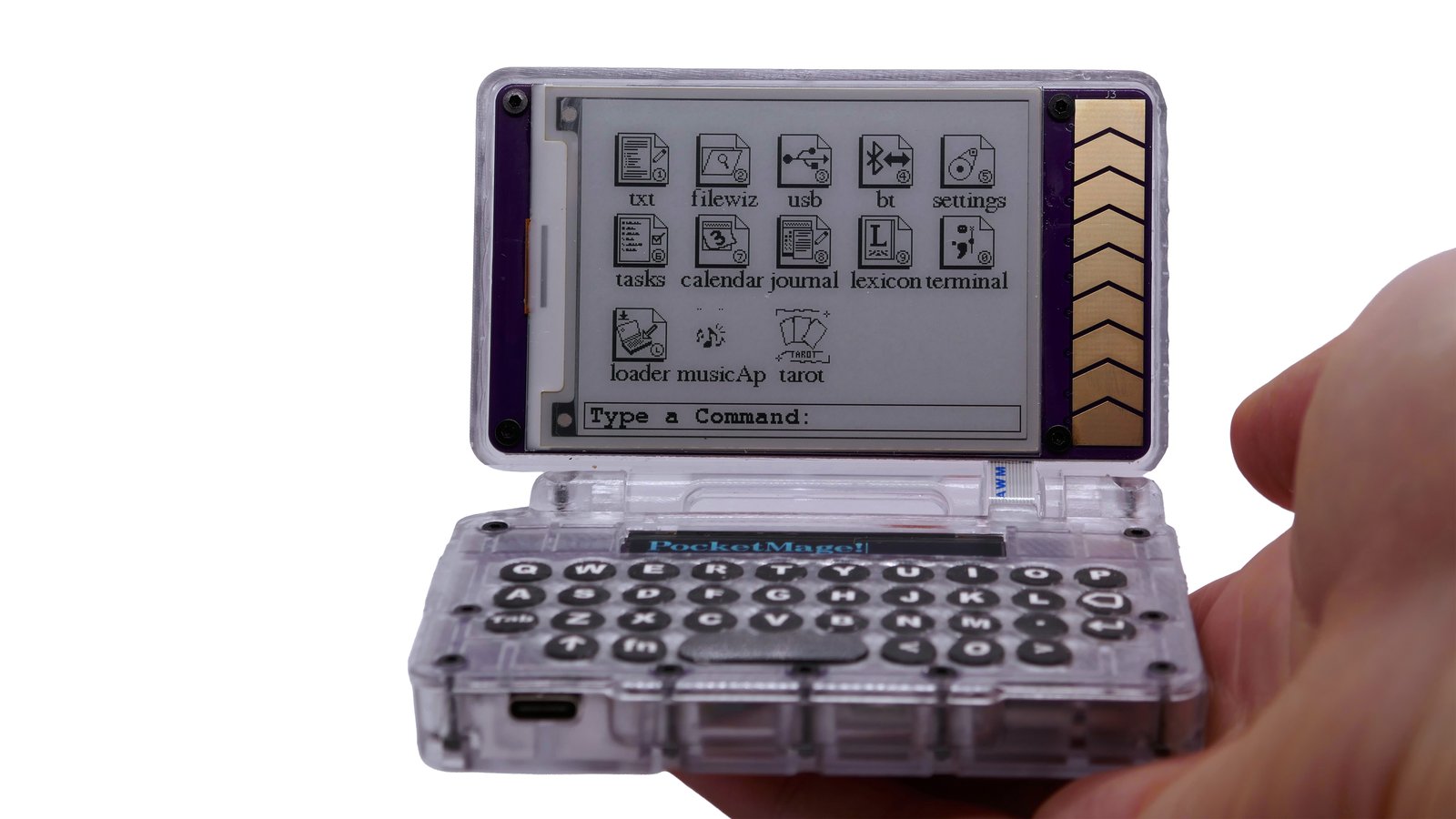
The heart of any minimalist portable workstation setup is the mix of hardware you choose, and this is where intent matters more than specs. If your core tasks are writing, note-taking, email, or light programming, a distraction-free pocket computer is compelling: it uses an ESP32-S3 chip with Wi‑Fi, Bluetooth, e‑paper plus OLED dual displays, a physical QWERTY keyboard, microSD, USB‑C, and promises up to seven days of battery life. That is an ultra compact laptop in spirit, designed to do fewer things better. Pair that with a foldable phone whose cover screen lets it stand in tent mode, and you gain continuous connectivity and the ability to work almost anywhere, without needing a separate stand or even a desk. The point is not raw power but matching each mobile work device to a specific slice of your workflow, instead of expecting one pocket-sized gadget to do everything.
| Spec | Pocket Computer | Foldable Phone Kit |
|---|---|---|
| Primary role | Focused writing/coding without distractions | Connected writing, email, and on-the-go tasks |
| Input | Built-in physical QWERTY keyboard | Magnetic Power Keyboard + foldable mouse |
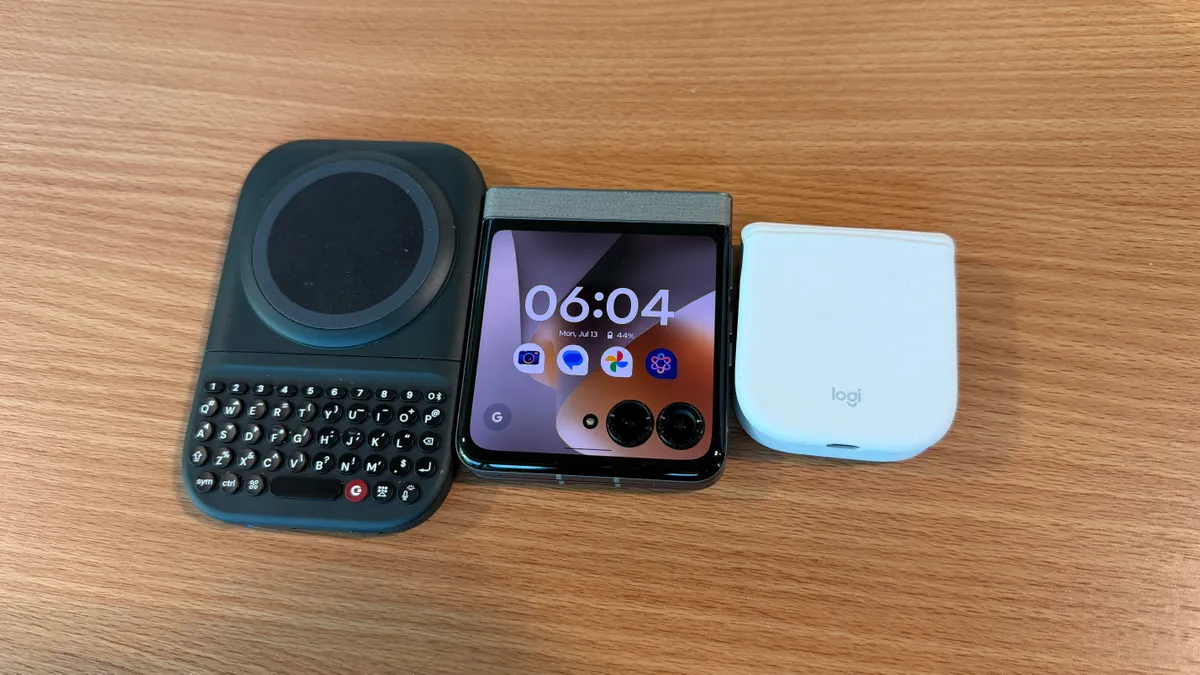
| Display | 3.1-inch e-paper + secondary OLED | 3.6-inch cover screen in tent mode |
Ergonomics and Accessories: Turning Tiny Screens into Usable Desks
If you ignore ergonomics, ultra-compact setups will exhaust you faster than they save you time. The reason the pocket computer idea works is the physical keyboard: most portable gadgets lean on touchscreens, but a full QWERTY layout immediately feels more natural for sustained writing. The same logic applies to phones. A magnetic power keyboard that slides down from behind the phone when needed gives you a thumb-friendly typing experience and even tops up your battery while you work, instead of forcing you to peck at glass. Foldable phones that can stand in tent mode also remove the need for extra stands, reducing gear while keeping the screen at a usable angle. In other words, the accessories are not optional toys; they are what turn mobile work devices into functional tools for multi-hour sessions instead of short bursts of input.
Battery Life, Portability Trade-Offs, and Where Laptops Still Win
Ultra-compact setups are a constant negotiation between battery life, comfort, and portability. A pocket computer that can run for up to seven days on a charge is ideal for throwing into a bag and ignoring the charger for a while. A foldable phone with a silicone carbon battery that lasts longer and charges faster than comparable lithium‑ion models pushes the same idea further, especially for continuous connectivity on the road. But every component adds weight, and every compromise shows up in real-world use. One journalist assembled a kit of phone, magnetic keyboard, and foldable mouse that weighed 480 grams total, allowing work even in economy seats and without a backpack. According to that account, “Bottom line, I'll take a laptop over this setup,” because while the tiny rig proved it was possible to write an entire article, it highlighted that serious multitasking and more demanding editing still feel better on a traditional machine.
What Minimalist Setups Handle Well—and When to Reach for a Laptop
Real-world testing shows that ultra-compact workstations shine in short, focused bursts, not in sprawling, complex sessions. A pocket-sized computer geared toward writing, journaling, and programming with a built-in terminal is perfect for text-heavy tasks and simple code edits on the go. A foldable-phone kit works for drafting articles, answering email, and taking notes wherever you can physically sit down, thanks to always-on connectivity. But this comes with a candid admission: using a tiny workstation for everything is “mostly a stupid idea,” because these devices are compromises, and extended, multi-window work remains more comfortable on a laptop. The practical approach is to treat ultra compact laptops and mobile work devices as complements, not replacements. Use them to reclaim places where a full laptop is awkward—planes, queues, tight cafes—then move back to a traditional machine when your task list expands and your neck starts to complain.





