
Siri, Not the Interface, Is iPadOS 27’s Real Revolution
iPadOS 27 is a tablet operating system update that focuses on performance improvements and a major Siri upgrade, turning the voice assistant into a more contextual, device-aware tool that can search across apps, understand stored content, and support richer tablet voice commands for everyday and professional workflows. Apple unveiled iPadOS 27 during its WWDC 2026 event, released a developer beta shortly after, and has now opened a public beta so users can try the software ahead of its expected fall release. This isn’t the long-promised dream of turning the iPad into a full Mac replacement, but it is the most meaningful change in how you use an iPad in years: you finally talk to it like a working companion instead of a gimmicky phone assistant.
The iPadOS 27 Siri Upgrade: From Gimmick to Working Memory
The iPadOS 27 Siri upgrade matters because it stops treating the assistant as a toy and starts treating it as a second brain. Siri now lives in a dedicated app, complete with a history of past chat sessions that you can revisit when you forget what you were searching for or drafting. After a one-time device indexing process, the assistant gains deep hooks into Messages, Files, Photos, Mail, Calendar, Notes and other Apple apps, giving it the contextual awareness that most generic AI services lack. Siri can write drafts, analyze documents, and describe content, but the practical power is its search awareness: you can ask what a friend emailed you last week or when you last talked about a specific topic, and it surfaces the relevant conversations and documents from across your iPad. On a tablet that often serves as a catch-all notebook and media library, that turns Siri into an extension of your memory instead of a noisy notification reader.
Tablet Voice Commands That Finally Fit How People Use iPads
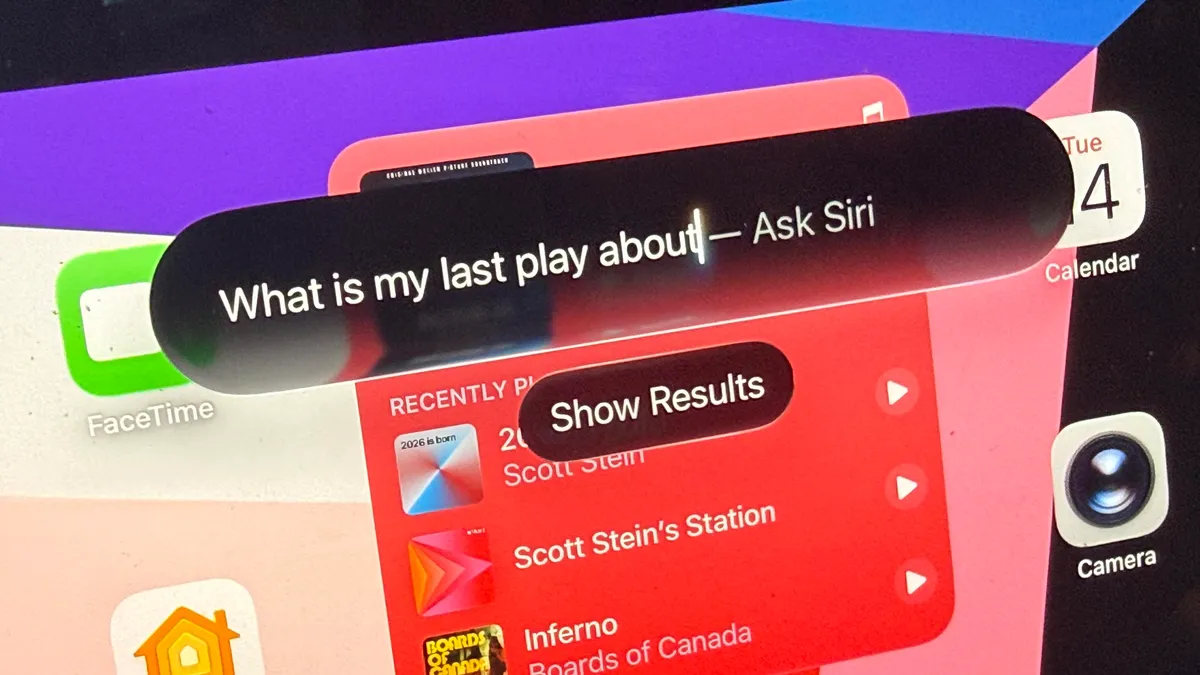
Voice on tablets has always felt like a bolt-on feature copied from phones, but iPadOS 27 begins to fix that. Siri can be summoned by voice as usual, or through a new pull-down gesture from the top edge of the screen that creates a teardrop-shaped search bar, ready for your query. That small visual change signals a bigger shift: voice commands are now tied tightly to iPad workflows. Using Siri to search large repositories of Apple-stored content such as Notes becomes "a huge eye-opener," because the assistant taps into the way many people use Notes as short-term memory. Instead of manually digging through folders and messages with a keyboard, tablet voice commands can surface drafts, emails and conversations that were essentially lost. On a device that straddles phone-like and laptop-like roles, that matters more than another cosmetic multitasking tweak; you feel the iPad responding to how you actually work on a touchscreen slab.
Performance Improvements and Productivity Gains Worth the Beta Risk
The headline story is Siri, but iPadOS 27 also brings performance improvements that make the new assistant’s constant indexing and searching practical on modern hardware. Much of Apple’s recent developer event focused on Apple Intelligence, promising that upgraded Siri, enhanced image editing tools, and new Safari features would change how people use their iPads for everyday tasks and creative work. In practice, the smarter Siri turns into a genuine iPad productivity feature: instead of treating Notes as a dumping ground, you can ask the assistant to surface ideas, analyze attached documents, or draft responses based on your stored content. This nudges the iPad away from casual couch device and toward a serious tablet workstation. The trade-off, especially in the public beta, is occasional bugs and crashes, which is why backing up your device before installing is strongly recommended. If you rely on your iPad professionally, testing the beta is tempting but should be done on hardware you can afford to experiment with.
Who Can Try It Now, and Why It Signals the iPad’s Future
The iPadOS 27 public beta is available today on a wide range of tablets: iPad Pro models from the M4 and later, the 12.9‑inch from 4th generation and later, and the 11‑inch from 2nd generation and later; iPad Air models including the 13‑inch M2, the 11‑inch M2, M3 and M4, and the 4th generation and later; iPad A16 and 9th generation and later; and iPad mini A17 Pro and 6th generation and later. The final release is expected sometime in fall 2026, likely around September if Apple follows past patterns. You can enable beta updates through Settings > General > Software Update to install the public beta on a compatible device. What’s notable isn’t a flashy interface overhaul but the direction: the iPad is embracing its role as the place where phone and computer habits meet, and the new Siri is tailored to that in‑between space. If Apple keeps deepening this device-aware intelligence, upgrading will be less about cosmetic features and more about owning a tablet that remembers and understands how you work.