

Google Maps vs Waze: The Bottom Line
Google Maps vs Waze is a head-to-head traffic app comparison between two free, Google-owned navigation tools that help drivers and other travelers plan routes, respond to congestion, and discover local places while differing in map depth, driver-focused extras, and overall feature complexity. For most commuters, Google Maps is the better default: its detailed maps, broad transport coverage, and AI-powered exploration tools make it a strong all-rounder for driving, transit, and trip planning. Waze, by contrast, is tuned almost entirely for drivers, with community-powered alerts and a playful interface that feels built for people who spend a lot of time in the car and care about on-the-road incident reporting more than neighborhood discovery. If you treat your phone as a general travel companion, Maps wins; if your priority is car-centric navigation with personality, Waze will feel more at home.
Platforms, Offline Use, and Map Detail
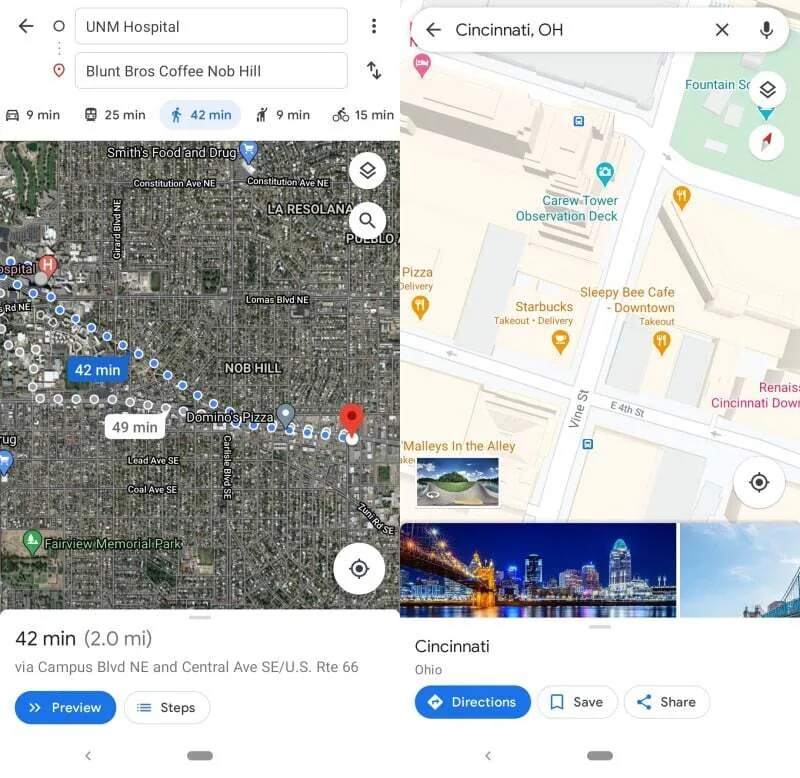
Both Google Maps and Waze are owned by Google and are free to use on Android and iOS phones. Google Maps also works smoothly in a browser, which makes it easy to check routes from a desktop before you leave. Crucially, Google Maps lets you download areas for offline turn-by-turn navigation, turning your phone into a modern equivalent of a printed map when your data signal is weak. Waze can be opened in a browser too, but it does not allow full map downloads and needs an online connection at the start of a trip for its richer alerts to work; if the signal drops mid-journey, you lose incident information like accidents and road closures. For map detail, Google Maps shows satellite imagery, terrain, 3D topography, Street View and even Immersive Navigation for highly visual route previews, while Waze keeps a flatter, cleaner look that is easier to read but far less informative when you are heading into unfamiliar areas.
| Spec | Google Maps | Waze |
|---|---|---|
| Price | Free to use | Free to use |
| Mobile platforms | Android and iOS | Android and iOS |
| Browser access | Full web version with rich maps | Browser version, simpler maps |
| Offline navigation | Supports downloadable offline maps | No downloadable maps; must start trips online |
| Map detail | Satellite, terrain, 3D features, Street View, Immersive Navigation | Flat, simplified maps focused on driving |
Traffic Awareness and Driver Experience
When you focus on traffic-aware navigation, both apps help drivers adapt to conditions, but they do it with very different priorities. Waze is built first and foremost for people behind the wheel: it stores frequent routes, offers routing options for vehicle types including electric cars and motorcycles, and taps a community of users who report accidents, bad weather, and other hazards in real time. Some of these driver-focused features are so strong that Google Maps incorporates Waze data into its own driving routes, so car users still benefit from that crowd wisdom even if they never install Waze. However, Google Maps spreads its attention across other transport modes as well, providing better guidance for buses, subways, and walking. Waze’s colorful, cartoony design, big icons, built-in audio player, and celebrity voice packs create a more playful, in-your-face driving companion, while a new “less chatty” mode tones down the banter for people who want fewer voice prompts.
AI Features, Exploration Tools, and Everyday Use
Over time, Google Maps has grown from a navigation app into a discovery platform you can use for travel planning and neighborhood exploration. It lets you add multiple stops to a trip, scan your current area for points of interest, and integrate with services like grocery delivery or ride-hailing. AI plays a central role: the Gemini-powered Ask Maps feature allows you to speak natural questions and see summarized reviews, photos, and suggested itineraries tailored to what you are asking about, from coffee shops to full vacations. An AR-powered Lens mode uses your camera to identify nearby shops, restaurants, or landmarks and answer follow-up questions. Waze’s extra features stay closer to the driving experience, emphasizing sound and on-road reporting. You can stream music through connected services, choose a celebrity navigation voice, and use Conversational Reporting powered by Gemini to describe an incident verbally and have it shared with other drivers. According to one reviewer, “since I’m not big on the gimmicky stuff and prefer a more feature-rich interface… I’m giving the edge to Google Maps.”
Buy if / Skip if
- Buy the Google Maps if you want one app that covers driving, public transit, and local exploration with rich, detailed maps.
- Skip the Google Maps if you find its many layers and AI tools distracting when your main goal is straightforward, incident-focused driving.
- Buy the Waze if you spend most of your time in the car and care about community-powered alerts, playful design, and driver-centric features.
- Skip the Waze if you often travel offline, need downloadable maps, or want deep information about businesses, buildings, and non-driving routes.





