
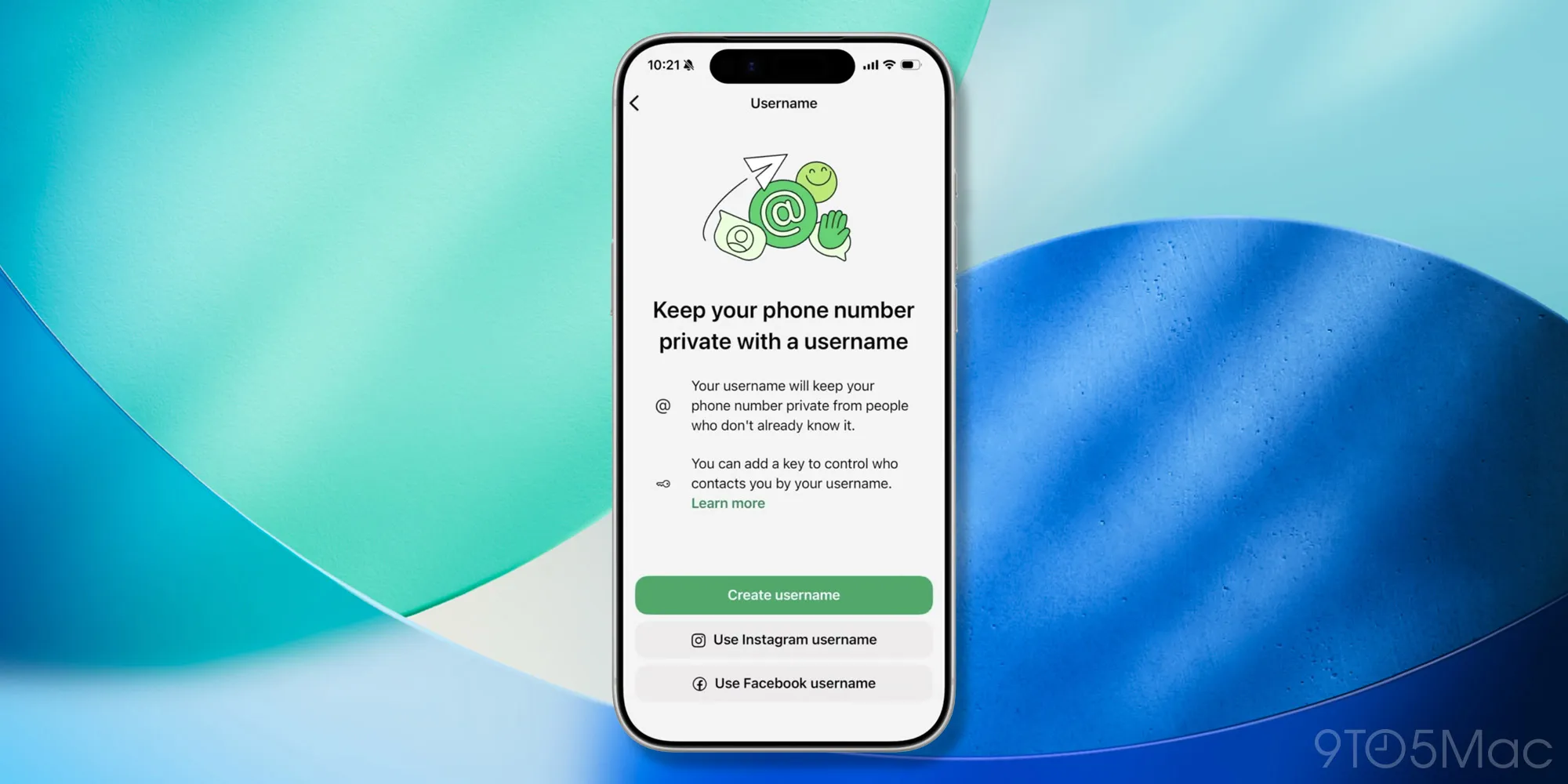

What WhatsApp usernames are and why they matter for privacy
A WhatsApp username is a unique handle linked to your account that lets people contact you without seeing your phone number, adding an optional privacy layer so new contacts, followers, or customers can reach you through WhatsApp while your actual number stays hidden in many interactions and your phone number remains the underlying login for the service. This is ideal if you share contact details in public places, connect with people you do not fully know yet, or run a small business and want to keep your personal number out of sight. The one big caveat: usernames complement your number, they do not replace it—WhatsApp still requires a phone number to create and access your account, and existing conversations will continue to show phone numbers where they are already known.
Right now, the username feature is rolling out in stages to a limited number of iPhone and Android users on both stable and beta app versions, so you may or may not see it yet when you open the app. If you do have access, you can claim a username and decide how people use it to reach you, including whether they need extra information such as a PIN or key before the first chat. Think of it as adding a controlled doorway to your WhatsApp: you still live at the same address (your number), but you now have a nameplate on the door that visitors can use instead of the house number.

Before you start: prerequisites and privacy trade-offs
To use WhatsApp usernames, you must already have an active WhatsApp account tied to a phone number, because a phone number is required to create and access your WhatsApp account and remains part of your existing chats. The username is an extra contact method, not a replacement for your number, so people who already have your number will still see it in their chat list. New contacts who only know your username, on the other hand, will see that username instead of your number when they start a conversation. This is the main way the feature helps you hide your phone number on WhatsApp from strangers and casual contacts.
There are a couple of important privacy and security settings to consider. When you claim a username under Settings > Account > Username, you can decide whether anyone who knows it can contact you directly, or whether new contacts must also enter a four-digit PIN in addition to the username to reach you. For users who want additional privacy beyond that, WhatsApp may also offer a username key, meaning new contacts need both the username and the associated key to start a conversation for the first time, unless you already share a group, have exchanged messages, or use other contact methods such as QR codes. If you choose a username that matches an account you already use on other Meta platforms, you may be asked to prove that you control that account to curb impersonation and scam risk.
Step-by-step: how to set up and activate your WhatsApp username
Once your account is eligible, setting up a WhatsApp username is straightforward, but the sequence matters because of how the feature is being rolled out in phases. Follow these steps in order to check availability, reserve your handle, and lock in the privacy level that works for you. This ordered process helps you avoid confusion about whether your username is active or still in the reservation stage and prevents surprises like your number reappearing in chats after you remove a username.
- Open WhatsApp and look for a banner at the top of your Chats tab that says your username feature is ready, or that usernames are coming soon; if you do not see the banner, tap Settings, then go to the Username section in your profile to check your status.
- If your account is eligible, tap Settings > Account > Username to reserve or claim a unique handle; choose a name that suits you or your brand, and be prepared to verify matching usernames that you use on other Meta platforms so WhatsApp can reduce impersonation.
- While still in the Username screen, choose how people can contact you: allow anyone who knows your username to message you, or require them to enter a four-digit PIN in addition to the username before they can reach you for the first time.
- If the app offers a username key for extra privacy, decide whether to enable it so that new contacts need both your username and its key to start a conversation, unless you already share a group, have each other’s numbers, or have messaged before.
- Wait for WhatsApp to activate your reserved username; when it becomes active, you will see a banner in the Chats tab confirming the feature is ready and the Username section will state that your username is active rather than showing a "usernames are coming soon" message.
- Once active, manage your username from the profile section in Settings: you can edit the handle if you want a new name, or remove it entirely, knowing that deleting a username causes WhatsApp to display your phone number in existing conversations instead.
- Share your username with new people or businesses as another WhatsApp contact method so they can reach you without your phone number, and remind close friends or colleagues that they will still see your number if they already had it before usernames were introduced.
According to WABetaInfo, users whose usernames are active "will see a banner in the Chats tab confirming that the feature is ready to use," and some reserved usernames might not become active until later in the rollout. If you edit or change your username, existing contacts are informed via a system message in the chat and in the Member changes section of group information, which means people are never left guessing about who is behind a new handle. This automatic transparency makes it safer to experiment with different usernames while keeping your identity clear for people you already know.
What changes once your username is active
When your username moves from "reserved" to active, WhatsApp starts treating it as a live contact method that can be shared and used in searches. You will see a banner at the top of your chat list letting you know your username is active and can now be shared with new contacts, which is your cue to start including it on business cards, social profiles, or anywhere you previously hesitated to place your phone number. Eligible users can look up other accounts by entering the exact username in the contact search field, but there is no public directory and partial searches do not work, so your handle is easier for people who know it and harder to guess for strangers.
In practical terms, this gives you more flexible WhatsApp contact methods: people can start conversations using your username, your number, or a QR code, and you can decide which option you share depending on how much privacy you want for that interaction. Phone numbers continue to remain part of your account and existing chats, so the people who already have your number still see it, while those who find you through a username alone do not see your number. If you ever delete your username, WhatsApp falls back to showing your phone number in those conversations again, which is the main gotcha to remember: removing the username does not remove you from chats, it removes the privacy layer you added.
Takeaway: is setting up a WhatsApp username worth it?
If you care about WhatsApp privacy features and you often share your contact details in public or semi-public spaces, setting up a username is worth the few minutes it takes. It gives you a way to hide your phone number on WhatsApp from people who do not need to know it, while keeping all your existing chats and number-based contacts working as before. The main things to watch for are rollout timing—your username might stay in reservation mode until later—and the effect of deleting a username, which causes your phone number to reappear in existing conversations. As long as you are comfortable with those trade-offs and you pick sensible options for PINs or keys, a WhatsApp username becomes a handy extra layer rather than a complicated new identity system.





