
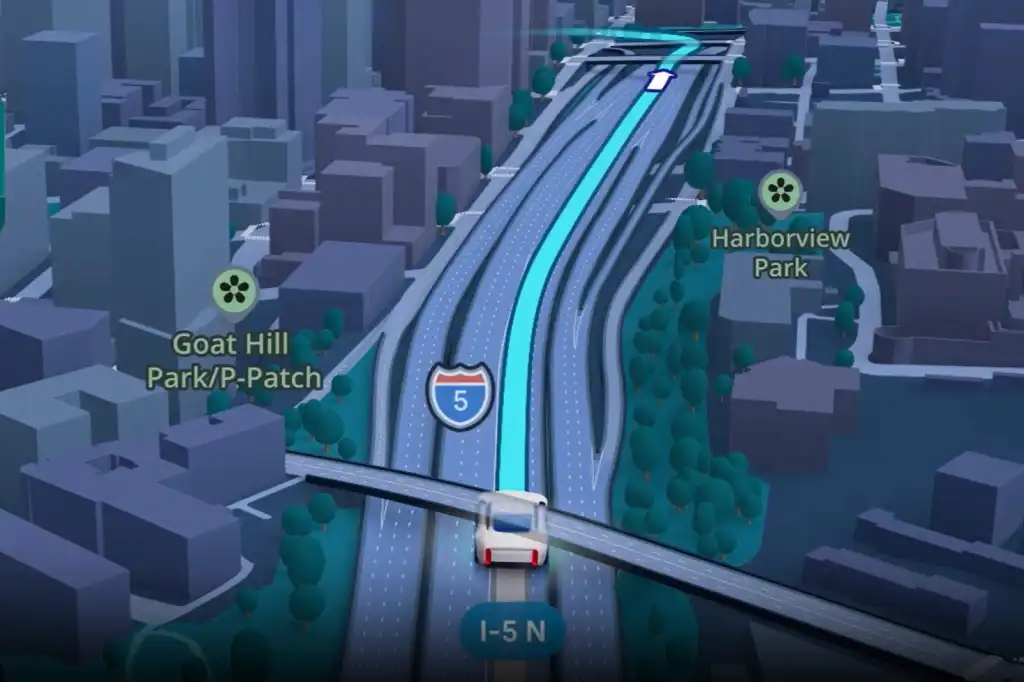

Immersive Navigation: Turn-by-Turn Directions That Match the Real World
Google Maps’ Immersive Navigation is a redesigned 3D navigation experience that renders realistic buildings, lanes, and terrain so drivers can match what they see on the screen with what they see through the windshield, making turn-by-turn directions clearer and easier to follow than traditional flat maps.
The core takeaway is blunt: Google Maps 3D navigation finally fixes the single biggest problem with directions—the awkward moment when the blue line says “turn” but the street ahead looks nothing like the screen. Instead of a flat overhead map, Maps now shifts into a fully 3D view with lane markings, translucent true-to-life building outlines, and individual trees along your route. Buildings and terrain look more realistic, which means your next turn no longer feels like a guess. This is not just a visual flourish; it is a deliberate attempt to make navigation feel intuitive, so you can glance, recognize a landmark, and commit to a turn with confidence.
How Google Maps Now Sees the World Like You Do
Immersive Navigation is powered by a new imaging pipeline that uses a recent Gemini integration to analyze Street View and aerial photos, then reconstructs accurate depictions of landmarks, medians, and buildings along your route. The result is not a stylized game world but a simplified, readable version of the city that still respects its real geometry. Buildings are shown exactly where they stand, with real outlines, and rendered translucent so you can “see through” them to upcoming roads and turns.
On screen, this translates into a layered 3D view: lanes painted clearly on the roadway, overpasses and underpasses differentiated so you can tell whether you should take an elevated ramp or stay at ground level, and tree markers that give a quick sense of how dense or open an area is. According to one early hands-on report, this is Maps’ biggest visual upgrade in a decade. In other words, Google did not add a few token skyscrapers; it rebuilt navigation around realistic landmarks navigation so the map finally respects the complexity of real streets.
From Confusing Arrows to Intuitive Landmarks
Traditional turn-by-turn directions force drivers to translate abstract arrows, distances, and street names into the messy reality of fast traffic, quick turns, and layered junctions. That mental math breaks down when you face two exits in quick succession or a tangle of ramps. If you have ever driven through a dense city, you know how often consecutive quick turns can catch you off guard; with the new view, you can anticipate those turns instead of reacting late.
Immersive Navigation attacks this pain point head-on. Because buildings are mapped where they are, with real outlines, your screen view finally matches the skyline in front of you. Highlighted entrances and parking lots make it easier to understand where you will actually pull in, even when that does not match the formal address. Lane markings tell you early which lane to choose for a ramp or exit, and the camera now zooms in on tricky freeway splits or multi-lane junctions to give a clear visual of where you belong. The net effect: fewer surprise maneuvers, fewer last-second swerves, and a calmer trip through places that used to feel hostile to outsiders.
Immersive View on Android Auto and Beyond
This new Immersive View on Android Auto is not about new buttons or features; it is about the biggest visual update Google Maps has seen in more than a decade. The 3D view during navigation looks impressive enough that some critics worry it could distract drivers, but the detail—individual lanes, traffic lights, stop signs, and an improved zoom function—exists to make routes easier to plan, not to decorate your dashboard.
Immersive Navigation is being enabled on the server side and is rolling out slowly. It has been arriving on Android phones over recent months and is now hitting Android Auto, with a broader rollout planned across supported platforms. That gradual approach matters: this is not a niche experiment, but a redesign meant to become the default experience for everyday commuting and long trips alike. Once it reaches your car, Immersive View Android Auto turns the once-static map into a dynamic model of the world you are driving through, and there is no graceful way back to the old flat view.
Voice That Talks Like a Passenger, Not a Robot
Visuals alone cannot fix confusing turn-by-turn directions; timing and wording matter just as much. Google has updated voice guidance to sound more conversational, closer to the way a helpful passenger would guide you. Instead of the vague “In one mile, exit right,” which can be hard to match to a real sign, you might hear, “Go past this exit and take the next one for South Tryon Street.” Another report echoes this change, noting that instructions are now more natural, like a person saying, “Drive past this exit and take the next exit for XY.”
This shift is more than tone; it changes how you process information. By anchoring instructions to visible cues—an exit you will pass, a name you can read—the guidance pairs with the realistic landmarks navigation on screen. You hear about the exit you see, then watch the 3D map zoom as your ramp comes into view. Detailed information on suggested alternative routes further supports decisions, such as choosing a less congested path even when it is slightly longer. Put together, smarter voice cues and richer visuals narrow the gap between what Maps says and what your eyes see, which is exactly where most navigation mistakes begin.
The Future of Getting Unlost
Immersive Navigation shows what happens when mapping stops pretending roads exist on a flat plane. By giving drivers a realistic 3D model—with clear lanes, true building outlines, and transparent structures that reveal upcoming turns—Google Maps 3D navigation turns every complex interchange into something you can read at a glance. It takes the spots where Maps used to struggle and makes them much easier to understand, especially in dense urban grids where fast back-to-back turns were once a recipe for missed exits.
This is not a bonus mode for tech enthusiasts; it is the logical evolution of turn-by-turn directions. For years, the map on your phone asked you to think like a satellite. Now, Immersive View Android Auto invites the map to think like a driver. As the rollout continues, the real test will be simple: does this new view make you feel less lost, more often? If the early experience holds, the answer is yes—and going back to flat lines and floating arrows will feel like driving with half the information missing.





