
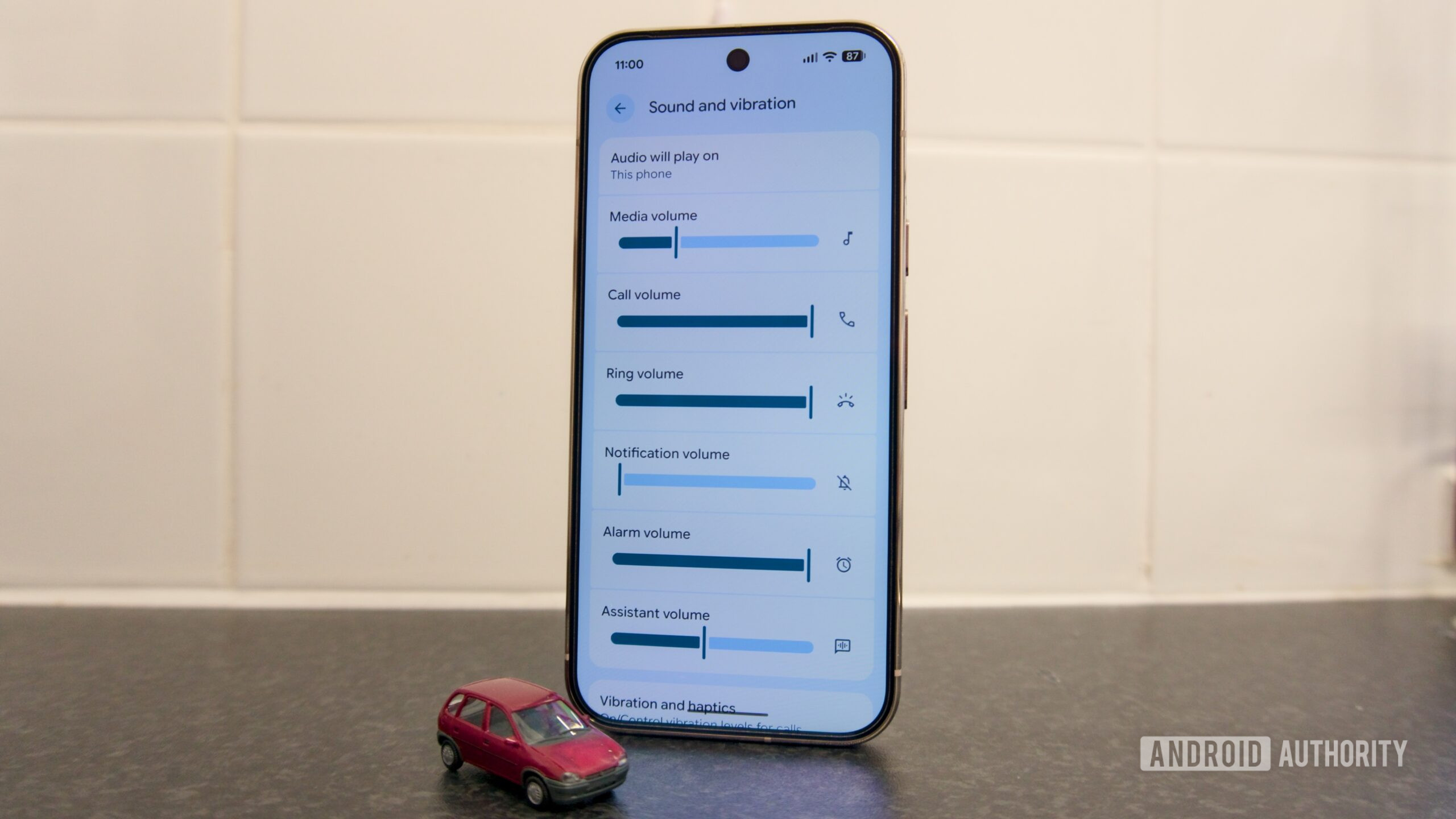

Pixel audio controls are about to grow up
Google’s new Pixel audio controls are a set of upcoming software changes to the Sounds app that add separate volume sliders for ringtones, alarms, and notifications, plus a dedicated area for customizable vibration patterns, so users can preview and adjust how their phone sounds and feels without diving through multiple system menus.
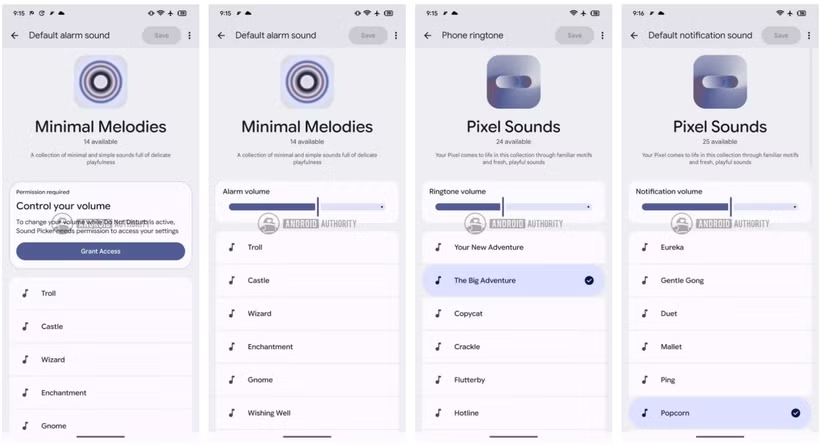
The headline change is simple but overdue: Google is adding volume sliders to the ringtone, alarm, and notification pickers on Pixel phones. Instead of selecting a tone and then hunting through Settings to fix its loudness, you’ll be able to hear the sound and tweak its level in the same place. That turns ringtone volume settings from a clumsy afterthought into part of the selection process. An unreleased build of the Pixel 11 firmware already shows these sliders on the selection screens for phone ringtones, notification sounds, and alarms, and they were working without hacks. If you care about notification customization, this is the kind of subtle control that changes how you use your phone day to day.
Granular ringtone volume settings beat one-size-fits-all sound
Today, picking a new ringtone on a Pixel means choosing a sound first and worrying about its volume somewhere else in system settings. That split makes no sense: your ears decide whether a tone works, so the volume should be adjustable at the exact moment you are listening to it. According to an unreleased build of the Sounds app included with Pixel 11 firmware, that is precisely what Google is changing.
On the new screens, each category—ringtones, notification sounds, and alarms—gets its own dedicated slider. This is Pixel audio controls done right: you preview the sound, drag the slider, and instantly hear whether that gentle chime is loud enough to wake you or subtle enough for meetings. It turns what used to be guesswork into a deliberate decision. For anyone who has silenced alarms by accident or been blasted by an over‑loud notification, this is the small, powerful fix that should have shipped years ago.
Vibration patterns: the silent side of notification customization
Sound is only half the story. New strings in the same unreleased build point to a "Vibrations" tab featuring a collection of familiar patterns and new, personal vibrations. This suggests Google is finally taking the haptic side of notifications seriously. The idea is not new: a vibration selector for Pixel ringtones and notification alerts first appeared back in January 2025, allowing the sound and vibration pattern to be chosen separately.
Those earlier efforts never made it to users, which made it easy to assume the project was abandoned. Its reappearance in this newer build strongly hints that Google still wants vibration customization to be part of the Pixel experience. Done well, this could be transformative. Distinct vibration patterns for calls, alarms, and alerts would let you identify what is happening without even seeing the screen. In a noisy room or on a muted phone, vibration patterns matter more than any ringtone, and Pixel has been lagging there for too long.
A promising APK teardown—without guarantees
There is a catch: all of this comes from work‑in‑progress code. The new sliders and vibration options were spotted in an unreleased build found in Pixel 11 firmware, not in a public release. An APK teardown helps predict features that may arrive in the future based on in‑development code, but there is always a risk that these changes never ship.
The same caution applies to every discovery here. While it is exciting to see new Pixel audio controls emerge in the code, these are works in progress, and there is a chance we may see them in the next update—or not at all. That uncertainty is frustrating, especially when the changes are as sensible as integrated volume sliders and richer vibration patterns. Google’s track record is clear: some experiments land; some disappear. Until Pixel 11 launches and updates roll out, this remains a promising preview, not a promise.
Why Google should ship these Pixel audio controls
Despite the uncertainty, Google should treat these audio and vibration upgrades as non‑negotiable for upcoming Pixels. Volume sliders on the selection screens for phone ringtones, notification sounds, and alarms eliminate an unnecessary step that has annoyed users for years. A dedicated Vibrations tab with familiar patterns and new, personal vibrations would fix the long‑standing gap in haptic customization.
Pixel phones already compete on smart features; it is time they also lead on the basics. Notification customization, thoughtful ringtone volume settings, and recognizable vibration patterns do not sell devices on their own, but they shape how people experience those devices every minute. If Google wants Pixel 11’s software to stand out as much as its hardware colors—which we already know are coming in a range of options—then shipping these granular controls should be an easy decision. Anything less would feel like a missed opportunity to fix problems Pixel users have been living with for far too long.





