

Immersive Navigation: A 3D redesign that fixes long‑standing driver pain points
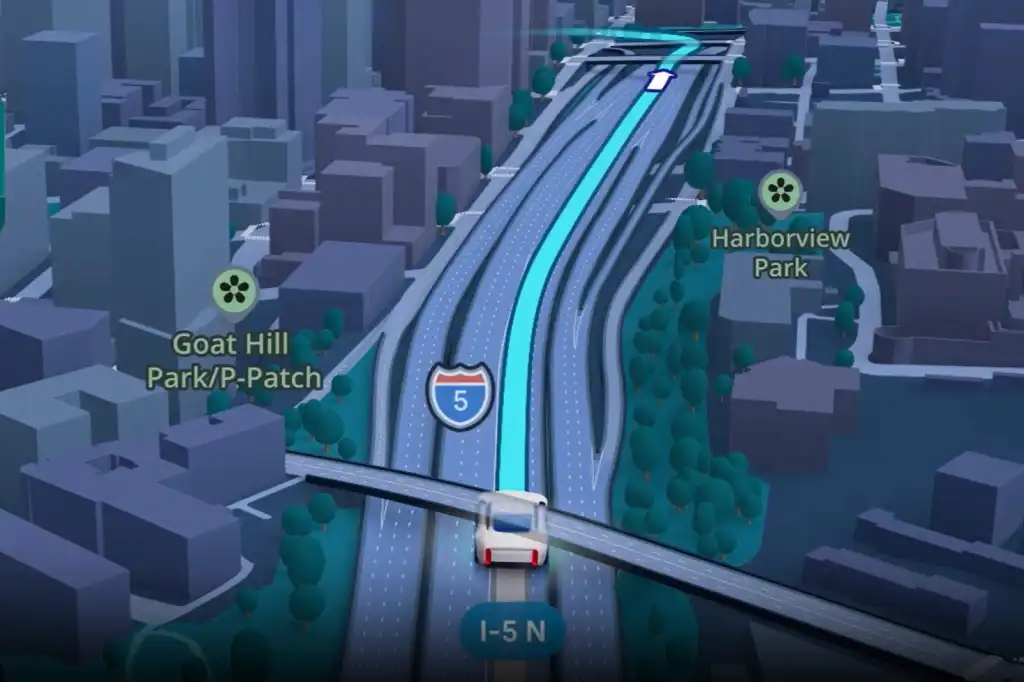
Google Maps’ Immersive Navigation is a redesigned 3D guidance mode that replaces flat maps with realistic buildings, lanes, and terrain so drivers can match what they see on the screen to what they see through the windshield, reducing confusion at complex junctions and near destinations by mirroring the real world more closely.
This is not a cosmetic tweak; it is the biggest visual overhaul of Google Maps’ navigation in a decade, and it matters most on Android Auto where bad visuals translate directly into missed turns and unsafe last‑second lane changes. The new Google Maps 3D navigation view replaces the familiar flat or lightly tilted map with a rich Android Auto immersive view: buildings rendered with realistic height and depth, clear lane markings, and visual cues for bridges and overpasses. Critics worry such detail could distract drivers, but for anyone who has squinted at a 2D map while guessing which of three ramps to take, this update is long overdue.
How realistic 3D maps cut confusion where drivers need help most
The core win of Immersive Navigation is not wow factor; it is clarity under pressure. Drivers report that the new version makes it “a lot easier to get your bearings” because buildings appear where they are in real life, with accurate outlines that stay translucent so the road ahead remains visible. This tackles one of the biggest complaints about older Google Maps 3D navigation: fancy shapes without functional guidance.
By using Street View and aerial imagery, Google now depicts landmarks, medians, and structures with lifelike depth. That extra realism pays off when quick turns stack up in dense areas; you can see successive turns coming and prepare instead of reacting late. Overpasses and underpasses are clearly differentiated, and markings show whether your route goes above or below another road. Near the end of a trip, Street View previews help you recognise the exact destination and entrance in the real world, rather than dumping you at a vague pin on the map. In short, the new real‑time navigation features finally tie digital directions to physical surroundings.
A safer visual hierarchy: lanes, zoom, and voice that act like a co‑driver
The redesign also tackles something most navigation app updates ignore: visual hierarchy. Instead of cluttered icons fighting for attention, Immersive Navigation emphasises what matters when you are moving at speed. Individual lanes appear in many urban areas, helping you choose the right position early for exits and turns. Traffic lights and stop signs are clearly visible, supporting better timing at intersections. The camera now zooms in automatically on tricky freeway splits and multi‑lane junctions, making routes easier to understand at a glance and giving “clear visuals on where you need to be.”
Audio guidance receives the same treatment. Instead of abstract distances like “In one mile, exit right,” the app now speaks more like a passenger: “Go past this exit and take the next one for South Tryon Street.” That conversational style matches the on‑screen realism, lowering the mental load of translating numbers into real‑world moves. Add in richer information on alternative routes—including when a longer detour might mean less traffic—and Android Auto’s immersive view shifts from passive map to active driving assistant. The end result is fewer last‑second decisions, which is another way of saying fewer mistakes and safer drives.
Rollout reality: why you might not see it yet—and what to expect
If your dashboard has not changed yet, the reason is simple: Google is moving cautiously. Immersive Navigation was announced four months ago as the “biggest transformation of the (Maps) navigation experience in over a decade,” and it is being enabled via server‑side switches rather than a single app download. That means some drivers wake up to a transformed interface overnight, while others with identical hardware wait days or weeks.
According to Google, the updated Maps “is rolling out slowly.” It has been appearing on Android phones for months and is now reaching Android Auto dashboards, with availability expanding over time. The new experience is also launching on Android, iOS, and other in‑car platforms, initially in limited markets before reaching more regions over the coming weeks and months. No specific Android Auto version is required, since the upgrade is not tied to a new release of the app. For now, the only practical advice is to keep your apps updated and be patient. When it lands, you will know; the difference between old Maps and Android Auto’s immersive view is obvious the first time those 3D buildings rise up on screen.
The bottom line: less guesswork, more confidence for everyday drivers
Immersive Navigation is the rare navigation app update that feels designed from the driver’s seat, not a design lab. It takes Google’s long push toward richer visuals and turns it into practical gains: clearer landmarks, earlier warnings about complex turns, and directions that sound like a human instead of a distance readout. Although some will argue that more detail risks distraction, the experience so far suggests the opposite: when the on‑screen world finally matches the outside world, there is less guesswork and fewer panicked glances at the map.
For Android Auto users who have spent years wrestling with flat maps and vague prompts, the verdict is straightforward. Google Maps 3D navigation in Android Auto’s immersive view is not a novelty; it is a long‑needed fix to how drivers understand their route in real time. As the rollout widens, this should become the new baseline for in‑car guidance—one that makes navigation easier to understand at a glance and turns Google’s map from something you fight with into something you trust.





