

Why Gemini Voice Commands Belong in Your Daily Drive
Gemini voice commands in Android Auto are conversational instructions that use generative AI to control music, connected apps, and other supported tasks through your car’s interface without relying on pre-made lists or strict phrasing. Instead of manually curating every playlist or jumping between apps on your phone, Gemini turns natural requests into actions that fit the context of your drive.
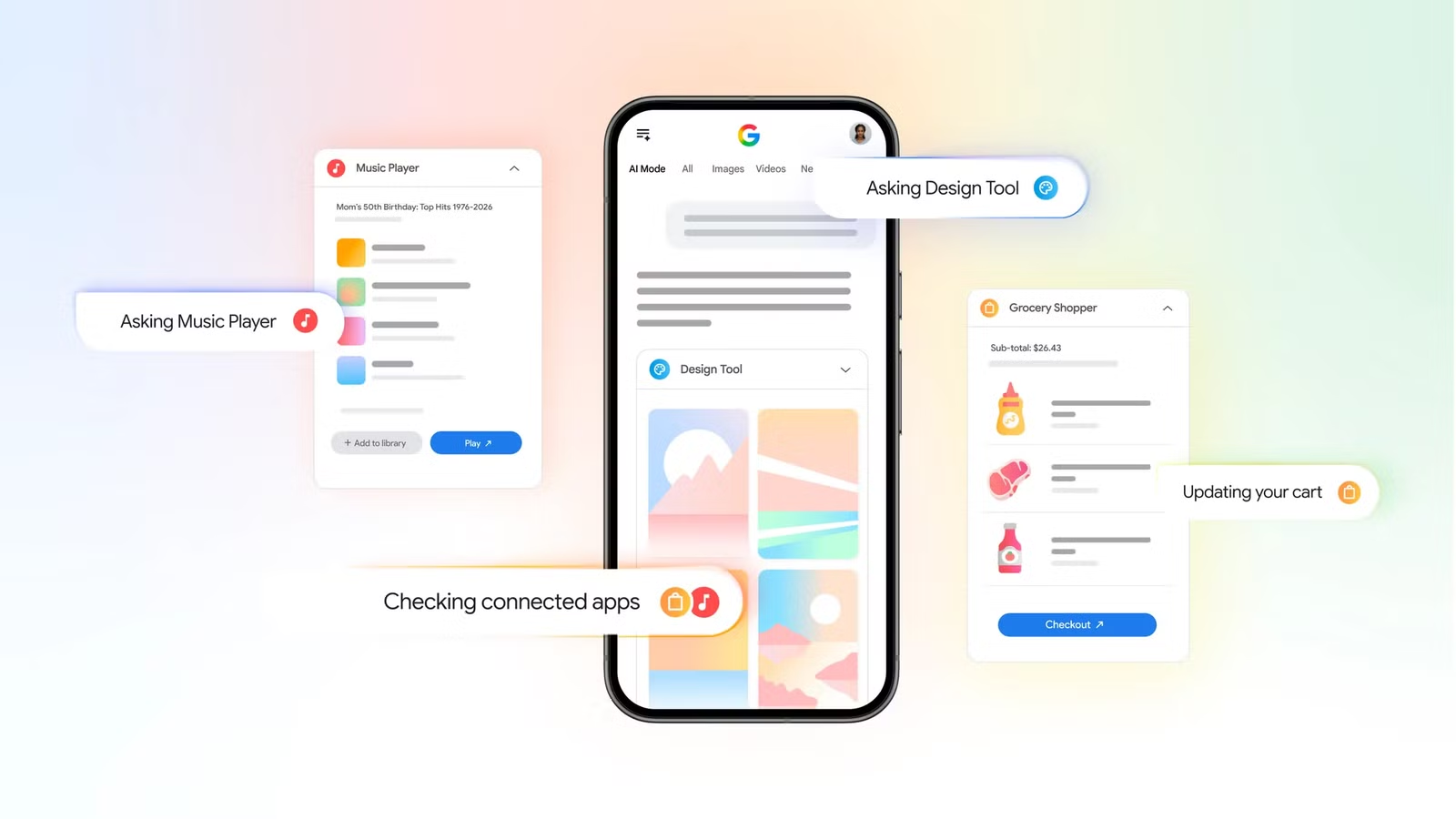
The point is not novelty; it is offloading repetitive, screen-heavy chores to voice-activated tasks so you can keep your attention where it belongs. Gemini already connects with apps like Canva, Instacart, and YouTube Music to get things done inside Google’s AI environment, from building grocery carts to creating playlists and draft designs. That same AI logic now supports your in-car experience: you talk, it interprets, and supported apps respond. The result is a driving setup that feels less like tapping a dashboard computer and more like giving directions to a capable co‑driver.
Before You Start: Set Up Gemini With Your Apps
If you treat Gemini as a shortcut layer on top of your existing services, setup stops being optional and becomes essential. To unlock meaningful Android Auto automation, you first need Gemini to understand who you are and which apps it can act through. According to Google, “To use the feature, you must be signed into a Google account and link that account to the service you want to use.”
- On your phone or desktop, go to google.com/ai.
- In the Ask Anything bar, enter a request that involves a supported service, such as YouTube Music, Instacart, or Canva.
- When Gemini surfaces an option to use that app, select Link, then follow the steps in AI Mode to connect your account.
- Repeat for each service you want available when you use Gemini-related features.
Once linked, those apps turn into action endpoints for Gemini, so the AI can move from answering questions to completing tasks like shopping and playlist creation inside its interface.
Task 1: Auto‑Curate Playlists That Match the Road
Most drivers treat music prep like homework: build playlists at home, then hand them off to Android Auto. Gemini voice commands flip that model. Instead of fetching pre-made playlists, you can ask Gemini to create them on the fly based on your mood, genre, or even vocal style preferences. This makes Android Auto less of a jukebox and more of a live DJ that responds to your description in the moment.
You can describe highly specific tastes—such as Synthwave in the style of certain artists or instrumental-only tracks—and Gemini will fill a playlist that fits that brief once you relay your preferences through a voice command. If that feels too detailed, short prompts like “for a rainy drive” or “upbeat for a long straight highway” also work. The payoff is clear: your in-car audio adapts to your drive instead of forcing your drive to adapt to a static queue.
Task 2: Play the Song You Can’t Name
Naming every track you want to hear while driving is unrealistic; Gemini’s value is that you do not have to. Its AI underpinnings allow you to play music without having to remember the name of the song or the artist. Instead, you speak in references and context—ads, events, or vague descriptions—and let Gemini resolve the details.
For example, a command like “Play the song from State Farm's Super Bowl commercial featuring Danny McBride” will bring up Bon Jovi's “Livin' on a Prayer.” That is the kind of mental shortcut traditional voice assistants often miss. Beyond playback, voice commands seeking information about the artist, song name, album, and other trivia are fair game thanks to Android Auto's context-aware AI. In practice, this turns idle curiosity at a stoplight into instant answers without leaving your music screen.
Task 3 & 4: Plan Errands and Creative Tasks Through Connected Apps
Gemini’s advantage is not limited to media. Once your accounts are linked, it can tackle errands and creative work through third-party connected apps. When you give it a task, Gemini does more than hand you a checklist; it reaches into services like Instacart, Canva, and YouTube Music so you end with actions and drafts, not loose ideas.
For instance, you can ask Gemini to prepare a grocery cart of healthy snacks and drinks for 8 adults, then send those ingredients straight into your Instacart cart so you can check out in their app or website with only a few taps. You can also tell it to “Create a playlist featuring the top trending Bollywood songs from the past 10 years” or request a retro, grainy flyer draft in Canva with neutral earth tones for a vintage clothing sale. The trio of apps makes for an easy way to plan a party, from getting the groceries to making the playlist and writing up the invites.
The Real Win: Less Admin, More Driving
Gemini voice commands are at their best when you treat them as an off switch for low-value admin. Whether you are calling up an oddly specific Synthwave mix, tracking down the song from a commercial, or moving from a grocery idea to a filled Instacart cart and party playlist, the effort shifts from tapping to talking. You trade memorizing menus and track names for describing what you want in plain language.
The direction of travel is clear: Google is working with other partners on introducing more apps soon, expanding what Gemini can do through connected services. If you adopt it now, you are not learning a gimmick; you are learning the control layer that those future integrations will share. The sooner you let Gemini handle the routine tasks, the more your drive can return to what it should be: time to think, not time to micromanage your phone.





